

A good Jobscan alternative depends on which job you were paying Jobscan to do. If you want a keyword check, SkillSyncer and Teal do it for less, and you can do it by hand in about ten minutes. If you want a tracker, Teal, Huntr and Simplify give you one for free. If you want a resume built for each posting, you are shopping in a different category. What no alternative can give you is the real number, because no applicant tracking system shows candidates a score. Every percentage on the market, Jobscan's included, is an estimate of a keyword match.
ApplyEze publishes this blog and competes with Jobscan for the same job seekers. We offer no ATS score, because no ATS exposes one, and this post tells you which tool fits if a score is what you want. Prices were read on 9 November 2026, with one exception flagged below.
What you are replacing
Jobscan bundles several tools, and most people use one or two:
- A scanner that compares your resume with a pasted job description and prints a match rate.
- AI rewriting, a cover letter generator and a LinkedIn optimizer.
- A job tracker and a Chrome extension.
- Auto Apply, with 2 credits a month on paid plans and packs at $1.40 to $1.70 a credit. "The Submit button is always yours."
On price, one gap to flag. Jobscan's plan page would not load for us on 9 November 2026, because it sits behind a browser check. Here is what we could read. Its promo page says the quarterly plan is "Billed as $89.95 every 3 months", with a seven day free trial and "Save 40% over a monthly plan". A Jobscan blog post dated 30 June 2026 lists the free plan at "5 scans per month". The $49.95 monthly price comes from SkillSyncer's comparison page, last verified 27 July 2026, and it matches what our Jobscan review read on the plan page in October. Check the plan page before you pay.
No ATS exposes a score
This is the fact that should drive your choice, and the vendors who sell scores say so themselves.
- Rezi's score documentation: "real ATS systems don't give your resume an official score."
- Enhancv's resume checker: "there's no such thing as an ATS score."
- Simplify's score guide: "Both are Simplify feedback, not an employer's ATS score or a prediction of an interview."
- Jobscan's own blog: "A keyword overlap score is not the same thing as how an AI-driven screen will rank you."
Employers can have a ranking of their own, and that is the part a checker cannot see. In Greenhouse's Talent Matching, the hiring team calibrates skills for the job, and candidates land in one of five groups, from "Strong match" to "Needs manual review". Greenhouse says it "does not automatically advance or reject candidates". That output is built from one employer's choices for one job, and it is shown to the hiring team. A website you paste your resume into has seen none of it. Our post on what a resume ATS score really is covers the whole mechanism.
Two details show how soft these numbers are. Jobscan recommends 75% and warns that going higher may mean "overstuffing your resume with keywords". Its comparison with Teal says of Teal's score that 80% or higher "is generally considered strong". Those are two rulers with two targets, and Simplify adds that a suggested percentage "is not an employer's passing threshold".
The more interesting detail comes from Jobscan itself. In its June 2026 test against SkillSyncer, the same resume and job description "returned an identical starting score of 42 in both tools", and it wrote that "the core scan is a wash". It is one test, run by the company with the most to lose from that sentence. Even so, it suggests that the basic scan is close to a commodity, and that the price differences pay for what surrounds it.
So use a checker for the list of missing terms and for catching parse problems. Treat the percentage as the vendor's opinion.
If you want a keyword check
Start with no tool at all. A scanner does five things, and you can do all five in about ten minutes.
- Paste the posting into a document. Mark every hard skill, tool, certification, degree and stated number of years.
- Search your resume for each one. Mark it exact, a variant, or absent.
- For a variant, use the posting's spelling, with the abbreviation in brackets if both are common.
- For an absent term you truly have, add it, with a bullet that proves it. For one you do not have, leave it out and count it as a gap.
- Open your PDF, select all, copy, and paste it into a plain text editor. If your name comes first and your jobs read in order, a parser can probably read it too.
Here is how the sheet looks. This is a sample, written for this post, not a real person's resume.
| Term in the posting | On my resume? | What I do |
|---|---|---|
| SQL | Yes, exact | Nothing |
| Salesforce | Written as "SFDC" | Change to "Salesforce (SFDC)" |
| Tableau | Used for two years, not listed | Add it, with a bullet on what I built |
| Looker | Never used it | Leave it out, and prepare to discuss the gap |
| 5+ years of analytics | Six years, but only implied by dates | Say it in the summary line |
If you would rather have software do it, these are the options, with list prices as of November 2026. None of them can show you an employer's number.
| Tool | Free | Paid | Worth knowing |
|---|---|---|---|
| SkillSyncer | 2 job match scans a week, 1 resume | $14.95 a month, or $34.86 a quarter | Its own page concedes it has no LinkedIn optimizer or cover letter tool |
| Teal | Top 5 keywords per posting, unlimited resumes | $13 per 7 days, $29 per 30 days, $79 per 90 days | The Match Score and all keywords are on Teal+ |
| Simplify | Keyword matching inside Copilot | $39.99 a month for the AI rewriting | Keyword review comes with a free autofill extension |
| Huntr | "Basic resume job matching" and basic scoring | $40 a month, $90 per 3 months, $160 per 6 months | Pro adds "Full keyword visibility" |
| Careerflow | Basic resume analysis | $8.99 a week, $23.99 a month, $54.99 a quarter | The ATS score and keyword analyzer are Premium features |
| Rezi | 1 resume, 3 PDF downloads | $29 a month, or $149 once | Its paid plans list money back within 30 days |
SkillSyncer and Jobscan describe parsing differently, and you can check it yourself. Jobscan says SkillSyncer does not evaluate how a resume will parse in a specific ATS. SkillSyncer says its checker catches "formatting issues that break resume parsers". Step 5 above tests the general case on your own file for free.
The math most lists skip
Free plans can stack. Jobscan's 5 scans a month plus SkillSyncer's 2 a week comes to 13 or 14 full scans a month for $0, by our arithmetic (5, plus 2 times 30 divided by 7). Teal's top 5 keywords work on any number of postings on top of that. If you scan fewer than a dozen roles a month, you may not need to pay anyone.
If you scan more, price it per posting. This is list price divided by postings scanned, and it is our arithmetic. These tools do not include the same things, so use it for scale only.
| Plan | Per month | 20 postings a month | 40 postings a month |
|---|---|---|---|
| SkillSyncer, quarterly | $11.62 | 58 cents | 29 cents |
| SkillSyncer, monthly | $14.95 | 75 cents | 37 cents |
| Careerflow Premium, monthly | $23.99 | $1.20 | 60 cents |
| Teal+, every 30 days | $29 | $1.45 | 73 cents |
| Rezi Pro | $29 | $1.45 | 73 cents |
| Jobscan, quarterly | about $29.98 | $1.50 | 75 cents |
| Huntr Pro, monthly | $40 | $2.00 | $1.00 |
| Jobscan, monthly | $49.95 | $2.50 | $1.25 |
If you want a tracker
You probably do not need to pay for this at all.
- Teal lists "Unlimited Job Tracking" on its free plan, with goals, notes and statuses. Jobscan's own comparison tells people to "Choose Teal if you prioritize project management and tracking".
- Simplify has a free tracker and a free Gmail link that suggests status updates from your mail, which you approve.
- Huntr tracks up to 100 jobs for free, with unlimited application autofills.
- Careerflow has a tracker on its free Basic plan, marked as limited.
- A spreadsheet works fine. Six columns will do: company, role, date applied, resume version, last contact, status. The resume version column is the one people forget, and it is the one that tells you later what worked.
Our Jobscan vs Teal comparison goes through the two most common choices side by side.
If you want a resume per posting
This need is a different kind of product, and a scanner only half meets it. A scanner tells you what is missing and leaves the writing, and often the many versions, to you. Here the question is who writes the file and who presses Submit.
| Option | Who writes it | Who submits | Free amount |
|---|---|---|---|
| Teal | You, with AI help on request | You | Unlimited resumes, 5 AI bullets, 2 summaries, 2 letters |
| Huntr | AI on request | You | 2 job-tailored resumes |
| Simplify+ | AI on request | You, or its Autopilot at 20 a week | None for AI tailoring |
| Tsenta | AI per application | Tsenta | 25 applications, once |
| ApplyEze | AI per application | ApplyEze | 50 applications, once |
Read any rewritten resume before you trust it. Simplify's advice holds for every tool on this list: "Do not accept invented accomplishments simply because they improve the wording or score."
When Jobscan is the right call
Stay with Jobscan if:
- You apply to a small number of roles that each matter, and you want one place to work each one over. Its free plan renews every month, where our free credits come once.
- You want to know how the number is built. Jobscan publishes its priorities in order: hard skills, education level, job title, soft skills and other keywords. We found no published weighting from Teal.
- You want advice tied to a named system. Where Jobscan can identify the ATS behind a posting, it says it tailors its guidance to how that system reads a file, and falls back to general advice when it cannot.
- You also want LinkedIn optimization and cover letters in the same place.
One thing to check first is the refund rule. A refund requires a dispute "within 2 calendar days of the billing period start", with no use of the service in that period, and "a fee of 3.5% of the original payment" applies. Set a reminder if you take the monthly plan.
What ApplyEze does instead
ApplyEze has no ATS score, because no ATS exposes one, and no keyword checker to paste into. It does the work the score was pointing at. If a score is how you like to work, use one of the tools above.
You pick matches from a ranked board and queue them in a desktop app, and for each application an AI model reads that posting and your real history and writes a resume for it, as PDF and DOCX. Each file is read back the way a parser reads it, and a failed read stops the run before the form. Then ApplyEze fills and submits the form. 94,207 applications have gone through ApplyEze since 14 August 2026, to 9,769 employers, as of 9 November 2026. It polls more than 100,000 employer boards directly, about 900,000 active jobs.
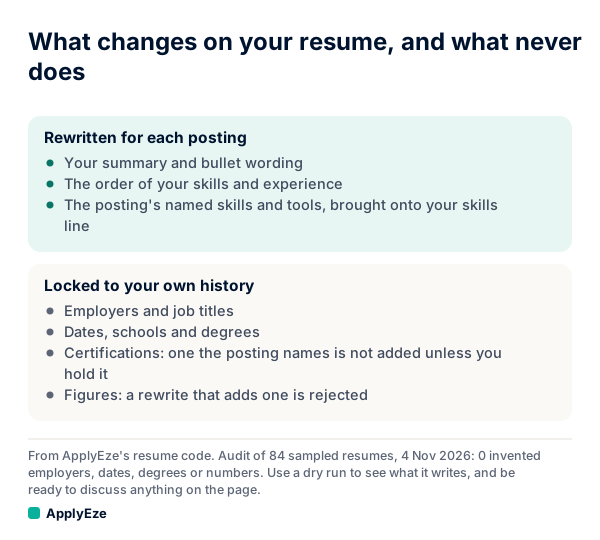
The chart splits what changes from what does not. The summary, bullets, order and the posting's named skills get rewritten. Employers, job titles, dates, schools, degrees, certifications and figures stay locked to your record. In an audit on 4 November 2026 of 84 sampled resumes, we found 0 invented employers, dates, degrees or numbers. ApplyEze brings the posting's named skills and tools onto your skills line, even when your own record does not list them. There is no step to remove one before a live run, so use a dry run to see what it writes, and be ready to discuss anything on the page. A certification the posting asks for is not added unless you hold it.
New accounts get 50 free credits, once per email address, with no card, and a credit is used only when an application is confirmed as Submitted. It runs in Chrome on your own macOS or Windows computer, which has to stay on and awake until the queue finishes, and Workday and Oracle jobs stay hidden until you connect an application inbox, because those sites email a code. If you have outgrown checking resumes one posting at a time, your first 50 applications are free, with a resume built for each posting.