
Callback detection speed has two clocks, and only the second tells you when a reply is ready for anyone to act on. Here is how callback detection works where it is switched on. It is rolling out with staffing teams first and is not part of self-serve accounts yet. The scanner sees most interview emails within 30 minutes (86% in our last measurement, median 18 minutes). Reading and labelling takes longer: the median from arrival to a labelled callback is about 45 minutes, and about 4 in 5 are done within the hour. That was measured over the 5 days to 9 November 2026, on 103 interview emails. This post explains the gap with the arithmetic shown, and the last section is what any job seeker should do about it, on any tool.
Two clocks, not one
Both clocks start when the email lands in the inbox. "Seen" stops when the scanner reads it. "Read" stops when classification finishes and the email has its label. Quote the first as if it were the second and you have overstated the speed by more than double, which is why we keep them apart.
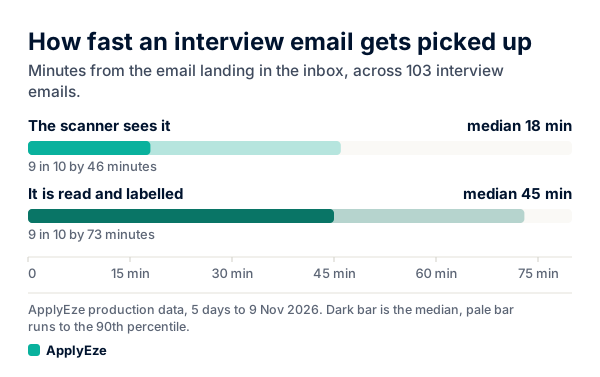
The chart shows the medians, 17.6 minutes seen and 45.2 labelled, with pale bars running out to the 90th percentile: 45.6 minutes seen and 73.3 labelled. So one interview email in ten waited more than 73 minutes for a label. There is a third clock, the time until a person looks, and we come to that below.
What the scanner does, and how often it runs
The scanner is set to check each inbox about every 30 minutes. An inbox comes due again 30 minutes after its last scan finishes, a job picks up due inboxes each minute, and each scan looks back 10 minutes past the last one so late delivery is not lost.
That setting predicts a result you can check. An email lands at a random moment in the cycle. If every scan ran exactly on time, waits would spread evenly from 0 to 30 minutes.
| Interview email, minutes to be seen | If every scan were on time (our arithmetic) | Measured |
|---|---|---|
| Median | 15 | 17.6 |
| 90th percentile | 27 | 45.6 |
| Share within 30 minutes | 100% | 86.4% |
The middle of the distribution behaves as designed, about half a cycle plus a little. The tail runs longer: a 90th percentile of 45.6 minutes means some scans run well past their half hour. One known mechanism is that a failed scan retries after 15 minutes, then 30.
Why labelling takes longer
The email is already in hand by the time this clock runs, and reading it takes seconds. The wait is in a queue, so "the AI takes 30 minutes to read an email" would be wrong.
The path for a likely callback goes like this:
- The scan flags it, and it joins that company's queue.
- The queue is ready when 10 emails are waiting, or when the oldest has waited 5 minutes.
- If at least 2 emails are ready, they go to the AI provider as a batch. A lone email skips the batch and is read straight away.
- AI reading runs in batches to control cost, and a batch gets up to 30 minutes before the email is read directly instead. Batch work carries no promise of a quick answer.
- If the batch misses that deadline, it is cancelled and those emails take the regular route at once.
Add up the slow path: up to 30 minutes for the scan, 5 in the queue and 30 for the batch comes to about 65 minutes. The measured 90th percentile is 73.3, which fits a slow path plus some late scans.
The gap between the two medians is 27.6 minutes (45.2 minus 17.6). That is a gap between medians, not a median of gaps, but it sits close to the 5 plus 30 minute ceiling. It suggests many interview emails wait for most of the batch deadline. We have not split how many batches actually reach it, so treat that as a reading and not a measurement.
This is a deliberate trade of minutes for lower AI cost. It is also a setting: change the deadline and these numbers move, and we would measure them again.
The measured numbers, including the slow tail
Here is everything from that window. "Seen" means the scanner read the email and "read" means classification finished. Times are minutes from arrival.
| Email type | Emails | Seen, median | Seen, 90th pct | Read, median | Read, 90th pct | Seen within 30 min | Read within 30 min | Read within 60 min |
|---|---|---|---|---|---|---|---|---|
| Interview | 103 | 17.6 | 45.6 | 45.2 | 73.3 | 86.4% | 21.4% | 80.6% |
| Assessment | 83 | 21.1 | 32.4 | 43.6 | 69.5 | 83.1% | 22.9% | 75.9% |
| All job email | 7,199 | 18.9 | 47.9 | 21.9 | 62.1 | 80.6% | 69.7% | 88.9% |
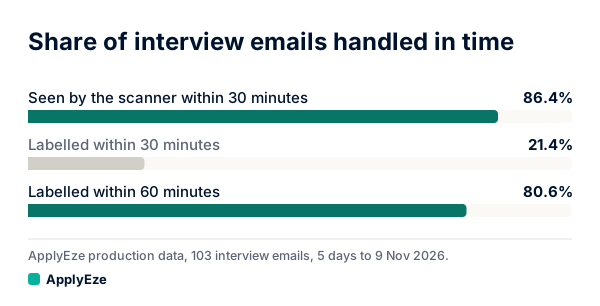
Read the interview row across. At the 30-minute mark, 86.4% of interview emails have been seen and only 21.4% have been labelled. So a claim about 30 minutes is true of the scanner and false of the result for nearly 4 in 5 emails. By 60 minutes, 80.6% are labelled, which leaves about 1 in 5 still waiting at the hour.
This is 103 interview emails and 83 assessments over 5 days, which is enough to see the shape.
Interview mail against job email overall
Look at the bottom row of that table. For all job email, the median to read is 21.9 minutes, and 69.7% is read within 30. A tool could put "median 22 minutes" on a page and be accurate.
It would tell you little about interview mail, because of what is in that row.
| Email type | Gap between seen and read medians (our arithmetic) | Why |
|---|---|---|
| All job email | 3.0 minutes | Nearly all of it is receipts settled by rule during the scan, with no AI |
| Assessment | 22.5 minutes | Goes through the AI queue |
| Interview | 27.6 minutes | Goes through the AI queue |
The emails that matter most take about twice as long to read as job email in general (45.2 against 21.9 minutes). The rule shortcut that makes the overall number fast does not apply to the mail you care about. Our rule gate post walks through what they settle.
So when a tool quotes a detection speed, ask two things: speed of what, seeing or labelling, and on which mail. An average across all mail tells you little about the interview invitation you are waiting on.
Assessment mail adds one more wrinkle. Assessment invitations tied to one application came a median of 0.2 hours after applying, in email received 4 October to 8 November at one staffing team. Those invitations can carry deadlines, and the label comes about 44 minutes after the email lands. That is one more reason not to use a label as your alarm.
Why no notification follows
The label is not the end of the chain, because nothing announces it. Callback detection does not email or text you. You see new callbacks when you open the page. The only signal is inside the portal, for the recruiters and company admins who use it: a count in the sidebar and the Callbacks page.
So "labelled in 45 minutes" does not mean "someone knows in 45 minutes". The third clock runs until a person looks, and then that person confirms, because the AI only suggests.
Callback detection gives a team a reviewed record of what came back. Your phone is the pager.
What this means for how fast you reply
Your own mail app is faster than any scanner, ours included. It shows the email when it lands, with no half-hour cycle and no batch. If speed is the goal, that is the tool to set up. It works the same on a self-serve account, where you see every application ApplyEze sends and record employer replies yourself on each one.
Whether speed matters that much is less settled than the advice suggests. Guides such as Robert Walters say "It's best to reply within 24 hours", and Kickresume says the same, with no data behind either. We found no study testing that rule on interview requests.
The nearest evidence is a study reported by Vanderbilt, "Speed Is a Signal", in Management Science. Across more than 11.6 million Fiverr message exchanges, "A one-hour delay was linked to a 46% decrease in the chance of being hired" and a one-day delay to a roughly 90% decrease. Experiments with thousands of participants pointed the same way. But it is freelance work, and the article itself says "Fiverr doesn't represent every hiring context." A fast reply also has to be useful. Take it as a reason to lean fast, and do not expect those percentages to apply to a salaried job.
Here is what we would do with that:
- Keep one inbox for applications and turn on phone notifications for it. This is a good reason to have a separate inbox at all, since you can leave its alerts on without hearing about everything else.
- Watch the likely hours. At one staffing team, 90.5% of 336 human callbacks arrived on weekdays, and 167 of the 336, or 49.7%, landed from noon to 5 p.m. New York time. Those are replies found by machine in email received 4 October to 8 November, and one team's employers may not be yours.
- Book first if there is a link. A scheduling link is where a delay has an obvious mechanism: the slots you wanted can go. If you need time to think, take a slot and adjust later.
- Send a short holding reply if you cannot answer properly yet. Robert Walters suggests the same. Here is a sample we wrote for this post: "Thank you for getting in touch. I would be glad to talk. I will confirm a time by this evening." Our interview reply samples cover the longer versions.
- Keep it in proportion. At the same team, tied interview replies came a median of 126.8 hours after the application, and that figure includes replies to applications sent before the window began. Employers often take days. You answering within a few hours of a message that took five days to arrive is unlikely to look slow.
And keep looking at the inbox itself, whatever tool you use. Callback detection can miss replies, and replies sent through a job board's own messaging, such as LinkedIn or Indeed, are not picked up. The five steps from inbox to card show where each of these numbers comes from.
The 50 free applications are for sending applications. Callback detection is not included in self-serve accounts yet, and your own mail app stays the fastest alarm you have. If you would rather spend your evenings answering employers than filling forms, your first 50 applications are free, no card needed: you queue the roles in the desktop app, which runs on your computer while it is on and awake, and ApplyEze fills and submits each form.