

A job email filter should decide as much as it can with plain rules and hand only the hard cases to anything smarter. ApplyEze built the filter inside its callback detection that way. Here is how callback detection works where it is switched on. It is rolling out with staffing teams first and is not part of self-serve accounts yet. Ten ordered rules run on every email, the first that decides wins, and only one of them sends mail to an AI. The logic is useful to anyone, though, so this post ends with five Gmail filters built on the same ideas, which you can set up today with no ApplyEze account.
Why rules run first
Three reasons, and one design habit that follows from them.
Less reaches the model. The AI sees only the emails the rules flagged. Job alerts, verification codes, rejections and receipts do not reach it. Be clear about what that means: the scanner itself still reads all the mail in its window, because that is the only way to sort it. The gate limits what goes to the AI, not what the scanner reads. That is why ApplyEze advises a separate inbox: "A new Gmail kept only for job applications keeps your personal mail out of it."
It is faster. Rules decide during the scan, while the AI step waits for a batch. In the 5 days to 9 November 2026, all job email went from seen to read with a gap of 3.0 minutes between medians (18.9 and 21.9), because nearly all of it is settled by rule. Interview email, which goes to the AI, had a gap of 27.6 minutes (17.6 and 45.2).
You can point at the line that fired. A rule gives the same answer every time and can be tested with a sample email. There is no confidence score to interpret.
The design habit. A wrong pass costs a little: the AI reads one extra email, and a person still checks the result. A wrong drop costs far more, because nothing downstream ever sees that email. So almost every rule that drops mail carries an exception for signs of an invitation. Those exceptions are what most homemade filters leave out.
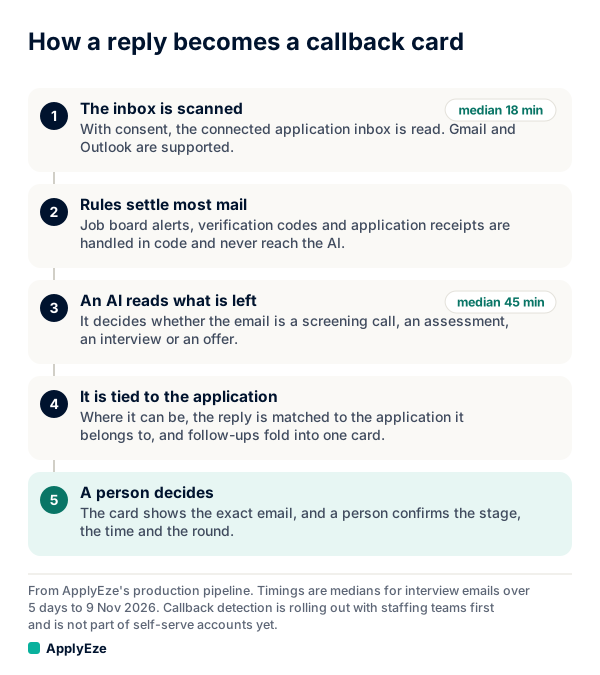
This post is about the second box in that chart. Here are the rules, in the order they run. The examples are made up.
| Order | What it catches | Unless | Result | Example |
|---|---|---|---|---|
| 1 | Sent mail, drafts, mail from the inbox itself | Dropped | Your own reply to a recruiter | |
| 2 | A verification email a run already used | Dropped | The code that opened an employer account | |
| 3 | A verification code or link | It has callback wording | Dropped | "Your code is 482913" |
| 4 | Job boards: LinkedIn, Indeed, ZipRecruiter, Glassdoor, Dice, Monster and similar | Dropped | "12 new jobs for you" | |
| 5 | Mail from ApplyEze and its service providers | Dropped | A product notice | |
| 6 | No sign it relates to a job | It has both a scheduling link and callback wording | Dropped | A dentist's reminder |
| 7 | Rejection wording | It has a scheduling link, invite or meeting link | Dropped, not stored | "We have decided to move forward with other candidates" |
| 8 | A receipt subject such as "thank you for applying" | It has invitation wording | Kept as a receipt, never sent to the AI | "Thank you for applying to Alder Freight" |
| 9 | A scheduling, meeting or assessment link, a calendar invite, or callback wording | Queued for the AI | "Could we set up a phone screen?" | |
| 10 | Everything else | Dropped | A company newsletter |
What is dropped straight away
Rules 1, 2 and 5 are housekeeping. Your own sent mail is not a reply. A code that a run has already used has done its job. Mail from us is not from an employer.
Rule 6 does more than it looks. It asks whether anything ties the email to a job search. Job context means a known application system as the sender, a sender naming a company the person applied to in the last 120 days, a thread already being kept, or an assessment host. Your dentist's reminder has a calendar invite, which is a strong signal on its own. It has no job context and no callback wording, so it stops here and never meets rule 9.
Job boards, codes and alerts
Codes come early because employer sites such as Workday and Oracle email a code during an application, and those emails are full of job words. Rule 3 drops them unless callback wording appears. So "Your code is 482913" goes, while "Here is your access code for the coding challenge, due Friday" carries on to the rules below.
Rule 4 is the blunt one. It drops everything from job boards, with no exception. Alert mail from those sites is plentiful and a message notification looks much the same, so the rule does not try to separate them. It runs before any test for an invitation, and that decision has a price, covered below.
Rejections and receipts
These two rules are where a simple phrase filter goes wrong.
Take this made-up email: "Unfortunately the 2 p.m. slot has gone. Please choose another here: [scheduling link]." A filter hunting for "unfortunately" buries an interview. Rule 7 fires only when there is no scheduling link, invite or meeting link, so this email passes through. A true rejection is dropped and its text is not stored. Callback detection does not track rejections, and rejection emails get no card. A person can still record one by hand.
The same goes for receipts. "Thank you for applying. Please complete this coding challenge by Friday" has a receipt subject and an invitation inside it. Rule 8 keeps only subjects with no invitation wording. Plain receipts are kept, without their email text, and never go to the AI.
These two rules also run after the job context test, so an email that fails rule 6 never gets this far.
What counts as a likely callback
Rule 9 takes either of two kinds of evidence.
- Strong signals: a link or sender on a scheduling, meeting or assessment host, or a calendar invite.
- Words: 65 phrases such as "phone screen", "your availability", "coding challenge", "offer letter" and "next round", searched in the subject and the first 3,000 characters of the body, after quoted history is cut.
Passing this rule does not make something a callback. It makes it worth reading. The AI can still label it a receipt, a rejection or nothing of interest, and after that a person decides. Callback detection follows one email through all of it.
What this design gives up
Any filter built this way makes the same trades, so build for them.
- Job board messages. Replies sent through a job board's own messaging, such as LinkedIn or Indeed, are not picked up. Rule 4 sees the notification and drops it.
- Bare forwards. A forward with no words of its own is not detected.
- Weak invitations under a receipt subject. "Thanks for applying, we would love to chat soon" can stop at rule 8, because the wording is too soft to count.
- Anything past the reading limit. Wording deep in a long email is not searched.
- New tools. A scheduling tool not on the host list counts only if the wording does. A list needs upkeep.
It can miss replies, so keep an eye on your inbox. What callback detection misses gives a manual routine for catching these.
What the AI receives from what is left
For each email that passes rule 9:
| Sent to the AI | Masked or left out | Can still get through |
|---|---|---|
| Received time, sender name and address | Your name and inbox address, where we can find them | Phone numbers and codes in the body |
| Subject, up to 300 characters | Your user ID and application IDs | Names that are also common words, such as Grace, Will or Mark |
| Body, up to 3,000 characters, quoted history cut | The query string on every link | The sender's own name and address |
| A list of applications it might be about: company, role, system, applied date, under throwaway aliases | Job URLs | Other people named in the email |
So: before an email reaches the AI, we mask your name and inbox address where we can find them, and the third column lists what can remain. The AI has no tools, it can pick only from lists the server made, each pick is re-checked in the database, and it treats email text as untrusted data, not as instructions. Connecting an inbox covers consent, storage and disconnecting.
Build the same filter in Gmail
On a self-serve account you see every application ApplyEze sends, and you record employer replies yourself on each one. These filters make that easier, and they work whether or not you use ApplyEze.
Most guides, such as JobShinobi's Gmail labels guide, give you a good filter per status but do not discuss an email that matches two. That overlap is the whole problem. Gmail's filter help says nothing about filter order or stopping further filters, so each sample below carries its own exclusions and does not rely on order. It uses the search operators Google documents. Paste a line into the search box, check the results, then create a filter from it.
1. Job board alerts. Label and archive.
from:(linkedin.com OR indeed.com OR ziprecruiter.com OR glassdoor.com OR dice.com OR monster.com)
This has rule 4's blind spot: it also hides message notifications. If recruiters reach you on one of those sites, leave it out of the list or check that label every day.
2. Codes. Label and archive.
("verification code" OR "verify your email" OR "one-time code") -("phone screen" OR interview OR assessment OR "coding challenge")
Do not delete these. During a live application you may need the code within minutes.
3. Rejections. Label and archive.
("not moving forward" OR "other candidates" OR "regret to inform") -(calendly.com OR zoom.us OR "your availability" OR "phone screen" OR "another time")
Phrase filters miss rejections worded differently, and those stay in your inbox, which is the safe way to fail.
4. Receipts. Label and archive.
subject:("thank you for applying" OR "application received" OR "we received your application") -("phone screen" OR interview OR "your availability" OR assessment OR "coding challenge")
Many receipts say "if selected for an interview", so these stay in your inbox too. Let them. A false alarm costs you a glance.
5. Likely callbacks. Label and star.
("phone screen" OR "your availability" OR "coding challenge" OR "next round" OR "offer letter" OR calendly.com OR hackerrank.com OR codility.com OR codesignal.com OR hirevue.com OR filename:ics) -from:(linkedin.com OR indeed.com)
The first five phrases are from our rule list. The hosts are common examples to adjust for your own field. A link hidden behind a button may not match, so the wording has to carry part of the load. With no job context test, this one will also star your dentist.
Four things to know before you rely on these. They are samples, so test each search against your own mail first. Never set any of them to delete. Google notes that a reply to a filtered message "will only be filtered if it meets the same search criteria", so a reply on a receipt thread does not inherit the receipt label. And in Outlook, rules run in list order with a "Stop processing more rules" option, on by default in Outlook on the web, so you can copy our order directly: codes, alerts, rejections, receipts, then callbacks, adding the same exceptions where Outlook offers them.
The 50 free applications are for sending applications. Callback detection is not included in self-serve accounts yet, so these filters are your reply system. For the sending side, you queue the roles in the desktop app, which runs on your computer while it is on and awake, and ApplyEze fills and submits each form. Your first 50 are free, no card needed.