

A missed interview email is rarely lost. It is usually sitting in a job board's message inbox, in spam, in an application inbox you stopped opening, or under a subject that reads like a receipt. Software can miss each of those, ours included. The fix that works on any plan and with any tool is a 10 minute routine on weekdays, using searches you can copy from this page. This post lists what slips through and why, gives you the searches, and ends with what to send when you find an invitation late.
Here is how callback detection works where it is switched on. It is rolling out with staffing teams first and is not part of self-serve accounts yet. We explain its gaps because they are the gaps of the whole approach, and because the product's own line is plain: it can miss replies, so keep an eye on your inbox.
What can be missed, and why
| Where the reply hides | Why software misses it | How you catch it |
|---|---|---|
| Inside LinkedIn or Indeed messaging | The reply never reaches your email, or only a notice does, and our rules drop job board mail | Open each site's messages |
| A forward with no words of its own | Quoted history is cut before rules read the body, so little is left | Search for forwards |
| An invite under a receipt subject | "Thank you for applying" with weak wording is kept as a receipt and never reaches the AI | Search receipts for call words |
| A recruiter with no job signal | Agency or personal addresses may show no link to anything you applied to | Search phrases, not senders |
| A phone call or text | It was never email | Check voicemail and texts |
| An inbox nobody opens | A separate application inbox protects your personal mail and also goes unread | Add it to your phone's mail app |
Detection sends no alert either. It does not email or text you. You see new callbacks when you open the page, so even where it is on, a person still looks.
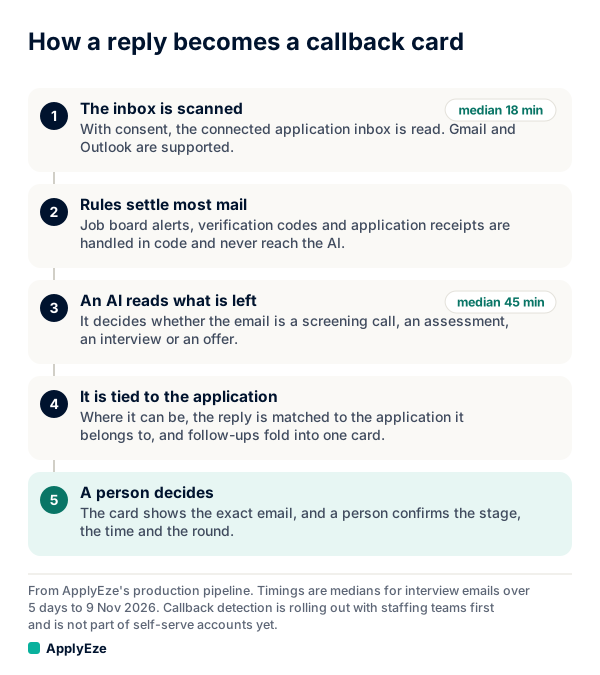
In words: the inbox is scanned, rules settle most mail, an AI labels what is left, the email is tied to an application, and a person confirms the stage. Most of the misses in the table happen at the second step, because a rule that drops mail never hands it to the AI. Rules first is a real trade. It keeps most mail away from a model and costs some recall on oddly worded invitations. Our post on how a job email filter decides goes through each rule.
Replies inside a job board
Indeed says that when an employer reaches out, you will "typically receive a message in your Indeed account", and its advice to job seekers (updated 1 July 2026) is to "Monitor your Indeed account and email for responses." Believe the first half of that. The conversation lives on the site.
LinkedIn is similar for recruiter messages. Its help page on InMail describes "Yes, interested" and "No thanks" buttons. Choose carefully: if you decline with only the templated response, the recruiter cannot message you further on that thread unless you reopen it.
Replies sent through a job board's own messaging, such as LinkedIn or Indeed, are not picked up by callback detection. No email scanner fixes this, because the message is not in the mailbox. Open both sites. It takes two minutes.
Some employers also skip email. Indeed publishes text message templates for employers, including one that asks a candidate for 30 minute windows for a first interview, and it says email invitations can be overlooked. Check the phone number on your resume, including voicemail.
Forwards and odd subjects
Two patterns get past rules like ours.
The silent forward. A hiring manager forwards a recruiter's note to you and writes nothing. Our rules cut quoted history and then look for callback wording, so a forward with no words of its own gives them almost nothing to read.
The polite receipt. A rule treats a subject like "Thank you for applying" with no invitation wording as a receipt. That is right almost every time, and when it is wrong it looks like this.
Sample email, written for this post.
Subject: Thank you for applying to Tidewater Labs
Thanks Sam. Dana is keen to talk. Are you free Thursday afternoon?
A person reads that as an invitation at once. It has no scheduling link and few of the phrases a rule looks for, so it can stay a receipt. If you skim receipts, you will miss it too.
A 10 minute inbox routine for any job seeker
Do this once each weekday, in the late afternoon or evening New York time. The timing comes from our own numbers.
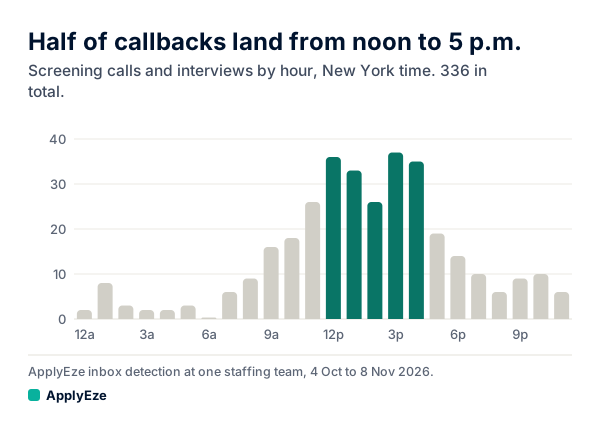
The chart shows 167 of 336 human callbacks landing from noon to 5 p.m. New York time, with few overnight. Add the 95 that arrive before noon and you get 262 of 336, or 78%, in by 5 p.m. On days of the week, 304 of 336, or 90.5%, arrive Monday to Friday. These are screening calls and interviews found in the application inboxes of about 29 candidates at one staffing team, in email received from 4 October to 8 November 2026. They are machine labels no person reviewed, and your time zone and field may differ.
| Minutes | Step |
|---|---|
| 3 | Run the phrase and assessment searches below in your application inbox |
| 2 | Open Spam or Junk and read the subject lines by eye |
| 2 | Open LinkedIn messages and Indeed messages |
| 1 | Check voicemail and texts on the number you applied with |
| 2 | Write down anything new: company, role, kind, date, next step |
Once a week, widen the searches to 30 days and run the receipt and forward searches. Two facts set that interval. Gmail says emails in trash or spam are permanently deleted after 30 days, and Microsoft says messages in Junk are deleted between 10 and 30 days after they arrive. And do not stop at a week. For applications from 12 to 23 October, with time to mature, 58 human callbacks came at a median of 116 hours, and 74% within 7 days, which leaves 26% later than that.
Assessments run on a different clock: of those tied to an application, 81.7% came within 72 hours, at a median of about 12 minutes. Run the assessment search on the same day you apply.
Spam is a real channel here. Greenhouse tells its own customers that "you cannot completely prevent emails from going to spam". When you find a real invitation there, mark it as not spam, so the sender's next note has a better chance of reaching your inbox.
Searches that find interview mail
The phrases here include some our own rules look for: "phone screen", "your availability", "coding challenge", "offer letter" and "next round". The tool names are common ones and not a full list.
In Gmail. These use in:anywhere, which Google says
includes Spam and Trash, plus newer_than, subject:, filename:, quotes for phrases, and OR.
in:anywhere newer_than:7d ("phone screen" OR "your availability" OR "next round" OR "next steps" OR "schedule a call")
in:anywhere newer_than:7d (assessment OR "coding challenge" OR "take-home" OR hirevue OR codesignal OR hackerrank)
in:anywhere newer_than:14d (calendly OR "calendar invite" OR "offer letter")
in:anywhere newer_than:30d filename:ics
in:anywhere newer_than:30d subject:"thank you for applying" (call OR chat OR talk OR available OR interview)
in:anywhere newer_than:30d (subject:fwd OR subject:fw) (application OR interview OR role)
In Outlook. Microsoft says
Outlook.com searches all folders by default, though that page does not mention Junk, so keep opening
Junk by eye. Operators such as OR must be uppercase.
Relative dates such as received:"this week" work, and day and month names no longer do.
"phone screen" OR "your availability" OR "next round" OR "next steps"
assessment OR "coding challenge" OR hirevue OR codesignal OR hackerrank
subject:"thank you for applying" AND (call OR chat OR talk OR interview)
received:"this week" AND (interview OR recruiter OR "schedule a call")
Save the Gmail ones as a note. Search wording changes results, so if one comes back empty for weeks
while you are applying, try a looser word such as interview before you trust it.
Recording a reply on a self-serve account
Your dashboard has Heard back and Interviews counts. On a self-serve account they count the replies you record on each application. They do not fill in from your email.
On each sent application you click a chip to record the reply: Rejected, Screening, Assessment, Interview or Offer. The note under it says "Record what the employer told you." Three details are worth knowing:
- A zero under Heard back means you have recorded nothing. It does not mean no employer replied.
- A status is one value per application, so an application that moves from interview to offer stops counting under Interviews.
- A hand entry is dated when you click it, not when the employer wrote. Note the real date in your own job application tracker if you care about timing.
What to do when you missed one
Speed counts more than the excuse. Alison Green of Ask a Manager, answering a hiring manager in 2017, suggested one follow-up after two or three business days and then moving on, and called it reasonable to expect a reply to hiring mail within two days. That is one adviser's view, and it shows how short the window can be. It is also not the last word. In one Blind thread, someone who found a hiring manager's note two weeks late was told by commenters that two weeks is not too long to reply. Outcomes vary, and we found no published rate. Replying costs you one email.
Reply on the original thread, so the context travels with it. Do not invent a reason. If it was in spam, say so. If you just did not see it, say that.
Sample reply within a few days, written for this post.
Hi Dana, thank you for your note, and I'm sorry for the slow reply. It went to my spam folder and I found it today. I'm still very interested in the Operations Analyst role. I can do Tuesday or Wednesday, 1 to 4 p.m. Eastern, or any slot still open on your link.
Sample reply after two weeks or more, written for this post.
Hi Dana, I found your 14 October note only today, and I'm sorry for the delay. If the role is still open, I would welcome a conversation this week. If it has moved on, thank you for reaching out, and please keep me in mind for similar openings.
Sample reply for an expired assessment link, written for this post.
Hi, the assessment link for my Harbor Analytics application expired on 20 October, before I saw the email. Could you send a new one? I can complete it within two days of receiving it.
If you do not hear back in two or three business days, follow up once, then let it go and keep applying. For replies you catch on time, our interview request samples cover phone, video and scheduling links.
Callback detection is not included in self-serve accounts yet, so this routine is how you catch what comes back. You queue the roles in the desktop app, which runs on your computer while it is on and awake, and ApplyEze fills and submits each form. If you would rather spend your time on this routine than on forms, your first 50 applications are free, no card needed.