
When you connect an inbox to a job tool, you sign in to Google or Microsoft and give that tool a standing permission on your mail. The screen you click through says what the tool could do. It does not say what the tool actually reads, what it sends to an AI model, what it keeps, or what stays after you disconnect. Those answers decide your real exposure, and tools publish them unevenly. Below are six questions that get them out of any tool, then our own answers, with a number of days for each kind of data. One example of the detail to expect: your name and inbox address are masked where we can find them, and phone numbers or other people's names in an email can stay.
Here is how callback detection works where it is switched on. It is rolling out with staffing teams first and is not part of self-serve accounts yet. Most of this post describes that feature, because it is the one that reads the most mail. The separate inbox a self-serve user connects for application codes is covered first.
Six questions to ask any tool
A useful answer is specific enough to be wrong. Ask these before you click Allow.
| Ask | A weak answer | A usable answer | |
|---|---|---|---|
| 1 | What does the permission allow, and who holds it? | "Secure connection" | Names the scope on the screen and the company holding the connection |
| 2 | Does it read everything and sort, or fetch only what a search returns? | "We only look at job emails" | Says how it decides what is job mail, and what it had to read to decide |
| 3 | What reaches an AI model, and what is removed first? | "Your data is anonymized" | Lists the fields sent, the fields masked, and what stays |
| 4 | What is stored, and for how long? | "We keep your data safe" | A number of days for each kind of data |
| 5 | Can a person read my email, and is that logged? | "Authorized staff only" | Names the roles, and says whether each read leaves a record |
| 6 | What stays after I disconnect? | "Disconnect at any time" | Says what is deleted, when, and what is not |
Published answers vary a lot among tools that read replies, several of which are rivals of ours. Apt's help page is specific about what it reads, down to calendar fields, and says it does not train general AI models, but gives no retention period. Simplify's email article explains matching and how to disable the connection, and points to its privacy policy for how the data is processed. Wonsulting's tracker page says "We only look at job related emails" and that you can delete your data, and on that page it does not say how the sorting is done. None of that is a fault on its own. It shows which question to send to support.
Question 1 is the one you can check yourself, because the providers publish their lists.
| Permission | The provider's own words |
|---|---|
Gmail gmail.metadata | "View your email message metadata such as labels and headers, but not the email body." |
Gmail gmail.readonly | "View your email messages and settings." |
Gmail https://mail.google.com/ | "Read, compose, send, and permanently delete all your email from Gmail." |
Microsoft Mail.ReadBasic | Reads email "except body, previewBody, attachments and any extended properties." |
Microsoft Mail.Read | "Allows the app to read the signed-in user's mailbox." |
Microsoft Mail.ReadWrite | "Allows the app to create, read, update, and delete email in user mailboxes. Does not include permission to send mail." |
Microsoft Mail.Send | Displayed as "Send mail as a user." |
Those come from Google's scope list and Microsoft's permissions reference. A scope wider than the job is worth a question. It may have a reason. You can see the scope, and you cannot see the code, so the scope is the only part you can verify from the screen.
Two reasons a tool asks for your inbox
To get through a form. Some application systems email a code or a link in the middle of an application. On ApplyEze, Workday and Oracle jobs stay hidden until you connect an application inbox, because those sites email a code. Roughly 4 in 10 of the open jobs we track are on those two. That share comes from a 1% sample of all jobs, so it says nothing about any one person's matches. During a run the app checks that inbox for codes and verification links. Connecting is optional, and "Connect later" is an equal choice.
To watch for replies. A tool reads mail to spot invitations and tie them to your applications. On ApplyEze this is callback detection, as described above.
On a self-serve account you see every application ApplyEze sends, and you record employer replies yourself on each one. What you agree to is the wording on the connect page when you connect, so read it. If it ever differs from this post, the page wins, and you can write to hello@applyeze.com.
The product's own advice is the one we would give about any tool: "A new Gmail kept only for job applications keeps your personal mail out of it." It is the simplest protection available, because it shrinks every answer below. Whatever gets read, it is employer mail and not your bank or your doctor. It also has a cost: nobody checks an inbox they do not live in, which is how interview invites get missed. Our routine for catching missed interview emails deals with that.
A few practical limits on the connection itself. It works with a Gmail or Outlook inbox. Yahoo, iCloud, Proton and other services cannot be connected. You choose the address employers see. Unless you change it, it is the one you signed up with. The account you connect must be that same address, or nothing is saved.
What you are asked to agree to
You read two things, on two screens.
The first belongs to Google or Microsoft. You sign in as the application address and grant a permission. The sign-in screen names the service that holds the connection for ApplyEze, so expect to see a name that is not ours. Question 1 applies: ask who that is if it matters to you.
The second is ApplyEze's connect page. Only the candidate can accept for themselves, and an operator's click records nothing. If a staffing team runs your search, ask them whether callback detection is on for your inbox.
The scanner only reads messages. It is built so it cannot send, label or delete mail. Do not take that as a statement about the permission. The limit lives in the scanner's code, and the permission on the screen can be wider than anything the scanner does. Read the screen.
What is read
Question 2, for callback detection. It is set to check each inbox about every 30 minutes, across every folder except sent and drafts. It also checks the spam folder, because employer mail often lands there.
It reads the mail in that window and then sorts it, so "we read only your job mail" would be untrue. Rules in code decide each email: dropped, kept as a receipt, or queued as a likely callback. Rules settle most mail. Job board alerts, verification codes, rejections and receipts do not reach the AI. Only likely callbacks do. The rules are walked through in how a job email filter decides.
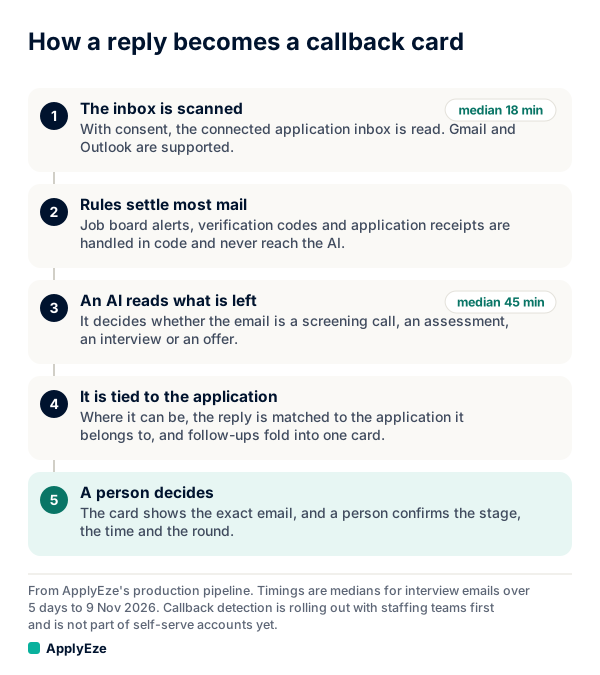
In words, the chart shows five steps: the inbox is scanned, rules settle most mail, an AI labels what is left, the email is tied to an application, and a person confirms the stage. The whole message is read in memory inside the scanner and is not stored whole.
What is masked, and what can remain
Question 3. For each flagged email, the AI receives the received time, the sender's name and address, the subject (up to 300 characters) and the body (up to 3,000 characters, with quoted history cut). It also gets a short table of the applications the email might be about: company, role, application system, applied date and status, under throwaway aliases.
Before that, some things are masked or removed, and some are not.
| Masked or removed | Can remain |
|---|---|
Your inbox address and employer login addresses, replaced with [inbox] | Phone numbers and codes in the body. They are scrubbed from the stored snippet and evidence only |
Your first, last and full name, replaced with [name] | Names that are also common words, such as Grace, Will, Mark or May, and names under 3 letters |
| Your user ID and application IDs | A name that is also a word in an offered employer's name |
| The query string on every link, which can carry recipient tokens | An unaccented spelling of an accented name |
| Job URLs, which are never included | A personal forwarding address in the sender field, or an address split across a line |
| The sender's own name and address, and other people named in the email |
If your first name is Grace, this table is telling you something specific: your name may reach the model. Masking works where we can find the thing, and the right column lists where we cannot.
The AI has no tools. It can pick only from lists the server makes, and each pick is re-checked in the database. It treats email text as untrusted data, not as instructions.
What is stored, and for how long
Question 4. Retention periods are what the pages above mostly leave out, so here are ours in full. They apply where callback detection is switched on.
| What | What it holds | Kept for |
|---|---|---|
| Waiting input for the AI | Sender, subject, up to 3,000 characters of body, snippet, link hosts | Cleared when classified, at most 24 hours |
| Email text for review | Screening, interview, assessment and offer emails only. Up to 20,000 characters of visible text, quoted history cut, nothing redacted | 90 days |
| Kept job email record | Sender, subject, a short snippet and evidence quote (links, addresses, phone numbers and codes removed), dates, category, company and role hints | 365 days. A receipt with no matched application, 30 days |
| Reply event | Kind, time, application, who decided | Life of the account. It loses the text when the email record expires |
| Queue record | Message and thread IDs, received time, skip reason, category. No content | 45 days |
| Logs | Counts, codes, AI usage, and who read what. Function logs hold counts and codes only | 90 to 400 days |
We keep job emails only. Other mail is not kept. The feature does not track rejections, and rejection emails get no card. An oddly worded one under a receipt subject can still be kept as a receipt, with no email text.
Who can read it
Question 5. The review screen is for company admins and recruiters. A recruiter sees their assigned candidates, and a company admin sees the whole company. Each decision records who and when, and each read of an email's text is logged.
The masking above protects the AI step. It does not apply here. A reviewer sees the email text with nothing redacted, because they have to judge it. If that matters to you, it is a good reason to keep the inbox separate from your personal mail, and to ask a team who reviews.
What disconnecting does
Question 6, in order of what goes first.
- You can disconnect your inbox at any time, and scanning stops.
- Disconnecting deletes the stored email text right away and clears any input waiting for the AI.
- Sender, subject and snippet records and reply events stay until their own expiry, because they describe your applications.
- Deleting the candidate account removes all of it.
- The button works for anyone who can access the candidate: the candidate, or a recruiter or admin on their account.
Use a tool's own disconnect button before anything else. Removing access from the Google side is a good second check, but the two do different things. Google's help says "If you remove access, the app can't access your Google Account", and it does not say what happens to data the app already holds. Apt's page is blunt about its own case: revoke at Google and stored data stays until you delete it. Expect that gap with any tool, and ask.
Your next step
Take the six questions to any tool you are weighing, and set up a new Gmail for applications before you connect anything. Our guide to the free applications covers where the inbox step fits, and callback detection has the full mechanism for teams.
The 50 free applications are for sending applications, and callback detection is not included in self-serve accounts yet. You queue the roles in the desktop app, which runs on your computer while it is on and awake, and connecting an application inbox opens the Workday and Oracle jobs. With that inbox ready, your first 50 applications are free, no card needed.