

ApplyEze gives new accounts 50 free job applications: 50 credits, once per email address, with no card. A credit is used only when an application is confirmed as Submitted, so this means up to 50 submitted applications and not 50 attempts. You sign up, answer setup questions, upload your resume, install a desktop app, queue the matches you want and press start. Then it builds a resume for each posting and fills and submits the form in Chrome on your own computer. The things that stop people come first, because they are better found here than halfway through.
What stops people
| The snag | Why | What to do |
|---|---|---|
| Google Chrome is not installed | It runs in Google Chrome on your computer, and ships no browser of its own | Install Chrome before you begin |
| The computer sleeps | Applications run on your computer while the app is open, so keep it on and awake until your queue finishes | Change your sleep setting, and keep the app open |
| You are not on a Mac or Windows PC | It runs on macOS (Apple Silicon and Intel) and Windows x64 | Use one of those |
| Your resume is a Word file | Upload takes a PDF up to 5 MB | Save it as a PDF first |
| You see no Workday or Oracle jobs | They stay hidden until you connect an application inbox, because those sites email a code | Connect one, as covered below |
| You cannot apply from the website | The site shows your matches, and queueing and applying stay in the desktop app | Install the app |
| The run stops before a browser opens | A missing name, email, phone, resume or work history stops it | Fill in your profile |
| Matches show zero | Zero matches show as zero. A role doing your work under a title you did not list ranks low | Add more target titles |
What you get, exactly
- 50 credits, once per email address, with no card. That is twice Tsenta's 25, also once and with no card.
- A resume built for each posting, and a cover letter when the form asks.
- 12 named systems: Greenhouse, Lever, Ashby, Workday, Workable, SmartRecruiters, Oracle, JazzHR, BambooHR, Rippling, Pinpoint and Recruitee. ApplyEze does not apply on other systems for you.
- Up to 10 lanes at once on your machine, 3 by default.
- A receipt for every run. You record employer replies yourself on each application.
The same engine has submitted 94,207 applications through ApplyEze since 14 August 2026, to 9,769 distinct employer names (counted 9 November 2026). That is a product total, and it is not a forecast for one account.
You will read about a different product elsewhere on this blog. ApplyEze Autopilot is set up today for staffing and recruiting teams that work with ApplyEze, and it is where the AI judge and most of our measured numbers come from, so those numbers are not a free user's result. Callback detection is rolling out with staffing teams first and is not part of self-serve accounts yet. Autopilot and the free 50, side by side, sets out which is which.
Before you start: what you need
- A computer you can leave running, and your resume as a PDF. You can start without a resume, but ApplyEze needs one before it can apply.
- The answers a resume leaves out: your address, work status, target roles, locations, minimum salary and start date.
- For Workday and Oracle, a Gmail or Outlook inbox. The product advises a new Gmail kept only for applications.
You do not need your own AI key, and AI use is not billed separately. Think about which email to sign up with, because the credits come once per address, and unless you change it, that address is the one employers see.
Create an account and answer the setup questions
Go to the sign-up page, type an email and a password, and press Create account. There is no card field and no plan to choose. Setup begins straight after.
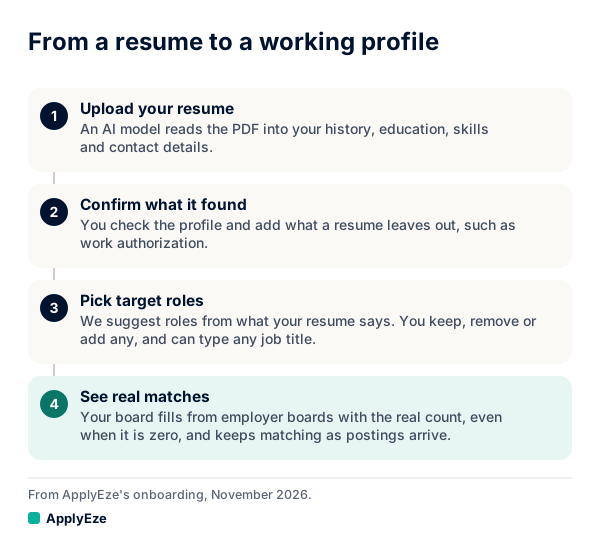
The chart shows the four stages. You upload your resume, confirm what was read, choose target roles, and then see matches. Three parts deserve more attention than the rest:
What was read from your resume. An AI model reads the PDF into a fixed shape and is told not to invent, and code copies what it read into empty profile fields. Your own answer beats the parse. The next screen asks you to confirm your name and level, and to fill in any missing dates. Your parsed skills and job bullets are on the Profile tab in the desktop app, since after setup the web has no profile editor, so read them there before you queue.
Work status. If your resume states your work status, the app suggests it. You still answer the question yourself. These answers go on real forms, so answer as you would on one.
Target roles. The app suggests roles from what your resume says, and you keep, remove or add any of them. You can type any job title. Their order is real: first listed ranks first. Matches rank on your target titles and the requirements read from each posting, not on text similarity, so a role doing your work under a title you did not list ranks low. List several.
Some later questions can be skipped, such as quick yes or no questions, how you like to work, references and optional EEO questions. Answer them anyway, because here is what happens otherwise. Hard facts come from your profile. When a required question is not covered by your saved answers, ApplyEze still fills it rather than stopping the run, so that answer may not come from you. Fill in your saved answers, use dry run first, and read your receipts.
Install the desktop app and sign in
The last setup screen sends you to your home page, and a button there labelled Download the desktop app takes you to the installers: macOS Apple Silicon, macOS Intel or Windows x64. On Windows you may see a SmartScreen prompt the first time you run it.
Open the app and sign in with the same email and password. The app has no sign-up of its own, and it can also email you a sign-in link. A short tour opens over the real screens. The tabs you will use are Matches, Applying to, Recent work, Profile, Documents and Preferences. Check your home page or the top of Applying to while you are there: the balance should show 50 credits.
Connect an inbox, and what that unlocks
Workday and Oracle jobs stay hidden until you connect an application inbox, because those sites email a code. Connecting is optional, and "Connect later" is a real choice. It can be done afterwards from your home page. The math below is the case for doing it.
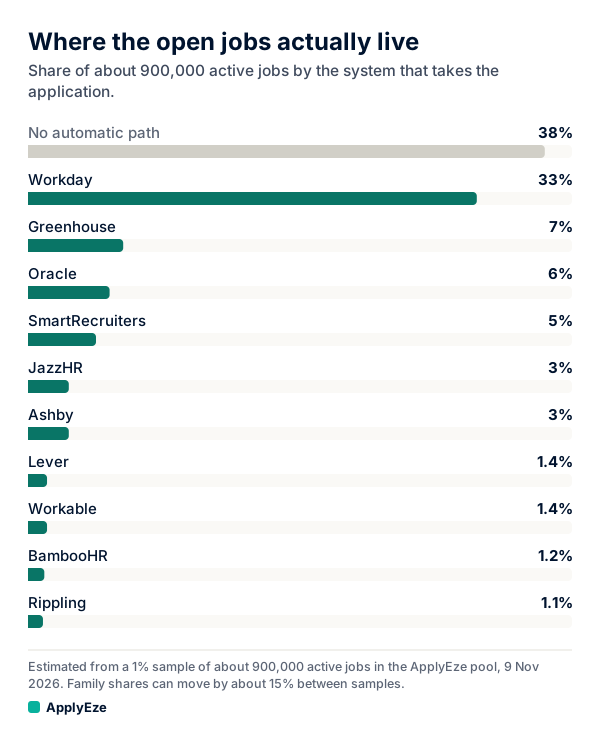
The chart shows where open jobs sit, from a 1% sample of about 900,000 active jobs, so read every figure as rough. Workday at 33% and Oracle at 6% come to roughly 39%, or about 4 in 10 of the open jobs we track. So ApplyEze applies automatically on systems holding roughly 62% of them with an inbox, and roughly 23% without. Those are shares of all jobs, not of any one person's matches, and yours may differ. Roughly 38% have no automatic path.
What connecting involves:
- A Gmail or Outlook inbox. During a run the app checks that inbox for codes and verification links.
- The connected account must be the same address as your application email, or nothing is saved.
- You choose the address employers see, and it does not change how you sign in. If you make a new Gmail for this, set it as your application email first.
- Even without Workday, some Greenhouse submits wait for an emailed code, so an inbox helps there too.
Queue your matches and press start
In Matches, press Queue on a card you want, or Queue all to add your matches at once. Queue all takes your own role tiers, and related rows and long shots need their own press. Pass hides a card you do not want.
In Applying to, keep the run on This laptop. Choose Visible to watch Chrome fill each form, or Background to keep it out of sight. Then set a lane count: each lane is one browser filling one application, and the default is 3. Start the next one sends a single application, and Apply to all sends the queue after asking you once. Dry-run mode is off by default, so either button means real submissions unless you turned it on.
The app checks your balance and profile first. Before each run it checks that the posting is on a supported system, that the inbox is connected where needed, that the posting is still live, your employer limit, and duplicates. Then a resume is built for that posting, a letter is written if the form asks, and Chrome fills and submits. You can use the computer in the meantime and cancel any single lane. Runs end, they do not pause, and there is no approval step before Submit, so dry run is your preview.
How to spend 50 credits well
Since only a Submitted uses a credit, attempts are not what you are rationing. You are rationing 50 real applications going out under your name. Spend them in this order.
| Stage | What you do | Credits used | Credits left |
|---|---|---|---|
| 1. Dry runs | One posting on each system you expect to use, using the practice run sheet | 0 | 50 |
| 2. First ten | Live, from your first-listed role. Leave the two or three employers you care about most for later | 10 | 40 |
| 3. Read and fix | Read the receipts and fix your profile and saved answers | 0 | 40 |
| 4. Next twenty | Those employers you held back, the rest of your first role, then your second | 20 | 20 |
| 5. Last twenty | Whatever the first thirty taught you | 19 | 1 |
Some details behind that table:
- Hold back your favorites at first. ApplyEze is built to stop double applications, so a flawed first attempt at an employer is hard to take back. Let your first ten find the flaws.
- Dry runs come first for a reason. A practice run uses no credit as long as you have one left, and at zero it stops. So the end of your credits is the wrong time to find you wanted one, which is why the plan keeps a credit back.
- Your queue may need to be longer than your credits. Closed postings and forms that cannot be finished do not use one, so reaching the full count can take more postings than credits.
- Check the skills line before you queue widely. ApplyEze brings the posting's named skills and tools onto your skills line, even when your own record does not list them. There is no step to remove one before a live run, so use a dry run to see what it writes, and be ready to discuss anything on the page. "Why this fits" lists skills missing, so a posting built around tools you do not know is one to Pass.
- Use a low lane count at first. One or two lets you actually watch. Raise it once you trust what you see, as far as your computer handles comfortably.
- It is your call where to apply. Some employers ask applicants not to use AI or automation. Whether to apply there is your call.
The rules on what uses a credit, including the rarer cases, are in ApplyEze credits.
What to do after your first ten
Stop and read before you queue more. It takes less time than it sounds, and it is the point of pacing the credits this way.
- Sort the results. Each application reads Submitted or Unconfirmed, and a run that did not send gives its reason. What each reading means is worth a look first. Many failures on one system suggest a dry run there before you queue more on it.
- Spot-check the Unconfirmed ones. If a site never confirms, no credit is used, and ApplyEze will not apply there again by accident. Look in your inbox for the employer's name to see if it went through.
- Open the documents. You keep the exact resume and cover letter that went out. Read at least three, and check facts and the skills line.
- Read what the forms held. On your laptop, each run leaves a folder with what the form held and how the run ended. Add a saved answer for anything you would not have said.
- Check your matches. If the wrong roles are near the top, change the order or wording of your target titles.
- Record replies as they come. You record employer replies yourself on each application. Your Heard back and Interviews counts come from what you record.
Do not judge the whole approach by replies yet. Ten applications is too few to read anything into, and replies take time. At one staffing team, the median human callback (a screening call, an interview or an offer) came 116 hours after the application, about 5 days, with 74% in within 7 days. That is 58 callbacks on applications sent from 12 to 23 October 2026. It is one team, and results for any one person will differ. So at this stage, grade the quality of what went out. That is the part you can see, and the part you can fix.
When the credits are gone, nothing is charged, no new application starts, and your profile, matches and history stay in your account. Your next step is the first dry run. Sign up here: your first 50 applications are free, with no card.