

ApplyEze Autopilot and the free 50 are two products under one name, and if you sign up on your own, the free 50 is the one you get. You pick matches from a ranked board, queue them in a desktop app on your computer, and ApplyEze fills and submits each form. ApplyEze Autopilot is set up today for staffing and recruiting teams that work with ApplyEze. There, rules and an AI judge pick the roles, and a browser on ApplyEze servers applies, using the same form filling as the desktop app.
Credits do not turn one into the other. Most of the numbers we publish describe Autopilot, so this page sets out exactly which is which.
The short answer: two products with one name
| The free 50, and Starter and Pro | ApplyEze Autopilot | |
|---|---|---|
| Who it is for | Anyone who signs up | Staffing and recruiting teams set up with us |
| How you get it | Sign up, no card | "Team plans are set up with us, not bought here." hello@applyeze.com |
| Who picks the roles | You, from a ranked board | The AI judge and the rules |
| Where it runs | The desktop app, on your computer, on and awake | ApplyEze servers |
| AI judge | No | Yes, where switched on |
| Callback detection | Not included | Rolling out with staffing teams first |
| Application systems | 12 named | Those, plus Dayforce and iCIMS where switched on |
| Measured numbers | No published rate | The judge, completion and speed figures on this blog |
Which numbers on this blog describe which product
This is the table to keep open while you read anything else we publish. When a post quotes one of these, this is what it measured.
| The figure | What it was measured on | Does it describe a free account? |
|---|---|---|
| 19.5% scoring 6 or higher, "about 4 of every 5 turned down" | The AI judge on Autopilot, 259,378 roles in 14 days | No. There is no judge on the free path |
| 83.5% agreement on 601 decisions | A separate, stronger model re-judging the Autopilot judge blind, 20 October 2026. One model checking another, not a panel of recruiters | No |
| 84% of applications a recruiter would send, against 69% hand-picked | A blind audit of 193 applications, 26 October 2026. A small sample, and a model's reading, not a recruiter's | No |
| 79.1% applied share, and the rate for each system | 45,376 Autopilot runs in 14 days, on ApplyEze servers, including iCIMS and Dayforce | No. It is not a free user's rate |
| Median 2.5 minutes per application | Autopilot, 17,994 applications in 7 days | No. Your computer and your queue differ |
| Median 32.9 hours from posting to application | Autopilot, 7 days | No. Your speed depends on when you press start |
| 94,207 applications and 9,769 employers, all time | Every applied run through ApplyEze since 14 August 2026, on every channel | Company totals, not a result for you |
| About 3 human callbacks per 1,000 applications, and about 2 rising to 7 per candidate per month | One staffing team's own tracker. Part of the rise is better counting | No, and it is not a promise to anyone |
| Interview emails seen at a median of 18 minutes, labelled at about 45 | The inbox scanner on callback detection, which is rolling out with staffing teams first | No. It is not included |
| 84 sampled resumes, 0 invented employers, dates, degrees or numbers | An audit on 4 November 2026, not split by product | A sample, not a promise about your resume. See the skills line note below |
| 109,237 employer boards, about 900,000 active jobs | All jobs we track, 5 November 2026 | Yes, with the inbox note below |
| $0 for 50, $19 for 700, $99 for 3,000 | The listed offer, 9 November 2026 | Yes |
The last two rows are the ones you can plan a search around. The rest show what the system does at scale, on the path it was measured on.
The note on the resume row: ApplyEze brings the posting's named skills and tools onto your skills line, even when your own record does not list them. There is no step to remove one before a live run, so use a dry run to see what it writes, and be ready to discuss anything on the page. A certification the posting asks for is not added unless you hold it.
Who each one is for and how you get it
If you are job hunting on your own, you can start with 50 free applications on sign-up, no card needed. You create an account, answer the setup questions and upload your resume, install the desktop app from your home page, sign in, queue the matches you want, and press start. The setup asks what a resume leaves out, such as address, work status, roles, locations, salary and start date, so uploading a resume alone does not finish it.
Autopilot is switched on rather than signed up for. It has three independent switches, ApplyEze's, the company's and the candidate's, and all must be on. A team then sets target roles and pace per candidate, and working hours for the company. A self-serve account has no such switch, and Autopilot is not a higher tier of it. Teams can write to hello@applyeze.com.
Who picks the roles
This is the real difference. Everything else follows from it.
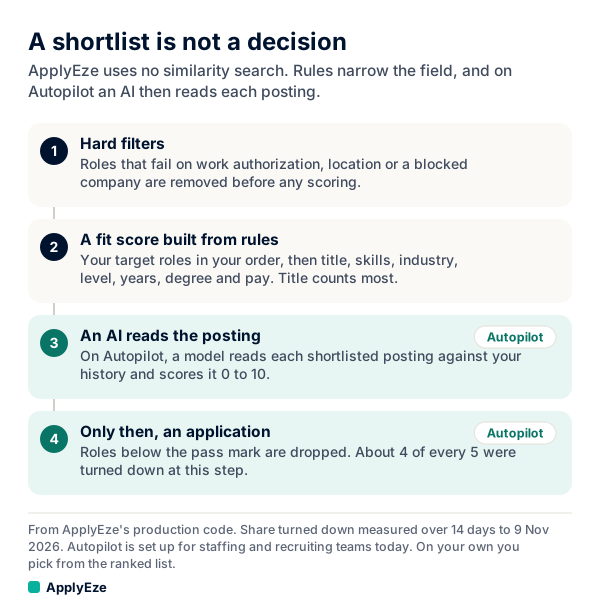
The chart has four steps. The first two are the same on both paths: hard filters remove roles that fail on work authorization, location or a blocked company, then a fit score built from rules ranks what is left. ApplyEze does not rank by text similarity. It ranks on your target titles and the requirements it reads out of each posting.
The paths split at step three.
- On the free path, you are step three. You see the ranked board with the factors behind each score, including skills matched and missing, and you decide: Queue, Queue all or Pass. A run can still stop itself on a clear conflict between the posting and your profile.
- On Autopilot, the AI judge is step three. It reads a short brief on each role and scores it from 0 to 10, and by default a role needs a 6. A team can raise the bar per candidate. A candidate's matches page says: "Autopilot picks from these. You do not need to queue anything."
So the choice is who holds the decision. On the free path you keep every call, and the list going out is exactly the list you chose. On Autopilot a team hands the call to a system that turned down about 4 of every 5 roles on the shortlist in the 14 days to 9 November 2026. How Autopilot works end to end has the measured counts.
Where it runs, and what your computer has to do
The free 50: macOS (Apple Silicon and Intel) and Windows x64, in Google Chrome, so you need Chrome installed. Applications run on your computer while the app is open, so keep it on and awake until your queue finishes. You can use the computer in the meantime. On Windows you may see a SmartScreen prompt the first time. You can run up to 10 lanes at once, with 3 as the default, and how many your computer handles well depends on the computer.
Autopilot: ApplyEze servers, in real Chrome, using the same form filling as the desktop app. No one needs to be signed in.
What the free 50 includes, line by line
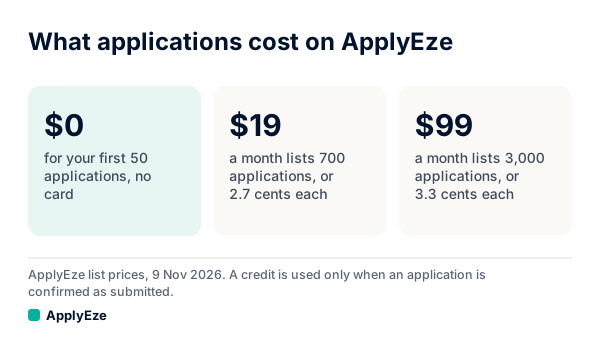
The chart shows the three listed prices: $0 for your first 50 applications with no card, $19 a month for 700 at 2.7 cents each, and $99 a month for 3,000 at 3.3 cents each. Pro costs more per application than Starter. Unused plan credits end with the month.
| Line | What is true |
|---|---|
| The allowance | 50 credits for a new account, once per email address |
| The card | None. Nothing is charged when they run out |
| Expiry | No expiry date today |
| What uses a credit | "A credit is used only when an application is confirmed as Submitted. Practice runs, skipped postings and forms that could not be finished cost nothing, and free credits are spent last." |
| A resume | One built for each posting, as PDF and DOCX, and read back the way a parser reads it |
| A cover letter | A cover letter when the form asks |
| Systems | Greenhouse, Lever, Ashby, Workday, Workable, SmartRecruiters, Oracle, JazzHR, BambooHR, Rippling, Pinpoint, Recruitee |
| Inbox | "Workday and Oracle jobs stay hidden until you connect an application inbox, because those sites email a code." Gmail or Outlook |
| Modes | Visible or Background. Dry run fills the form and stops before Submit, and uses no credit as long as you have one left |
| AI costs | You do not need your own AI key, and AI use is not billed separately |
| A receipt | Every run leaves one: result, time taken, screenshots where taken and the documents sent |
Here is how a credit count works, with a sample queue of 60 invented applications:
| What happened | Applications | Credits used |
|---|---|---|
| Confirmed as submitted | 46 | 46 |
| Form could not be finished | 9 | 0 |
| Posting skipped | 3 | 0 |
| Site never confirmed | 2 | 0 |
| Total | 60 | 46, so 4 left |
If a site never confirms, no credit is used, and ApplyEze will not apply there again by accident. So 50 credits means up to 50 submitted applications. It does not mean 50 attempts, and it does not mean we pick 50 jobs for you. The credits post has more cases, and the walkthrough follows the setup screen by screen.
The inbox line matters more than it looks. Workday is roughly 33% of the active jobs we track and Oracle roughly 6%, from a 1% sample on 9 November 2026. ApplyEze applies automatically on systems holding roughly 62% of active jobs with an inbox connected, and roughly 23% without. The product advises a new Gmail kept only for applications.
What stays with the team product: the AI judge, Autopilot itself, iCIMS and Dayforce, and callback detection. On the last of those, here is how callback detection works where it is switched on. It is rolling out with staffing teams first and is not part of self-serve accounts yet. The inbox is scanned about every 30 minutes as set, code rules settle most mail, an AI labels the likely callbacks, and a person confirms each one.
On a free account, employer replies arrive in the inbox you chose and you read them yourself. You record replies on each application, and your Heard back and Interviews counts come from what you record.
What holds on both paths
Neither product promises an interview, a callback or a job, and results for any one person will differ. Three more things are true on both.
Some answers on a form may not come from you. Hard facts come from your profile. When a required question is not covered by your saved answers, ApplyEze still fills it rather than stopping the run, so that answer may not come from you. Fill in your saved answers, use dry run first, and read your receipts.
Some stops are deliberate. ApplyEze does not take assessments for you. A form that requires your full Social Security or national ID number stops that application. Runs end, they do not pause, and there is no approval step before Submit. Dry run is the preview.
The employer's wishes are your call. Some employers ask applicants not to use AI or automation. Whether to apply there is your call.
Which one to start with
If you run a staffing or recruiting team and want the system choosing and applying for your candidates, hello@applyeze.com is the way in. For anything else, a refund included, email hello@applyeze.com and we will sort it out.
If you are one person with a search to run, start with the path that is built for you. Fill in your saved answers, connect an application inbox, queue a handful of roles you picked yourself, and watch a dry run in Visible mode. Your first 50 applications are free, no card needed, and a credit goes only when an application is confirmed as submitted.