

A practice job application lets you rehearse a form before it counts, and it comes in two kinds. The first is a blank worksheet: you write out the questions forms commonly ask and keep your answers beside you. If you apply by hand, that may be all you need. The second is a dry run on a real employer's form, which is what the rest of this page is about. This page reads a run the way an editor reads a proof: every field checked against a source, with a mark beside anything that would not go out under your name.
The editor's sheet
Keep this open beside the run. Each row names a field, what to check it against, and when to put a mark on it. Use four marks: OK, Fix profile, Add saved answer, and Would not send.
| Read this on the form | Check it against | Mark it if |
|---|---|---|
| Name, email, phone | Your Profile tab | An old address, a typo, or an email you do not want employers seeing |
| Street, city, ZIP | Your Profile tab | Anything out of date. Workday asks for all three |
| US work authorization | Your saved answers | It differs from what you saved, or from another answer on the form |
| Sponsorship, now and later | Your saved answers | Same, and be strict about it |
| Work history fields | Your resume | Any employer, title or date that differs |
| Education fields | Your resume | A school or degree you would not have picked |
| Links | Your Profile tab | A link you do not recognize |
| Screening questions | What you would really say | An answer you never gave |
| Free-text answers | What you would really say | A sentence you would not defend on a call |
| Voluntary self-identification | Your saved choices | A choice you did not make |
| The resume uploaded | Your own resume and the posting | A changed fact, or a skill you cannot discuss |
| The letter, if the form asks | Your record and the posting | A claim about you or the company with no source |
| The last page | The run ending before it |
For what each of these fields is asking and how to answer it well, our guide to filling out a job application goes through them one at a time.
A dry run is the only preview
Runs end, they do not pause, and there is no approval step before Submit. You can cancel a single lane, and that is all the steering a live run offers. So a dry run is the one point where you can read what your setup produces while nothing depends on it.
Be clear about what you are reading. A later live run on another posting writes its own resume and meets its own questions. You are checking patterns: whether your facts hold, where your saved answers run out, and how far the writer goes on the skills line. You are not approving a specific application.
Before you start: visible mode, one lane
- Turn it on. In the desktop app, open Preferences and find Run defaults. Dry-run mode is a switch there, and it is off by default.
- Choose Visible, one lane. A lane is one browser filling one application. Visible shows Chrome filling each form, and you cannot read three at once on a first pass.
- Queue one posting per system. Pick one posting on each application system you expect to use most. Workday forms and Lever forms ask different things, and even two employers on one system can differ.
- Keep a credit. It uses no credit, as long as you have a credit left. At zero, dry runs stop too.
- Check before you press. Press Start the next one to run a single posting. It shows no dialog, so look at the switch first. Apply to all gives you a tell: on a real batch it asks "Start this batch?" and warns that "Real applications will be submitted". If you see those words while you meant to practice, the switch is off. Press Not yet.
Your own Chrome must be installed, and your computer must stay on and awake until the run finishes. A clean practice run reads Filled in Recent work. Open that row afterwards to preview the documents, and use the folder button to open the run folder, which holds what the form held and how the run ended. A dry run asks the agent to screenshot the filled form before Submit, so look for that as well. What each part of a run's record means is covered in proof of a job application.
Checking the identity and work status answers
Start here, because these are the answers that can end an application on their own. Read work authorization and sponsorship together, since a form that says one thing in question 3 and another in question 9 reads badly whichever is right. Right before the final click on a live run, code re-reads the form for answers that contradict your saved citizenship, sponsorship and address. In a dry run that job is yours, and doing it by eye is the point.
Two behaviors surprise people. ApplyEze does not skip a job because the posting says it will not sponsor, and sponsorship questions use the answers you saved. So whether to apply to such a posting is a decision you make when you queue. And some employers ask applicants not to use AI or automation. Whether to apply there is your call, so read the posting when it matters to you.
A few hard stops are worth knowing. A form that requires your full Social Security or national ID number stops that application. ApplyEze does not take assessments for you. LinkedIn URLs are never invented, so a blank link field may mean your profile has none.
Checking questions your profile did not cover
This is the row that matters most, and the reason to read at all. Hard facts come from your profile. When a required question is not covered by your saved answers, ApplyEze still fills it rather than stopping the run, so that answer may not come from you. Fill in your saved answers, use dry run first, and read your receipts.
An editor reads for exactly this: text with no source. Go through the form and ask of every answer whether you gave it. For each one you did not, put it to one test:
If a recruiter read this answer back to you on a call, would you say "yes, that's right"?
If yes, mark it OK, though you may still want to save it so it comes from you next time. If no, mark it Add saved answer. Then open the Profile tab, where Screening answers and Application defaults hold what the app reuses. Gaps tend to turn up in the same places: years with one particular tool, willingness to travel or work shifts, how you heard about the job, and essay boxes.
A required essay answer deserves extra care, because it is the one place a form asks for your voice. Read each one aloud.
Checking the resume and the skills line
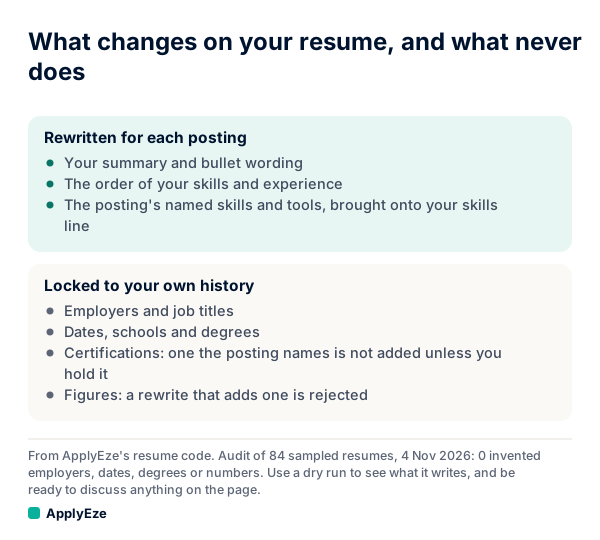
The chart gives you the proofreading rule. One list is what the writer may change: summary, bullets, order and the posting's named skills. The other is what must match your record: employers, titles, dates, schools, degrees, certifications and figures. So read in two passes.
First pass, the locked list. Open your own resume and the generated one side by side. Every employer, title, date, school, degree, certification and number should match. Read the contact line at the top as well. A wrong fact here is usually a wrong fact in your profile, since your employers, job titles, dates, schools, degrees and certifications come from your own record.
Second pass, the skills line. ApplyEze brings the posting's named skills and tools onto your skills line, even when your own record does not list them. There is no step to remove one before a live run, so use a dry run to see what it writes, and be ready to discuss anything on the page. A certification the posting asks for is not added unless you hold it. Note which added tools you could not talk about, because that tells you which kinds of posting to pass on. Full detail, with a labelled sample, is in what an AI resume rewrite changes.
Checking the letter, when the form asks
A letter is written when the form asks for one, so a run with no letter usually means this form did not ask. When there is one, you are checking two sources. Claims about you must come from your record, and any name or figure about the company must appear in the posting. So take each company fact in the letter and find it in the posting. Then take each claim about you and find it in your history. Any you cannot find is a mark. Also check that it names the right role, and that you would be comfortable having written it.
What a dry run cannot tell you
- What happens at Submit. An error that appears only on sending, an emailed code at the last step, and the confirmation page all sit past the point where a dry run stops.
- How a person reads it. It cannot show whether anyone reads the application, or what they make of it.
- What the next form will ask. A clean run on one Greenhouse form makes the next likelier to go well. It does not make it certain.
- What the next resume will say. Each posting gets its own.
- That the site never saw you. It is a real form on an employer's real site, not a sandbox. In a dry run, code refuses the final Submit, and that is the promise.
- Whether you will hear back. Nothing about a rehearsal predicts that.
What to fix before going live
Work through your marks in this order, since each fix can clear later ones.
| Your mark | Where to fix it | Then |
|---|---|---|
| Wrong contact detail or history | The Profile tab in the desktop app. After setup the web has no profile editor | Dry run the same posting |
| An answer you would not give | Add it under Screening answers or Application defaults | Dry run a posting on that system |
| Wrong kinds of roles coming up | Reorder or edit your target roles, since the first listed ranks first | Check Matches |
| A skill you cannot discuss | Pass on postings built around that tool, because a live run will not stop for an edit | Read the next resume |
| The run ended early | Read the reason in Recent work. A missing name, email, phone, resume or work history stops it before a browser opens | Fix it and run again |
| A form that could not be finished | Try another posting on the same system. A form that cannot be finished costs no credit | Decide if that employer is worth doing by hand |
When a sheet comes back with no open marks on one posting per system, you have what a rehearsal can give you. Turn Dry-run mode off in Preferences, or your next runs will fill forms and stop again. Spending the credits well after that is its own subject, and it is covered in how to use your 50 free applications.
Your first 50 applications on ApplyEze are free, with no card, and a practice run uses none of those credits as long as you have one left. You can try one on your own profile, and read it with the sheet above.