

Proof of a job application is any record that shows who you applied to, for which role, when, with which documents, and what the employer's system said back. The strongest proof comes from the employer: a confirmation email or an entry in its candidate portal. Everything else, including an ApplyEze receipt, is a record from your side of the transaction, and a good one is worth keeping. If you came here for a letter proving you hold a job, that is a proof of employment letter, which your employer issues, and it is a different document.
Proof, ranked from strongest to weakest
This ranking is ours, and it follows one rule: evidence is stronger the less it depends on you or your tools.
| Evidence | Who produced it | What it shows | Its weakness |
|---|---|---|---|
| Employer's confirmation email | The employer's system | They received something, and when | Some employers never send one |
| Entry in the employer's candidate portal, such as Workday's Candidate Home | The employer's system | It is on file, sometimes with a status | Needs an account, and works only where the employer offers one |
| Dated screenshot of the confirmation page | You or your tool | The site's response at that moment | Says nothing after that moment |
| The exact resume and letter, with the send time | You or your tool | What went out | Does not show it arrived |
| A line in your own log | You | What you say you did | Weakest alone, and often the one an agency asks for |
A record worth keeping combines one from the top of the table with your copy of what went out, plus the log line. Save the posting's text as well, since postings come down.
If an unemployment office asks for it
Search for this topic and most of what you get is about proof of employment. One group does have to show proof of applications: people claiming unemployment benefits, and state agencies are specific about it. This is general information, not legal advice. Rules differ by state, so read your own agency's page and your claim notice. Here are two we read on 9 November 2026.
| State | What the record needs | How long to keep it | When they can ask |
|---|---|---|---|
| Washington | "all the information our log requires", from the agency's own log form or anything similar | At least 30 days after your benefit year ends or after you stop receiving benefits, whichever is later | "at any time, even after you have stopped submitting your weekly claims" |
| North Carolina | Date, company, contact method, and for online contact a website address, entered in your MyNCUIBenefits account | Recommends saving a copy for two years | "for up to 5 years after you have filed a claim" |
Two details are easy to miss. North Carolina wants the employer's main website, because "Some job posting links expire or change over time", and will not accept a direct posting link. Washington says "You need to take all steps necessary to apply for the job to count it", which is worth remembering when an application reads Unconfirmed.
Neither page mentions applications filled in by software, so if your benefits depend on it, ask your agency first. And no receipt from any tool will complete these logs alone. An ApplyEze receipt has no employer phone number or mailing address, so you would add those yourself.
What a receipt holds
Every ApplyEze run leaves a receipt, whatever the outcome. You find it under Recent work in the desktop app and under Applications on the web.
| On the receipt | What it tells you | The limit |
|---|---|---|
| Result | Each application reads Submitted or Unconfirmed, and a run that did not send says so | It is ApplyEze's reading of the site, explained below |
| Time taken | How long that run took | A measure of the run, not of the employer |
| Screenshots | Saved during the run, when the run took any | There may be none. The Screenshots button then opens the run folder instead |
| Documents sent | You keep the exact resume and cover letter that went out, and the time it was sent | A letter exists only when the form asked for one |
| The run folder | On your laptop, each run leaves a folder with what the form held and how the run ended | It lives on the computer that ran it, so back up what you need |
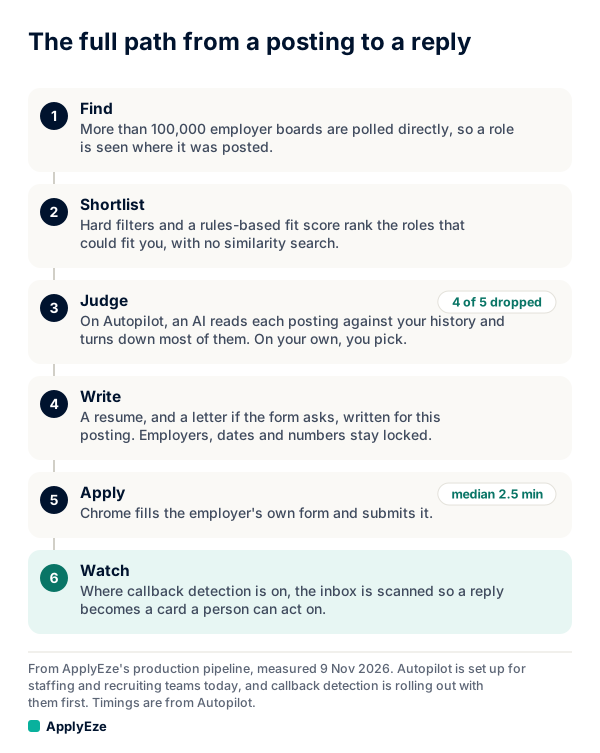
The chart shows the whole path from a posting to a reply. A receipt comes out of two of its six steps: write, which produces the documents, and apply, which produces the result and the time. The judge step and the inbox step belong to a different product. ApplyEze Autopilot is set up today for staffing and recruiting teams that work with ApplyEze. If you are job hunting on your own, you can start with 50 free applications on sign-up, no card needed. You pick the matches and queue them in the desktop app, and ApplyEze fills and submits each form.
What to add yourself
A receipt is your side of the record, so a few things stay with you.
- A screenshot, where you need one each time. Screenshots are saved when the run took any, so they are not on every receipt. If you need one each time, watch in Visible mode and take your own.
- The employer's word. Submitted does not mean the employer confirmed it to you, so keep their email or portal entry when you get one.
- Replies. You add those yourself, and how is covered below.
- Phone numbers, addresses and recruiter names. A benefits log may want them, so add them to your own log.
How a submit gets confirmed
ApplyEze looks for the system's own proof: a confirmation page, a thank-you message with the form gone, or its status line. The agent's word is not enough: the run's own record of the Submit click and the page decide. A form that merely disappeared is an observation, not proof, and an error page or a refusal overrides any confirmation wording around it.
When a site shows no message, ApplyEze reads the page. If the form is gone and nothing asks for more, the application counts as submitted. If the form or an error is still there, it does not, and the role can run again. So there are three readings, and they mean different things.
| It reads | What happened | Credit used | Can it run again |
|---|---|---|---|
| Submitted | The site showed its own proof, or the form was gone after a real final Submit with nothing asking for more | 1 | Built to stop double applications |
| Unconfirmed on the web, Maybe submitted in the app | Submit was clicked, and the site never confirmed | 0 | No |
| Not sent | The form or an error was still there | 0 | Yes, the role can run again |
Read Submitted as a strong reading rather than the last word. Not every Submitted carries a confirmation page, which is why the checks below still matter.
If a site never confirms
If a site never confirms, no credit is used, and ApplyEze will not apply there again by accident. That protects you from a duplicate, and it also means no second attempt comes unless you make one. Work through this in order:
- Search your application inbox for the employer's name.
- If the system has a candidate portal, sign in and look for the role.
- Open the run folder and read how the run ended.
- If you find no trace and you still want the role, apply by hand. The posting will not be retried for you.
Until you have evidence, do not record it as submitted on a benefits log. Write down what you know: the date, the employer, and that the site did not confirm.
What to check in your first five receipts
Anything that goes wrong every time will show up in five. Open each receipt and run down this table.
| Check | Where | What wrong looks like | What to do |
|---|---|---|---|
| Did the result match the world | Your inbox, then the employer's portal | Submitted, with an error email from the employer | Note it, and read the run folder |
| Time taken | Recent work | One run far shorter than others on the same system | Open that one first |
| The resume sent | Documents | A wrong date, or a skill you cannot discuss | Fix your profile for facts. ApplyEze brings the posting's named skills and tools onto your skills line, even when your own record does not list them, so use a dry run to see what it writes, and be ready to discuss anything on the page |
| The letter, if any | Documents | A claim you would not make, or a company fact that is not in the posting | Claims about you come from your record, so correct the record |
| What the form held | The run folder on your laptop | An answer you never gave | Add a saved answer |
That last row deserves a plain statement. Hard facts come from your profile. When a required question is not covered by your saved answers, ApplyEze still fills it rather than stopping the run, so that answer may not come from you. Fill in your saved answers, use dry run first, and read your receipts. A practice run lets you do this before a credit is on the line.
Recording an employer's reply
You record employer replies yourself on each application. Your Heard back and Interviews counts come from what you record, so the numbers are only as true as your habit. On the run, in Recent work or under Applications, choose one of five labels: Screening, Assessment, Interview, Offer or Rejected.
A rejection is worth recording too, though it does not raise your Heard back count, which covers the other four. Keep the employer's email as well, because the label is your note and the email is the evidence. The same goes for phone calls: write down who called and when, somewhere you control, such as a job application tracker.
On a self-serve account, replies are yours to record. Callback detection is rolling out with staffing teams first and is not part of self-serve accounts yet.
What other tools keep
Compare the evidence, then the price. Each description here is that company's own, read on 9 November 2026. Scale.jobs, where people submit the forms, advertises "a proof screenshot for every single application", with prices as of November 2026 starting at $399 once for up to 500 applications, or 80 cents each. Tsenta says each submitted application "keeps a record you can open later".
ApplyEze gives you the exact files that went out with the time they were sent, a folder on your laptop showing what each form held and how the run ended, and a dry run you can watch, at a listed 2.7 to 3.3 cents an application. Whichever tool you use, keep one record from the employer beside your copy of what went out.
To see whether that record is enough for you, read your own. Your first 50 applications are free, with no card, and a credit is used only on a confirmed Submitted. A practice run leaves a receipt too. You can start here.