
Easy Apply on Indeed sends the employer your Indeed profile and resume, plus your answers to any screener questions, without you leaving Indeed. Indeed's badge says "Easily apply", and Indeed reports a median of 44 seconds to finish one. It delivers a real application. What it skips is the part where you adjust anything, and that can matter more than people expect, because a pre-filled screener answer can move you to a Rejected tab automatically. Most guides stop at how to press the button. This one goes through Indeed's own documents, including the developer reference that lists what gets sent.
A disclosure: ApplyEze makes software that applies on employers' own application systems, so we have a stake in where you apply. Our position is at the end, after the numbers.
What Easy Apply sends
Indeed's job seeker page says "your profile automatically fills required fields and employer questions", and that the employer "receives the details from your Indeed resume and profile" and your answers to required screener questions. That is accurate and short. Indeed's application data reference, written for the systems that receive these applications, is more specific. We read it on 9 November 2026.
| What goes across | When | What the reference says |
|---|---|---|
| Name and email | Always | Required fields |
| Verified flag | Always | Whether your email is confirmed, for example because you are signed in to a verified account with that address |
| Phone | If you gave one | Optional |
| Resume file | Normally | The file itself, whether you uploaded it or use Indeed Resume |
| Resume as text, HTML and structured data | Only with Indeed Resume | Positions, education, skills, certifications, licenses and more, in separate fields |
| Cover letter | Only if you wrote one | "If an applicant did not provide a cover letter, the JSON object does not contain this field." |
| Screener questions and your answers | If the job has them | Each question paired with your answer |
| Technical details | Listed in the reference | The page holding the Apply button, your IP address, your browser and device, and whether the job was sponsored on Indeed |
| Smart Fit Score | Only if the employer enrolled in Smart Screening | A score Indeed adds, covered below |
Two caveats on that table. It describes what Indeed sends to a connected applicant tracking system, and an employer working only in Indeed's dashboard sees Indeed's own view of the same data. And the two documents differ slightly on uploads. The reference lists only the file for an uploaded resume, while Indeed's help page says Indeed scans it and "We'll send the employer your resume details along with your resume".
It is also not quite one click. Indeed's own steps end with a review screen where you check your resume and answers before you select "Submit your application". That screen is the only place you can catch a wrong pre-filled answer.
What it skips
- Your choice of resume, unless you make one. The resume saved to your profile goes by default. You can upload another for a role.
- Tailoring, unless you accept it. Indeed says it "will help you rephrase your resume bullet points to include keywords that employers care about", and our LinkedIn vs Indeed comparison covers that step. Read what it changes before you accept it.
- A cover letter. Unless you add one, none exists in what is sent.
- Steps on the employer's side. Indeed says some employers "require you to complete additional steps on their own career site, such as assessments or disclosures". So a finished Easy Apply does not always mean a finished application.
Screening questions and resumes on file
This is the part worth slowing down for. On Indeed's employer guide, last updated 29 September 2026, an employer can mark pre-made questions as required, and "Candidates who don't meet a required screener question are moved to your Rejected list". The topics cover education, experience, languages, location, willingness to commute or relocate, work authorization, and, in the US, security clearance and shift availability. Employers can still open that list and move someone back, and custom questions cannot be marked required.
Put that next to the auto-fill line and you can see how a person gets filtered out without noticing.
A sample, made up for illustration: a posting asks for three years of bookkeeping experience, as a required question. Your Indeed profile still says two, from when you last updated it, and you now have four. If that fills the answer and you tap through, you have told the employer two, and the rule acts on the answer, whatever your resume says.
So four habits are worth keeping:
- Read every pre-filled answer on the review screen.
- Update your Indeed profile and resume before a batch of applications. Stale data goes out faster here than anywhere else.
- If the resume on file is a general one, upload a version for roles you care about.
- Answer truthfully. The filter is working as designed when your real answer misses. The problem is only when an old answer does.
Smart Screening, where an employer has it
Indeed also sells employers a paid product, announced in February 2026, that goes further. Smart Screening "screens and scores candidates" before they reach the employer's tracking system. After an Indeed application, a candidate may be asked to complete an AI Recruiter conversation by text, chat or video. Each applicant gets a Smart Fit Score from 0 to 100, built from what you gave Indeed, which is why it appears in the table above. Indeed's release notes from June 2026 describe sending only applications that "meet your deal breakers" on to the employer's system. Indeed says the score is "intentionally not a final decision-maker", and we have no data on how many employers use it. But if you get a text from an AI recruiter after pressing Apply, this is probably why, and it is part of your application.
Interview rates by channel
The most useful public numbers come from Huntr, a job search tracker, in its Q3 2026 report.
| Comparison | Interview rate | Who |
|---|---|---|
| Employer career sites, Q3 2026 | 6.0% | All users |
| ATS pages such as Greenhouse or Workday, Q3 2026 | 4.8% | All users |
| Job boards, Q3 2026 | 3.4% | All users |
| Employer sites against job boards | 6.2% against 4.9% | The same 5,855 people |
| ATS pages against job boards | 5.3% against 4.6% | The same 5,846 people |
| Indeed, past 12 months | 3.6% | All users |
Read the same-people rows first. They shrink the gap, because they remove some of the difference between who applies where. Per 100 applications, 6.2% against 4.9% is 1.3 more interviews.
Now the caveats, which matter here more than usual. These numbers do not measure Easy Apply. Huntr says "We see when a user marks a job applied, not how they applied", so its job board row mixes people who used a board's own form with people who clicked through to an employer. An interview means the user logged one. Huntr also says plainly that its rates "do not prove that any choice caused an interview". And Huntr sells job search tools.
Indeed offers a counter-number: its career guide says jobs using Indeed Apply are "on average, 2.4X more likely to lead to a hire", sourced only as "Indeed data (US)". No method is given, and it counts jobs, so it can reflect which employers use the feature. Treat it as a vendor claim.
The math most advice skips
Rates per application ignore what each application costs you. Here is the same comparison per hour, using Indeed's 44 second median, a 2022 audit that timed a Fortune 500 form at 4 minutes 52 seconds, and the 44 minutes people reported in a 2026 survey for the whole job with tailoring. All arithmetic is ours, per 100 applications.
| Route | Time for 100 | Interviews at Huntr's same-people rate | Time per interview |
|---|---|---|---|
| Easy Apply, no changes | 73 minutes | 4.9 | about 15 minutes |
| Employer form, no tailoring | about 8 hours | 6.2 | about 79 minutes |
| Employer form, tailored | about 73 hours | 6.2 | about 12 hours |
Tailoring may raise the rate above 6.2%, so the bottom row is the pessimistic case. These sources were never meant to be combined, and the table is a rough sketch. It still shows something advice columns rarely admit: while a person does the typing, Easy Apply wins on time by a wide margin.
The time in those lower rows is typing, and typing is the part software can take over. Huntr's rates do not cover that route, so read it as a change in hours, not as a promised rate.
So the choice depends on what you are short of. If you are short of time and plenty of roles fit you, the quick route gets you more interviews per hour. If you are short of good roles, and there are only a few postings a month you really want, then each one is scarce, and the extra minutes cost little against losing the role. Also, if 44 seconds is easy for you, it is easy for every other applicant, so expect a crowded pile, and silence after "viewed" that says little about you.
When Easy Apply is fine, and when to go to the employer's site
| Situation | Our call | Why |
|---|---|---|
| The posting has no employer page you can find | Easy Apply | It is the route the employer chose |
| Your saved resume already fits and there are few questions | Easy Apply | Little to gain by retyping it |
| Plenty of similar roles and limited hours | Easy Apply | The time math above |
| You want status updates in one place | Easy Apply | My Jobs tracks it, and an application made on an external site "will not appear" there |
| One of the few roles you really want | Employer's site | You control every field and every file |
| Someone inside is referring you | Ask them first | Referral steps usually run through the employer's own process |
| The posting looks old or reposted | Employer's site | You confirm it is still open before you spend anything |
| A long list of required questions on Indeed | Either, but slowly | Your answers carry more weight than your resume there |
One thing that is not a reason: fear that Easy Apply goes nowhere. Indeed says "Both methods deliver your application to the employer", and it can flow into the employer's tracking system through an integration. What differs is the pile: Indeed tells employers that "How job seekers apply determines where you manage your candidates, either in your Indeed Employer Dashboard or in your ATS". LinkedIn has a similar split, covered in does LinkedIn Easy Apply work.
Finding the employer's own posting
Indeed's default for a job pulled from a career site is to send you there anyway. For an Easy Apply job, you have to look.
- Copy the exact job title and any requisition or job ID from the description.
- Search the title and company name, in quotes, with the employer's likely system. A sample:
"Staff Accountant" "Acme Foods" site:myworkdayjobs.com. - If that fails, go to the company's own careers page and search there.
- Match the location and ID. Large employers run several near-identical openings.
- If you cannot find it within five minutes, use Easy Apply. Some postings live only on Indeed.
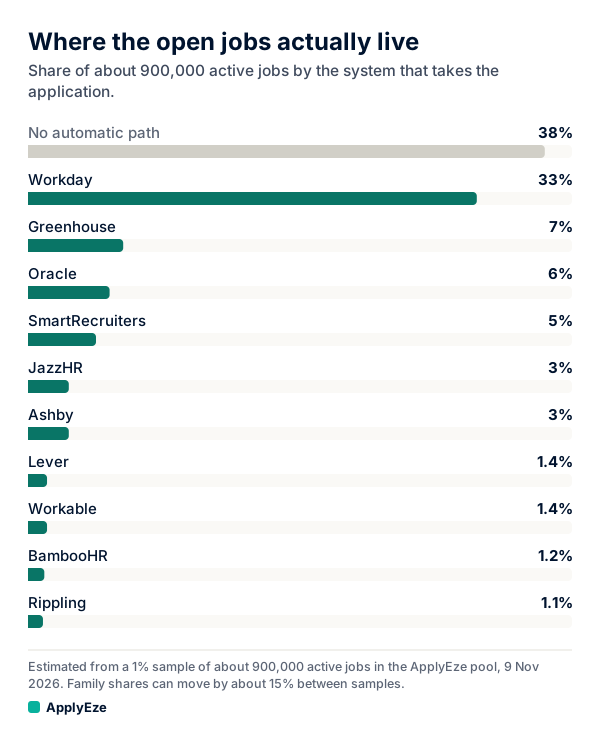
The chart shows roughly how the 900,000 or so active jobs we track split by application system, from a 1% sample taken on 9 November 2026. The largest bar, 38%, is jobs on other systems that ApplyEze has no automatic path for, so it tells you nothing about where to search. Workday is roughly a third, so try it first. The addresses below are the ones to search:
| System | Rough share of active jobs we track | Address to search |
|---|---|---|
| Workday | 33% | myworkdayjobs.com |
| Greenhouse | 7% | boards.greenhouse.io, job-boards.greenhouse.io |
| Oracle | 6% | oraclecloud.com |
| SmartRecruiters | 5% | jobs.smartrecruiters.com |
| JazzHR | 3% | applytojob.com |
| Ashby | 3% | jobs.ashbyhq.com |
| Lever | 1.4% | jobs.lever.co |
| Workable | 1.4% | apply.workable.com |
| BambooHR | 1.2% | bamboohr.com |
| Rippling | 1.1% | ats.rippling.com |
Where ApplyEze fits
ApplyEze applies on employers' own application systems, such as Workday, Greenhouse and Ashby, the channel that beat job boards in Huntr's same-people data, 5.3% against 4.6%. It does not apply through LinkedIn Easy Apply, and Indeed's form is not on its list either. If you want help on Indeed's own form, Simplify says its Copilot autofills there, and you still press Submit. Roughly 62% of the active jobs we track sit on systems ApplyEze can apply to automatically, once an application inbox is connected, and 94,207 applications have gone out through it since 14 August 2026, to 9,769 employers.
You pick the matches and queue them in the desktop app, and ApplyEze fills and submits each form in Chrome on your computer, which stays on and awake until the queue finishes, with a resume written for that posting. Workday and Oracle jobs stay hidden until you connect an application inbox, because those sites email a code. It brings the posting's named skills and tools onto your skills line, even when your own record does not list them. There is no step to remove one before a live run, so use a dry run to see what it writes, and be ready to discuss anything on the page.
So keep Easy Apply for the quick ones. If the employer's own form is where you want to be and the typing is what stops you, your first 50 applications are free, once per email address, with no card, and a credit is used only when an application is confirmed as Submitted.