
Application viewed on Indeed but no response is common, and on its own it tells you very little. Indeed's help page says the status means "The employer reviewed your application" (Indeed). Its career guide is more careful: a Viewed status "generally means an employer opened your application within Indeed" (Indeed). Opened is all you can rely on. Give it about a week from the day you applied, send one message if there is a way to send it, then move your attention elsewhere.
What viewed means on Indeed
Indeed's help page lists 11 statuses, set by three different parties. That split matters, because a status from the employer and a status from Indeed mean different things.
| Status | Set by | Indeed's words |
|---|---|---|
| Applied | Indeed | "You submitted an application." |
| Employer reviewing applications | Indeed | "The employer is reviewing applications, but has not reviewed yours yet." |
| Application viewed | Employer | "The employer reviewed your application." |
| Employer reached out | Employer | "The employer contacted you through Indeed." |
| Not selected by employer | Employer | "The employer rejected your application." |
| Response seems unlikely | Indeed | "We don't expect the employer to reply." |
| Job closed | Indeed | "The employer closed the job, or the job expired." |
You can also set Interviewing, Offer received, Hired or No longer interested yourself, and employers can set the first three.
Two limits change how you read this table. First, "Statuses set by Indeed are only available if you use the mobile app", so the desktop site may show you less. Second, "If you applied on another site, you may not see these statuses". A related Indeed page says the viewed feature covers only applications "submitted directly through Indeed" (Indeed).
What it does not mean
It does not say who looked, or for how long. The Indeed pages we read do not define what counts as a view. It could be a recruiter reading closely, a hiring manager clicking through a list, or an assistant sorting a pile.
It is not interest. Indeed's own answer to this exact question is that employers may still be reviewing candidates or deciding whom to contact. LinkedIn is more explicit about its similar notice: a view or a resume download does not mean a message, an interview or an offer will follow (LinkedIn).
It is not a rejection. A rejection has its own status, Not selected by employer. An employer who never updates it leaves you with silence, so silence after a view is simply missing information.
Its absence means little too. Indeed says "not all employers update viewing status, meaning you may not have a viewed label even if your application was reviewed". There is a mechanism behind that. Indeed says applications can go to an employer through its dashboard, "directly into their applicant tracking system (ATS) or via email", depending on how the job was set up. By its own wording, Viewed means opened within Indeed. So a recruiter reading your application in their company's system has, as far as we can tell from that wording, not produced a view you would see. That part is our reading of Indeed's pages, and Indeed does not spell it out.
Indeed's developer documents show employer systems sending hiring stages back to Indeed (Indeed Docs), but they do not say how, or whether, those stages reach your My jobs page. So treat the page as a partial view of what happened.
How long a reply can take
We found no published figure for the time between a view and a reply. What we measure starts from the application, so count from the day you applied, and do not restart the clock when the view appears.
Our figures come from callback detection, which is rolling out with staffing teams first and is not part of self-serve accounts yet. Where it is switched on, a scanner reads a candidate's application inbox and labels likely replies. These cover about 29 candidates at one staffing team and email received from 4 October to 8 November 2026. No person reviewed the labels, so they are found, not confirmed. The time runs from the application, not from an interview. They also come through an application inbox, so replies sent through Indeed's own messages are not picked up.
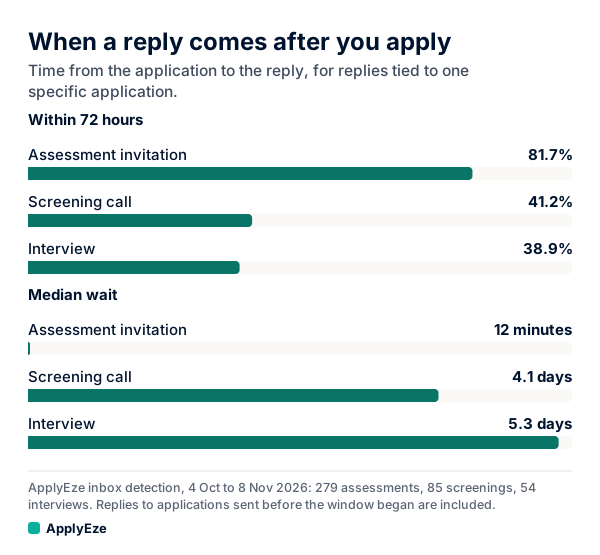
The chart covers replies tied to one specific application. Screening invitations came at a median of 98.1 hours, about 4 days, with 41.2% inside 72 hours. Interview invitations came at a median of 126.8 hours, about 5.3 days, with 38.9% inside 72 hours. Assessment invitations came at a median of 12 minutes and are mostly automated, so ignore them for this question.
For applications sent 12 to 23 October, which had time to mature, 58 human callbacks (a screening call, an interview or an offer) gave a median of 116 hours, with 38% inside 72 hours and 74% inside 7 days. The separate outside figure sits close by: Huntr's users logged a median of 5 days from application to interview in Q3 2026 (Huntr).
All of these describe applications that got a reply. An application that never gets one has no wait to measure, and results for any one person will differ. What these figures do show is that a view on day 2 followed by silence on day 4 is not a meaningful event yet.
Job boards against employer sites
Huntr, a job search tracker, publishes interview rates by channel in its Q3 2026 report. "Interview" here means a user moved the job to interview in their own tracker, and Huntr sells that tracker.
| Comparison | Figures | Who it covers |
|---|---|---|
| By channel, Q3 2026 | Employer career sites 6.0%, ATS pages 4.8%, job boards 3.4% | All logged applications |
| By site, past 12 months | Google job search 9.9%, LinkedIn 3.6%, Indeed 3.6% | All logged applications |
| Same people on both | Employer career sites 6.2%, job boards 4.9% | 5,855 job seekers |
| Same people on both | Indeed 4.3%, LinkedIn 3.0% | 2,607 job seekers |
The same-people rows are the ones to trust most, because they hold the person constant. They show a gap in favor of employer sites, smaller than the raw figures suggest. The site row also shows that about 96 of every 100 Indeed applications those users logged did not reach a logged interview (100 minus 3.6, our arithmetic). An application that goes nowhere is the normal case on any channel, viewed or not.
Does a job board application fail to reach the recruiter's real queue? We found little evidence for it. Indeed says its tools "do not automatically delete applications before a person sees it", and that your full application still appears in the employer's dashboard. An exception to that comfort: applicants who miss a required screener question are moved to the employer's Rejected list (Indeed). On the other side, Greenhouse says applications through "LinkedIn, Indeed, or other third-party sites may not appear in MyGreenhouse" (Greenhouse), which is about your view of the application. It does not say the recruiter cannot see it. We found no primary source showing that board applications go into a lesser queue. One guide that raises the idea of different queues (Resume Worded) cites no source, so we leave it as unproven.
The practical reading: for a role you care about, use the employer's own site from the start when it takes applications. Do not reapply to the same posting now just because Indeed is quiet, since some employers block repeat applications. Our guides on Indeed Easy Apply and LinkedIn against Indeed cover the routes in more detail.
What to do at day 7
By the end of day 7, 74% of the human callbacks in that matured group had arrived, so day 7 is the first sensible day to write. Indeed's career guide suggests "one to three weeks after applying" (Indeed), so nothing is lost if you wait longer on a role you are unsure about. Only write about roles you would take.
First find a channel, in this order:
- Indeed's message option for that application. "Some employers allow you to message them after a job application is submitted", and "This feature only works if the employer turns it on" (Indeed). Check My jobs and your Indeed messages.
- A contact in the posting. If the posting says no calls or emails, respect that.
- A recruiter at the company, or its careers contact. Use a work address you can verify, and refer to the Indeed application.
Pick one channel. Indeed itself advises you to "Avoid sending repeated messages across multiple platforms".
This is a sample we wrote, not a real person's message. Replace everything in brackets.
Hello [Name],
I applied for [Job title] on Indeed on [date], and it shows my application was viewed. I am still interested, and I wanted to check whether the role is still open.
The role asks for [requirement from the posting]. In my current job I [one specific result]. I can send more detail if useful.
Thank you, [Your name] [Phone number]
Mentioning the view is optional. It helps a recruiter find you without implying they owe you a reply. Do not ask why they have not responded.
Do not over-read the next signal either. Indeed Messages can show "read" and "unread" receipts (Indeed), which gives you a second small thing to stare at. Read without reply means the same as viewed without reply. And if you see a banner saying messaging this employer is disabled, Indeed says messages may be frozen while the employer account is under moderation review, so check the employer is real before you share anything else.
When to move on
Stop waiting today, and keep the application open in your records. Those are different decisions. Send the next application now, whatever this one shows.
Treat the role as closed in your plans when any of these happens:
- Response seems unlikely appears. Indeed shows it when the employer has hired enough people, or after "no activity on your application for at least two weeks". It is a forecast, with the mobile app caveat above.
- Job closed appears, or the posting is gone.
- Your one message has gone unanswered for a week or two.
- Two weeks have passed with no message option and no contact to try.
Do not withdraw. Replies do still come late: in that matured group, the other 26% of human callbacks came after day 7, and a later reply costs you nothing. Keep your own tracker too, since Indeed says applications made more than six months ago may drop out of My jobs. How to check job application status covers applications made anywhere else.
When you pick the next jobs, one small filter may help. Employers who respond consistently can earn a Responsive Employer Badge, which Indeed says "can signal to job seekers that they are likely to hear back" (Indeed). That is Indeed's description of its own feature.
ApplyEze starts on the employer's side. It polls more than 100,000 employer boards directly, about 900,000 active jobs, and applies on employers' own application systems, not through Indeed. Those systems hold roughly 62% of those jobs with an application inbox connected and roughly 23% without, because Workday and Oracle jobs stay hidden until you connect one. If a quiet Indeed tab has you refreshing, put that time somewhere else: your first 50 applications are free, no card needed. You pick the matches and queue them in the desktop app, and ApplyEze fills and submits each form while your computer stays on and awake.