
To check a job application status, first work out which system took your application, because no central place exists. Look at the web address of the form, or the sender of your confirmation email, then go to that system's candidate page for that employer. Some systems give you a login. Some give you a one-time code. Lever says plainly it cannot help, and we found no candidate status page in Ashby's documentation, so there the only real check is an email to a person. The table below is the lookup, and a copyable email follows further down.
| The address or email shows | System | Where the status lives | How you get in | The catch |
|---|---|---|---|---|
myworkdayjobs.com | Workday | Candidate Home, under My Applications, on that employer's career site | An account you made for that employer | Labels are coarse, and a change may not email you |
oraclecloud.com | Oracle Recruiting Cloud | The candidate page on that employer's career site | You must confirm your identity | Lists show 5 at a time |
greenhouse.io | Greenhouse | MyGreenhouse, under Applications | Email code, or Google, Apple or LinkedIn | Only if the employer shares it |
lever.co | Lever | We found no candidate page | Your email | Lever cannot check for you |
ashbyhq.com | Ashby | We found no candidate page in its documentation | Your email | Employer-side documents only |
icims.com | iCIMS | The dashboard on that employer's career portal | A login for that employer | Options vary by company |
smartrecruiters.com | SmartRecruiters | Wherever the employer's site shows it | Start from your confirmation email | Do not rely on a login address from a forum |
| You applied on Indeed | Indeed | My jobs, Applied | Your Indeed account | Most detail only for jobs posted directly on Indeed |
| You applied on LinkedIn | Job tracker, Applied tab | Your LinkedIn account | Status updates depend on the employer | |
usajobs.gov | USAJOBS | Applications or Home tab | Your USAJOBS account | Messages may not explain the evaluation |
| Anything else | Unknown | Your confirmation email | Follow its link | Ask the employer if there is none |
If the employer's own domain hides the system, look for "Powered by" at the foot of the page or read the footer of the confirmation email. Lever says "Powered by Lever" on a career page means the company uses its software (Lever).
Why status is so hard to find
Three things cause this, and knowing them saves time.
There is no shared account across systems, and often none across employers. iCIMS says "you do not have a shared login among different employers" (iCIMS). A Workday account also belongs to one employer's career site, so you can end up with one login per company. Greenhouse is the exception, with one candidate account of its own.
The employer controls what you see. Greenhouse puts it this way: "You may see a high-level status, but not every step or decision in the hiring process" (Greenhouse). Workday's material says a setting exists so that candidates "do not receive internal terminology" (Workday).
The vendor cannot help you. Greenhouse "will not share the status of any candidate application" (Greenhouse). Lever: "Unfortunately, we can't help you apply for jobs or check application status" (Lever). iCIMS: "Only our companies can take action on their respective job applicant data" (iCIMS). Do not spend a message on a vendor's support desk.
Workday and Oracle
Workday. "External candidates can view the status of their job applications from their Candidate Home accounts", and once signed in they can see active and inactive applications (Workday).
- Open the employer's Workday career site, from the posting link or the confirmation email.
- Sign in with the email address you applied with. Workday uses that address as your identifier.
- Open My Applications, then look at both the active and the inactive lists.
- Look for a pending task as well. Workday shows a notification icon when you have one, and a task means more than a label.
Check the inactive list on purpose. UW-Madison shows every decline and every canceled requisition there as "Completed", and its guide says a status change "does not send them any kind of notification/communication" (UW-Madison). At an employer set up like that, the portal may be the only place the news appears. What each label means varies by employer, as covered in Workday application status meaning.
Oracle. Oracle's documentation says external candidates "must confirm their identity" before using the candidate page, and then "A maximum of 5 job applications appear in each job applications list: Active, Inactive and Draft" (Oracle). Two details matter. Use Show More before you decide an application is missing. And look at Draft, because a draft was never submitted. Some employers also offer a chat assistant, which verifies your email with a code sent by email or text before it shows a status (Oracle).
Greenhouse, Lever and Ashby
Greenhouse. Go to MyGreenhouse. "MyGreenhouse is password-free": enter your email and it sends a single-use code. "You can request a new code after 10 minutes", and if you asked for several, only the latest works. Then open Applications.
What you find depends on the employer. "If an employer has chosen to share your application status in MyGreenhouse, you can view it", and a line reading "Not sharing updates" means that status will not change there. Applications sent through "LinkedIn, Indeed, or other third-party sites may not appear" (Greenhouse). Do not wait for an email about a change either. When an application turns inactive, "Candidates are not notified about the change" (Greenhouse). Our Greenhouse application status post explains the levels.
Lever. We found no candidate login. Lever's page for job seekers says it cannot check a status and sends you to the organization "directly through their website" (Lever). Your check is the email below.
Ashby. Its help center is written for recruiting teams, and we found no candidate status page documented there. An employer might still show you something, so read your confirmation email. Otherwise, use the email below.
iCIMS and SmartRecruiters
iCIMS. "You can check your status by logging in to your profile and reviewing your job seeker dashboard", and "The dashboard will display all positions you've applied to, along with the status of each one" (iCIMS). You reach it from that employer's career portal, usually at an address like careers-company.icims.com. Use Forgot Your Password if you need to. The candidate guide warns that "Options available may depend upon the company" (iCIMS), and the words on the dashboard are the employer's. Auburn University, for one, publishes a column headed "Status candidate can view in their dashboard" that turns many internal steps into a few labels (Auburn).
SmartRecruiters. Its developer documentation lists the states "from the candidate perspective": New, In Review, Interview, Offered, Hired and Archived, where Archived carries a reason such as Rejected or Transferred (SmartRecruiters). It tells integrators to "expose it in your interface" (SmartRecruiters), so where you see it depends on the employer's site. Start from the link in your confirmation email, and treat any guide naming one login address with caution. SmartRecruiters application status covers the labels.
Job boards and government sites
Indeed. Open My jobs, then Applied. Statuses such as Application viewed are mainly for jobs posted directly on Indeed. "If you applied on another site, you may not see these statuses", and applications older than six months may be missing (Indeed).
LinkedIn. Click the Jobs icon, then Job tracker, then the Applied tab (LinkedIn). For an employer's system connected to LinkedIn, status events reach you only if that employer consented to applicant notifications (LinkedIn on Microsoft Learn).
USAJOBS. Sign in, open the Applications or Home tab, find the announcement and read the message. NIST warns that these messages "may not provide detailed explanations of how applications are being evaluated" (NIST).
No login: the email fallback
When there is no page to check, or the page has not moved, write to a person. Good targets, in order: the recruiter named in the posting or your confirmation email, a recruiter for that team you can identify, and then the careers contact on the company's site. Include the role title, the job ID and the date you applied, because the recruiter has many open roles.
This is a sample we wrote, not a real person's email. Replace everything in brackets.
Subject: Status check: [Job title], ID [number], applied [date]
Hello [Name],
I applied for [Job title] (ID [number]) on [date]. Could you confirm that you have my application and whether the role is still open?
I am still interested. I have [one specific qualification that matches the posting], and I can share more if useful.
Thanks, [Your name] [Phone number]
It asks one question that takes seconds to answer. It does not ask for a decision, which a recruiter may not be able to give. If you get no reply, Indeed's career guide says it's "best to wait one to two weeks after checking in to follow up again" (Indeed). After that second note, stop.
How long to wait before checking
These are two different actions. Looking at a portal costs nothing, so look once a week. Writing to a person spends a little goodwill, so wait for a reason.
A wait of days is normal. Our numbers come from callback detection, which is rolling out with staffing teams first and is not part of self-serve accounts yet. Where it is switched on, a scanner labels replies in application inboxes. Across about 29 candidates at one staffing team, in email received from 4 October to 8 November 2026, screening invitations tied to one application came at a median of 98.1 hours, about 4 days, and interview invitations at 126.8 hours, about 5.3 days. No person reviewed those labels, so they are found, not confirmed, and the time runs from the application, not from an interview.
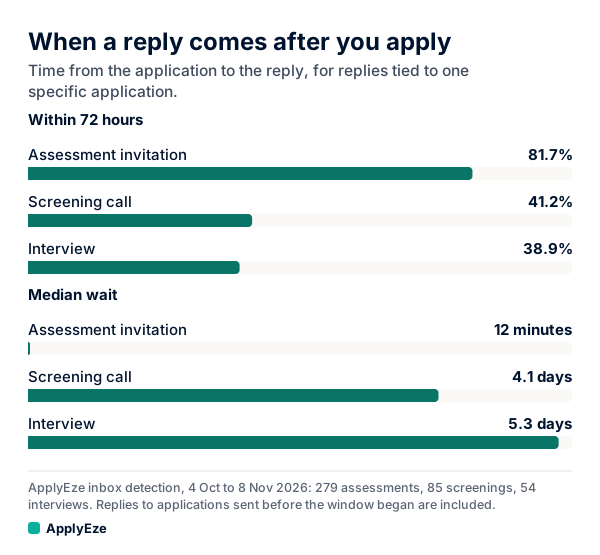
The chart shows that fewer than half of screening and interview invitations had arrived by 72 hours: 41.2% and 38.9%. Assessment invitations, at 81.7%, run on a separate and mostly automated clock. For applications sent 12 to 23 October, which had time to mature, 58 human callbacks gave a fuller read: 38% within 72 hours and 74% within 7 days. So:
| Days since you applied | Portal | Person |
|---|---|---|
| 0 to 7 | Look once if you like. Confirm it is there. | Do not write yet, unless the role has a deadline. |
| 8 to 14 | Look weekly. | Send one email on roles you want. |
| 15 to 28 | Look weekly. | Send your second and last email. |
| After that | Check when you remember to. | Stop writing. Keep it in your tracker. |
Indeed's career guide says to "wait one to three weeks after applying", which fits. Our figures describe applications that got a reply, so they say nothing about how likely a reply is. Results for any one person will differ.
Your run's result against the employer's status
If you apply with ApplyEze, the receipt answers the first question. Every run leaves one with the result, the time taken, the documents sent and screenshots where taken, so a Submitted receipt tells you the form went in, with no login to find. What the employer does next stays with the employer, so use the lookup above for its status, and record employer replies on each application. Your Heard back and Interviews counts come from what you record. What a receipt holds is in proof of job application.
Your next step is short: find the system, look once a week, and send the email above on the roles you want. If you would rather spend your time on those emails than on retyping your history into forms, your first 50 applications are free, no card needed, and a credit is used only when an application is confirmed as submitted.