
Your SmartRecruiters application status is one of six broad stages: New, In Review, Interview, Offered, Hired or Archived. SmartRecruiters' developer reference lists these as the status "from the candidate perspective". The one that causes the most worry, Archived, means the application is closed for that job, and it has four possible reasons, of which rejection is only one. The employer controls the process, and SmartRecruiters does not decide. Below is the full table with what to do at each status, followed by two mechanisms the guides we read leave out: what actually moves you to In Review, and why an Archived status can appear within an hour.
What each status means
The definitions come from SmartRecruiters' two developer documents, the candidate status reference and the application status guide. They spell a few names differently. The "what moves you here" column draws on SAP's training course for SmartRecruiters. SAP finished buying SmartRecruiters in September 2025.
| Status | Documented meaning | What moves you here | What to do |
|---|---|---|---|
| New | "Candidate Applied" | Applying. Also where a rejected application returns if the employer reactivates it | Nothing yet. Save the confirmation email |
| In Review | "Candidate is being reviewed by the hiring team" | A recruiter emailing you from the application, or anyone adding a review | Answer any message quickly. Do not read it as progress |
| Interview | "Candidate is being interviewed by the hiring team" | A recruiter moving you to that stage | Check email, spam and texts for scheduling |
| Offered | "Candidate received an offer" | The offer stage | Look for the offer by email. Ask if you have seen nothing |
| Hired | "Candidate is hired" | The final stage | If that is news to you, contact the employer the same day |
| Archived | Closed, with one of four reasons below | Rejection, withdrawal, transfer or deletion | See the next section |
| Lead | "Candidate is considered for the job but has not applied" | A recruiter adding you | Check the sender is real. You may get a consent email |
Employers can also add their own steps inside In Review, Interview and Offer, up to 15 per stage, such as a phone screen. SAP's course says the portal shows the "high-level status", so you may sit at In Review through several steps you cannot see.
Why In Review means less than it sounds
SAP's course is specific. "If a candidate is initially in the New stage, sending them an email will move them to the In Review stage", and "adding a review, even in the New stage, will also move the candidate to the In Review stage."
So In Review is a record that someone acted. That act may be a real read, a star rating or a message. It does not tell you how you compare with the others in the pile. Our guide to what under review means covers the same label on other systems.
Archived and inactive: what they usually mean
The reference gives four sub-statuses for Archived:
| Sub-status | Documented wording | What it means for you |
|---|---|---|
REJECTED | "Candidate is rejected" | The employer declined. SAP's course says a reason is selected, and the email is a choice |
WITHDRAWN_BY_APPLICANT | "Candidate has withdrawn interest" | You withdrew, or a recruiter recorded it for you. If you did not, ask |
TRANSFERRED | "Candidate is transferred away from the job to another" | You may be under a different job. Ask which one |
DELETED_BY_COMPANY | Listed without a definition | The employer removed the application. Ask if it matters |
The portal may show you only the word Archived, so you often cannot tell these apart without asking. Two more facts help you read it.
A silent rejection is possible. The course says that on rejecting someone, a recruiter "can choose to send a rejection email". So the status can change with no email. A recruiter can also defer a candidate "for later consideration" or add them to other jobs, and a rejected application can be reactivated, which moves it back to the New stage. Archived is usually the end, though it is not technically final.
Inactive is not in the documents we could read. Neither developer list includes it, and we could not open a current SmartRecruiters page that defines it. Some employers run their own careers portals and may use their own words. Read it as closed for that job, and ask the employer if you need the reason.
Why you can be archived within an hour
This is the part most worth knowing. SmartRecruiters lets employers set knock-out questions, and it "will automatically reject candidates who choose answers marked as knock-out when completing their applications." They can be any yes or no or dropdown screening question, except diversity questions. SAP's example is answering no to wanting to work in an office location.
The timing is also set by the employer. The delay options are "1 hour after the candidate submits application (default)", "2 days after" and "5 days after". During that delay, SmartRecruiters "will mark the candidate as rejected immediately but will delay updates to the Applicant Tracking Portal" and hold the email.
That changes how you read the timeline:
| What you see | Likely reading | What to do |
|---|---|---|
| Archived about an hour after applying | Quite possibly a knock-out answer at the default delay | Reread your answers in the portal. If one was wrong, contact the employer |
| Archived exactly 2 or 5 days after applying | Possibly the same, on a longer delay | Same check. The wait does not prove anyone read your application |
| Archived weeks later, with no message | A person or a bulk action, or the job closing | Treat it as closed, and apply elsewhere |
These are readings, not proof. The portal does not say which path applied. Answer screening questions truthfully, and read any yes or no twice, since a slip here can end the application with no person involved.
Where to see your status
One guide we read says guest applicants get only email updates and that the portal sits behind a My Applications page. SmartRecruiters' own documents describe something else. It announced in 2024 that an Applicant Tracking Portal would replace its older Smartr accounts, with candidate access to Smartr ending that July, and that all candidates could track applications with "no need to create an account". It works like this:
- Your confirmation email holds "a unique, application-specific link".
- The link opens the portal, and a one-time passcode goes to the address you applied with. There is no account or password.
- Once in, you see "all direct applications they've made to a single organization". So access is per employer, with no single list across companies.
SAP's course says you can view the high-level status, read your responses, update information, manage attachments and withdraw there.
If you cannot find it, there are documented reasons. Applications "manually created by a recruiter, or submitted by an agency on behalf of an applicant will not be visible", and customers "can choose to opt out entirely". Search your inbox for the confirmation email first, including spam, then ask the employer, who can also generate a company-specific link. If a message looks wrong, our SmartRecruiters legitimacy guide has the checks. The general method is in how to check your application status.
How long each stage tends to take
We found no one who publishes this per stage for SmartRecruiters with a method behind it. The same guide gives 3 to 14 days from New to In Review with no source, so treat such ranges as estimates.
Here is reply timing across all systems, not SmartRecruiters alone. It comes from inbox scanning at one staffing team, about 29 candidates, on emails received from 4 October to 8 November 2026, found when the scanner first ran on 3 November and read back to 4 October. That feature is rolling out with staffing teams first and is not part of self-serve accounts yet. These are machine labels and no person reviewed them, so they are replies found, not confirmed.
| Reply | Median after applying | Within 72 hours | Within 7 days |
|---|---|---|---|
| Assessment invitation | 0.2 hours | 81.7% | 94.6% |
| Screening call | 98.1 hours | 41.2% | 60.0% |
| Interview | 126.8 hours | 38.9% | 61.1% |
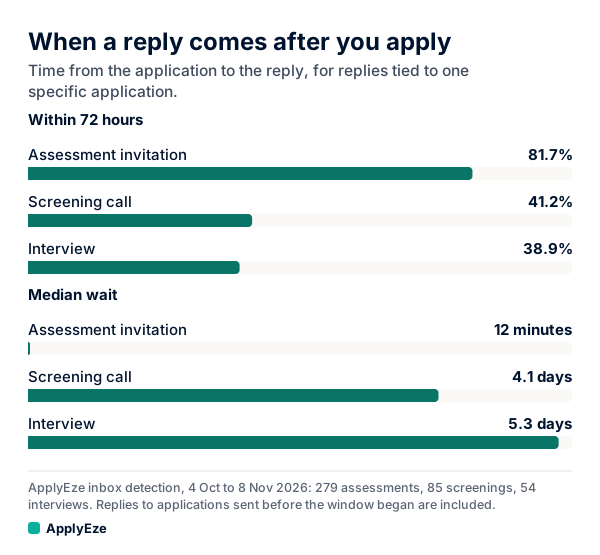
The chart shows how far apart these are: assessments arrive within minutes, because most are sent automatically, while screening calls and interviews take four to five days at the median. These cover only the 279, 85 and 54 replies tied to one specific application, and they include replies to applications sent before the window began, which pulls the within-7-days figures down. A fuller read of applications from 12 to 23 October, 58 human callbacks with time to mature, gave a median of 116 hours, with 38% within 72 hours and 74% within 7 days.
A practical reading: a quiet first week is normal, because about a quarter of the replies in that fuller read took longer than 7 days. If a status has not moved after two weeks, one short message to the employer is reasonable. That two-week mark is our suggestion, not a measured rule, and these are not odds for your application. See how long to hear back after applying for more.
What the numbers show
SmartRecruiters holds roughly 5% of the about 900,000 active jobs we track, from a 1% sample on 9 November 2026, which puts it fourth on our list behind Workday, Greenhouse and Oracle.
In the 14 days to 9 November 2026, ApplyEze Autopilot submitted 1,535 SmartRecruiters applications and released 386, so 79.9% of 1,921 runs ended in an application, with a median of 3.4 minutes each. Released means the run ended without one, for any reason, including a posting that closed.
Autopilot is set up today for staffing and recruiting teams that work with ApplyEze, so these are team numbers and not a free user's result. If you are job hunting on your own, you can start with 50 free applications on sign-up, no card needed. You pick the matches and queue them in the desktop app, and ApplyEze fills and submits each form.
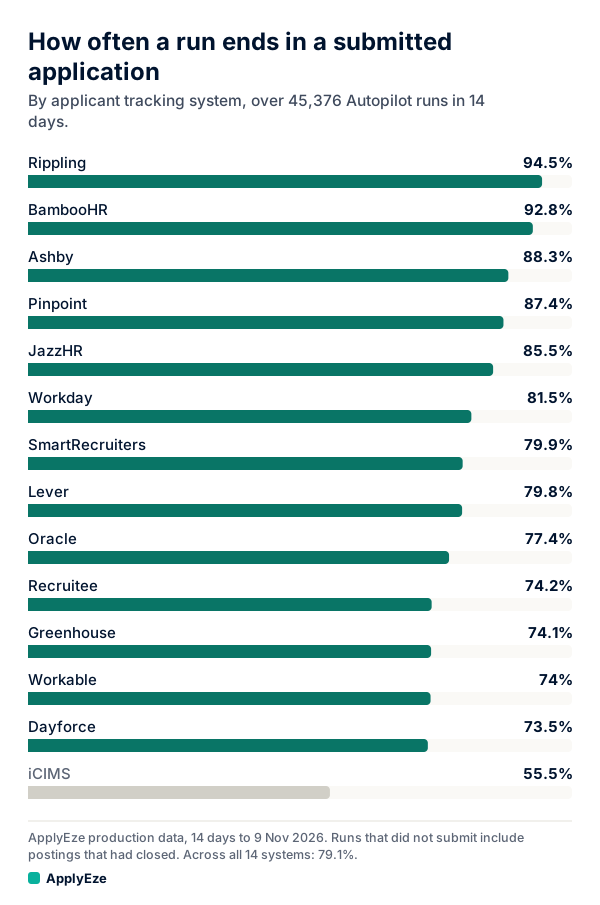
The chart places SmartRecruiters just above the 79.1% across all 14 systems, which took 35,874 applications in the same two weeks. Since August, ApplyEze has delivered 94,207 applications to 9,769 employers. What the status does after that is the employer's decision.
Applying through ApplyEze on the free path
SmartRecruiters is one of the 12 systems on the free path, and it needs no connected inbox. Workday and Oracle do, because they email a code. New accounts get 50 free credits, once per email address, with no card, and a credit is used only when an application is confirmed as Submitted. That means up to 50 submitted applications, not 50 attempts. You queue the matches you want, and the desktop app runs them on your computer while it is on and awake.
Two things from this guide apply directly. First, knock-outs. Hard facts come from your profile. When a required question is not covered by your saved answers, ApplyEze still fills it rather than stopping the run, so that answer may not come from you. Fill in your saved answers, use dry run first, and read your receipts. Second, status. Your confirmation email and the one-time passcode go to the address the application used, so make sure you can read that inbox. You record employer replies yourself on each application in ApplyEze, and your Heard back and Interviews counts come from what you record.
So open your confirmation emails today, check each status against the table above, and send one short note on anything past two weeks. If you would rather spend that time on follow-ups than on filling in the next form, your first 50 applications are free, and ApplyEze fills and submits each one.