

How to reply to a recruiter on LinkedIn comes down to one check and three answers. Confirm the message is real, then say yes, no or not yet in under 50 words, and ask for whatever you need before giving up an hour for a call. Then copy the exchange into your own log, because a LinkedIn conversation stays in LinkedIn, and anything that reads your email will never see it. The samples below are written fresh for this post. The names and details are invented.
| Your situation | Send | Sample |
|---|---|---|
| You cannot tell if it is genuine | A request for the posting and a company email | A |
| The role is close and you would take the call | Yes, with two windows and a request for details | B |
| Wrong kind of role, now and later | A short no, plus what you would want to hear about | C |
| Right kind of role, wrong moment | Not yet, with a date | D |
| You are in late stages somewhere else | Not yet, with your timeline | E |
| They left out pay, location or contract type | A request for the details | F |
Before you reply: is it real?
Take one minute before you answer anything. Does the message use your name and a specific role? Does the sender's profile show real history at the company they name? Are they asking you for anything beyond a conversation?
LinkedIn's help page on scams lists the warning signs: offers that seem too good to be true, messages not addressed to you personally, requests for personal or financial information, generic email addresses in place of a company domain, and urgent pressure to move to WhatsApp, Telegram or an outside form. Our nine checks for a recruiter on LinkedIn go through each one.
If you are unsure, you can make the sender do the work. This reply costs you nothing and gives away nothing.
Sample A. The reply that checks first
Thanks for writing. Before we go further, could you send the link to this role on your company's careers page, and write to me from your company email? Then I can share more.
A real recruiter at a real company can do that in a minute, and most will not mind. Some roles are not posted, especially with agencies, so a recruiter may tell you the search is confidential. That is a fair answer, as long as they can still write from a company address and name who they work for. A sender who ignores the request and pushes you toward a chat app has told you something too.
Sample: interested
Say yes, say why in one clause, and give windows, not "whenever suits you". Windows end the back and forth early.
Sample B. Yes (44 words)
Thanks for reaching out, Dana. This looks close to my current work, pricing analysis in SQL for a retail group. I am open to a call. Tuesday or Thursday after 2 p.m. Eastern works. Could you send the job description and pay range beforehand?
Do not attach your resume yet unless they ask for it, and do not put your home address in the thread. Your phone number is fine once you have agreed on a call.
Sample: not interested
A short no helps you more than silence when the recruiter works in your field, because you can tell them what would be worth a message next time.
Sample C. No, with a filter (41 words)
Thanks for thinking of me, Dana. I am going to pass on this one, since I am not looking at contract roles. If you ever have a permanent pricing or revenue analytics role, I would be glad to hear about it.
You do not need to explain more than that. You also owe nothing to a mass message for a job nowhere near your field. Ignore it, or report it if it trips the warning signs above.
Sample: not yet
The mistake here is saying "not right now" and stopping. Without a date, nobody comes back. Name the date yourself and offer to make the next move.
Sample D. Not yet, with a date (38 words)
Thanks, Dana. The timing is not right: I want to finish my current project, which ends in March. Could I come back to you then? Pricing and revenue analytics roles are what I would want to hear about.
Then put March in your log, because the recruiter will not remember.
If the reason is another process, say so plainly. A competing timeline is useful information to a recruiter, and it often speeds things up if they are interested.
Sample E. Not yet, because you are mid process (32 words)
Thanks, Dana. I am in late stages with another employer and expect to know in about two weeks. I would still like to hear more. What is your timeline on this role?
Asking for pay and role details first
Plenty of recruiter messages leave out the pay, and that alone means little. In a 1% sample of the active jobs we track (9,474 rows, 9 November 2026), only roughly 15% stated their pay. So ask.
Sample F. The details (36 words)
Before we set up a call, could you share the pay range, the location or remote policy, and whether this is permanent or contract? It will save us both time if it is not a match.
Asking is normal, and waiting does not always get you the number. In Survale's 2025 candidate experience research, based on more than 66,000 candidate surveys at employers that signed up for the benchmark, 27% of candidates were told the salary during interviews without having to ask.
In some places the law is on your side. This is general information, and rules differ by state:
- California. The Labor Commissioner's FAQ says "An employer with 15 or more employees must include the pay scale for a position in any job posting", and "upon reasonable request, an employer must provide an applicant for employment the pay scale for a position". That second right belongs to an applicant, so someone a recruiter has only messaged may not hold it yet.
- New York. State law requires businesses with four or more employees to list compensation ranges for designated openings.
Now the reverse question: "What do you make today?" You can decline. California's FAQ says "Generally, no, an employer cannot, orally or in writing, personally or through an agent, seek salary history information". The words "through an agent" matter when the person asking is an outside recruiter. The same FAQ says employers may ask about salary expectations, so have a range ready.
Sample G. When they ask your current pay (28 words)
I would rather not share my current pay. For this role I am looking at $95,000 to $110,000, depending on the scope. What range has the company set?
Moving the conversation to email
Move once you have checked the person and agreed to go further. Email gives you search, attachments and a record you control. Move to a company address, and treat a chat app differently, for the reasons in the scam list above.
Sample H. Moving to email (23 words)
Happy to continue by email: sam.rivera@example.com. Could you send the job description from your company address? I will reply there with my resume.
If you keep a separate inbox for applications, use that address. It keeps recruiter mail together and away from your bank and your family.
Keeping track of LinkedIn replies
This step is easy to skip, and the reason to do it is mechanical: a LinkedIn thread never reaches an inbox.
Here is how callback detection works where it is switched on. It is rolling out with staffing teams first and is not part of self-serve accounts yet. It scans a connected application inbox and labels likely callbacks from the email it finds. Replies sent through a job board's own messaging, such as LinkedIn or Indeed, are not picked up.
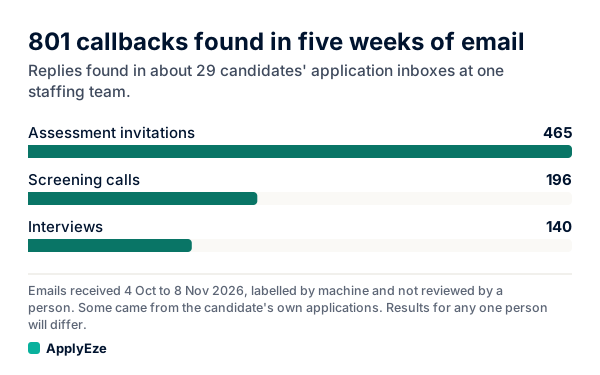
The chart shows what that scan found in the application inboxes of about 29 candidates at one staffing team, in email received from 4 October to 8 November 2026: 801 callbacks, made up of 465 assessment invitations, 196 screening calls and 140 interviews. These are machine labels that no person reviewed, so read them as found, not confirmed. Not all of them could be tied to one ApplyEze application, and some may have come from the candidates' own applications. Most assessment invitations are sent automatically, so the 336 screening calls and interviews are the human side of that count.
Now look at what is missing. A person writing to you on LinkedIn does not appear anywhere in those 801, because the scan reads email. Anything that reads an inbox gives you a partial count, and LinkedIn threads sit outside it.
So keep your own log. A spreadsheet is enough, and our guide to a job application tracker has a full template. For recruiter threads, these columns do the work:
| Date | Person, company | Channel | They asked | I said | Next step, by when |
|---|---|---|---|---|---|
| 9 Nov | Dana, Northwind (sample) | Interest in Senior Analyst | Yes, asked for pay range | Call, Tue 17 Nov 2 p.m. | |
| 9 Nov | Tom, agency (sample) | Contract role | No, permanent only | None | |
| 9 Nov | Lena, Acme (sample) | Role opens in spring | Not yet | Write to her, 1 Mar |
The channel column is the one people skip, and it is how you find the thread again three weeks later.
If you fall behind, LinkedIn lets you rebuild the record. Its Download your data page says the export includes messages sent, received and archived, with the date, subject line, content and the other member's profile URL. On a computer, go to the Me icon, then Settings & Privacy, then Data Privacy, and choose Download your data. LinkedIn's table lists messages among the data available within 48 hours, and download links expire after 72 hours. Pulling it once a month and checking it against your log catches anything you missed.
Your next step is to answer the message in front of you and add its row. If you are the one writing first, start with our samples on how to reach out to a recruiter on LinkedIn.
The same habit works in ApplyEze. On a self-serve account you record employer replies yourself on each application, and your Heard back and Interviews counts come from what you record, so a LinkedIn reply counts as soon as you enter it. You queue the roles you want in the desktop app, which runs on your computer while it is on and awake, and it fills and submits each form. Workday and Oracle roles need a connected application inbox. If you would rather spend your time on recruiter conversations than on forms, your first 50 applications are free, once per email address with no card.