

An interview confirmation email should pin down six things in writing: the date, the time with its time zone, the format, the link or address, who you are meeting, and how long it runs. If you received one, reply with those details repeated back. If you are expecting one, those six are what it should contain. Most samples stop there. The mix-ups that are hardest to spot come after that point, in time zones and in calendar files that do not update, so this guide spends its time there.
Before confirming, make sure what you are confirming. In email found at one staffing team from 4 October to 8 November 2026, 801 next-step replies broke down like this:
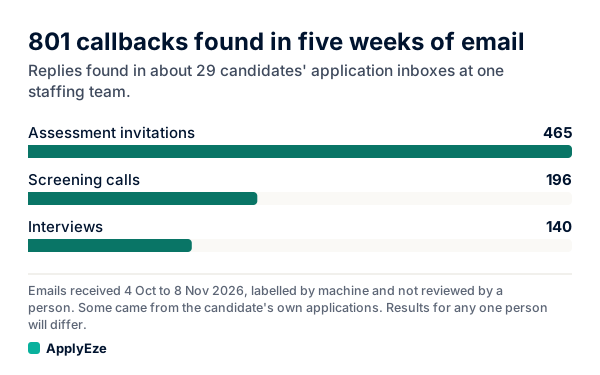
The chart shows 465 assessment invitations, 196 screening invitations and 140 interview invitations. So in that mix, a reply that seems to be a next step is more often a test link than an interview, and a screening call is more common than a full interview. A short recruiter call and a panel need different preparation, which is why length and names matter below. These are machine labels from an inbox scan that is rolling out with staffing teams first and is not part of self-serve accounts yet. Nobody reviewed them, so read them as found, not confirmed, and your own mix will differ.
What a confirmation must contain
| Detail | Right | Wrong | What goes wrong |
|---|---|---|---|
| Date | Tuesday, November 17 | 11/17, or "next Tuesday" | The weekday catches a mistyped date |
| Time and zone | 2 p.m. Eastern (11 a.m. Pacific) | 2 p.m. | You guess, and may guess wrong |
| Format | Live video on Zoom | "Virtual" | You cannot tell a live call from a recording |
| Where | The link, or street, floor and who to ask for | "Our office" | You arrive at the wrong site |
| Who | Dana Cole, recruiter, and Lee Park, operations manager | "The team" | You cannot prepare for the people |
| Length | 45 minutes | Nothing | You book something straight after it |
A scheduling vendor's list of eight adds the role and company, plus a clear next step for confirming or rescheduling. Both are worth checking if you have several applications open.
What you should expect to receive
A sample of a good one, with invented details:
Subject: Interview confirmed: Operations Analyst, Tuesday, November 17
Hi Sam,
This confirms your interview for Operations Analyst at Harbor Supply.
When: Tuesday, November 17, 2 to 2:45 p.m. Eastern (11 to 11:45 a.m. Pacific)
Where: Zoom, using the link in the attached invite
Who: Dana Cole, recruiter, and Lee Park, operations manager
Bring: Nothing needed. We will share a short case on screen.
To change the time, reply to this email by Monday at noon Eastern.
Dana
Sample: you confirm
Subject: Re: Interview confirmed: Operations Analyst, Tuesday, November 17
Hi Dana,
Thank you. I confirm Tuesday, November 17 at 2 p.m. Eastern (11 a.m. my time, Pacific) on Zoom with you and Lee Park. I look forward to talking.
Best, Sam Rivera
Repeating the time in your own zone is the useful part. If you converted it wrongly, the reader can catch it now, while it costs nothing.
Sample: you confirm and ask one question
Subject: Re: Interview confirmed: Operations Analyst, Tuesday, November 17
Hi Dana,
Thank you. I confirm Tuesday, November 17 at 2 p.m. Eastern on Zoom. One question: the invite does not say who else will join. Could you let me know, so I can prepare?
Best, Sam Rivera
Ask one question, or two at most. If you have a long list, save it for the interview. If you were invited but no time has been agreed yet, you want our interview request samples instead.
Time zones and calendar invites
Five traps, each with a mechanism behind it.
1. EST in summer. EST means standard time, and New York is not on it from March 8 to November 1 in 2026. Most people who write "2 p.m. EST" in July mean the clock in New York. Read literally, it is 3 p.m. there (our arithmetic). Write "Eastern" or "New York time", and ask if a date looks close to the line.
2. The weeks when the US and Europe disagree. The US moves its clocks on the second Sunday of March and the first Sunday of November. The EU moves on the last Sunday of March and the last Sunday of October. So from March 14 to March 28, 2027, New York will be five hours behind Paris instead of the usual six (our arithmetic from those rules). If you are interviewing across the Atlantic in late March or late October, convert the exact date, not a remembered gap.
3. Places that skip daylight time. NIST lists Hawaii, American Samoa, Guam, Puerto Rico, the Virgin Islands and Arizona as not observing it, apart from the Navajo Reservation. So "Mountain time" has two meanings in July: 2 p.m. in Denver is 1 p.m. in Phoenix.
4. A calendar file with no time zone. The calendar standard, RFC 5545, allows three forms of time. One is UTC, one names a zone, and the third is called "floating": it is "not bound to any time zone in particular" and shows "the same hour, minute, and second value regardless of which time zone" you are in. A file written that way says 2 p.m. wherever you open it. A mismatch can have other causes too, which is why you should compare the invite with the email and not trust either one alone. Calendar apps also adjust as you move. Google Calendar says "When you travel to a different time zone, your calendar appears in the local time", so check again if you are traveling.
5. An invite that does not follow the change. On Greenhouse, a candidate usually gets the invite as a calendar file unless the employer connects its own calendar. Greenhouse says plainly that "Calendar files are not linked to the scheduled interviews", so when a time changes, someone has to send you a new file by hand. It also warns that a deleted interview that was not cancelled first "will still show up on the candidate's calendar". So your calendar can show a time that no longer exists.
The rule that follows: the newest email from a person beats the calendar. Fix the calendar yourself once you have it.
Reading a thread. Changes rarely arrive with a new subject line. Gmail groups replies into one conversation and shows the newest at the bottom, and it can also group automated mail with a matching sender, recipient or subject that arrives within a week. So a moved time may sit as the seventh message in a collapsed thread, and a reminder may land among old messages that still show the old time. Open the whole thread and read to the bottom each time something new comes in. When you reply, keep the subject, because Gmail says "A conversation breaks off into a new conversation when the subject line changes."
If the details look wrong
| What you notice | What to do |
|---|---|
| The role or company is not the one you expected | Ask, naming the role you applied for. A wrong title in a template happens, and so does a second application you forgot |
| The email and the calendar disagree | Ask which is right, and quote both |
| The sender is an unfamiliar system address | It can be real. Greenhouse lists no-reply@us.greenhouse-mail.io among its senders, for one. Check through the employer's own careers page |
| A recruiter writes from a personal address | Be careful. The FTC notes "Recruiters will generally email from a corporate email account" |
| It moves to text, WhatsApp or Telegram, out of nowhere | The FTC says to ignore unexpected job messages of that kind. Confirm through the company's own site |
| Someone asks for money or ID details to hold the slot | Stop. The FTC says "Honest employers, including the federal government, will never ask you to pay to get a job", and warns that scammers "ask for your personal information before you interview" |
A short note for the honest errors, as a sample:
Hi Dana, thanks for this. The email says 2 p.m. Eastern, but the calendar invite shows 2 p.m. Pacific. Could you confirm which is right? I can do either.
If the employer never confirms
Silence is often mechanical. On Greenhouse, sending the confirmation can be a manual step, a button a coordinator clicks, so someone can simply forget. Work down this list:
- Search first. Check spam, then search for the company name and the word interview, including any application inbox you set up.
- Go back to the link if you used one. Greenhouse's self-schedule page has a Resend Confirmation Email button.
- Reply in the same thread after one business day, or sooner if the date is close. Candidate.fyi's guide puts the attitude well: a recruiter "would far rather send a duplicate than have a candidate guess."
- Phone if it is under a day away. Use the number in the thread or on the company's site.
- Hold the time until you hear. Keep it free, and keep your note as a record.
A sample:
Subject: Re: Interview for Operations Analyst
Hi Dana, I want to make sure I have this right. I am holding Tuesday, November 17 at 2 p.m. Eastern for our interview, but I have not seen a confirmation or a link. Could you confirm the time and send the details? Thank you.
Do not treat silence as a cancellation, and do not assume the time stands either. The cost of asking is one email. The employer side knows mix-ups happen: Workable's no-show template page tells recruiters "Before rejecting candidates who didn't show up at an interview, make sure it's not a miscommunication issue", and it singles out time zones for remote candidates.
The day before
- Open the newest message in the thread, and read the time, zone and format again.
- Compare that with your calendar. Delete any old event.
- Open the video link and test your camera and sound. For a phone call, save the number and turn off call screening.
- For an in-person interview, look up the route and the entrance, and have the name of the person to ask for.
- Send a note only if something changed or nobody has written in several days. A sample: "Looking forward to tomorrow at 2 p.m. Eastern. I have the Zoom link." It is optional.
If something has come up, deal with it now, because waiting makes it harder. Our reschedule samples are sorted by how much notice you have.
Once this thread is in order, the next interview still has to come from somewhere. ApplyEze polls more than 100,000 employer boards directly, about 900,000 active jobs, and applies automatically on systems holding roughly 62% of them once you connect an application inbox, because Workday and Oracle email a code. You pick the matches and queue them in the desktop app, it fills and submits each form while your computer is on, and you record each reply on its application. If you would rather spend your evenings preparing for the interviews on your calendar, your first 50 applications are free, with no card.