
Is Simplify free? Yes, for most of what people install it for. The Copilot extension fills job applications at no charge, the job tracker is free, and connecting Gmail is free. What costs money is anything that writes for you or submits for you. AI tailoring, AI cover letters and Autopilot all need Simplify+, which is $19.99 a week, $39.99 a month or $89.99 for three months as of November 2026. Autopilot also stops at 20 applications a week on every plan, so whether to pay is mostly arithmetic, and the arithmetic is below.
ApplyEze publishes this blog and makes a competing application tool. Every Simplify fact here comes from its own help center or policy pages, read on 9 November 2026 and linked, so you can check each one. This post shows where free is enough, where it stops, and what to weigh past that point.
The short answer
| What you want | What it costs on Simplify |
|---|---|
| Forms filled, and you click Submit | $0 |
| Applications tracked, and replies matched from Gmail | $0 |
| A resume rewritten for a posting, or AI-written answers | Simplify+ |
| Applications submitted for you | Simplify+, and 20 a week at most |
Simplify says this about itself. Its homepage FAQ calls the product "free for job seekers", with "matches, autofill, and the tracker included". The same answer explains who pays: "We make money from Simplify+ subscriptions and from employers who hire through us." Nothing on the pages we read puts a time limit on the free tools.
What is free, with limits
Most pages stop at "the extension is free". The limits are where the decision sits. This table comes from Simplify's features and pricing article and the help pages linked below it.
| Tool | What you get for free | Where free stops |
|---|---|---|
| Copilot autofill | "Autofill supported application fields and review before manual submission" | AI tailoring and writing actions |
| Resume Builder | Create, import, edit and export by hand | AI generation, tailoring and feedback |
| Uploaded resumes | One at a time: you "replace the current uploaded resume after confirmation" | Keeping several |
| Keyword match | You can review keyword matching | Having AI rewrite to close the gaps |
| Cover letters and form questions | Write them yourself and reuse saved content | AI generation |
| Job Tracker and Gmail | Tracking, matched conversations, sending, suggested status updates | AI Email drafting |
| Job discovery | Matches and the job board | Referral tools and extra job analytics |
| Autopilot | Nothing | "Requires Simplify+" |
| Resume Review, Salary Negotiation | Nothing | Separate purchases, even on Simplify+ |
Three of those limits deserve a closer look.
Autofill fills what it can. Simplify's Copilot page claims "over 100 job boards and application portals", including Workday, Greenhouse, iCIMS, Taleo, Avature, Lever and SmartRecruiters. Its setup guide adds a sentence worth keeping in mind: "a supported provider name does not mean every custom page will fill correctly." You complete what it leaves, then "choose the employer's final Submit button yourself". That makes it free, with some of the typing left over. It works in Chrome, Edge, Brave and Arc, Firefox support is a best-effort beta, and on an iPhone it runs as a Safari extension.
We found no stated cap on autofill. The credits article says "Basic Copilot autofill does not use Autopilot credits", and even Jobscan, a rival, describes it as "free without caps or credits".
One uploaded resume at a time. If you keep three versions for three kinds of role, the free tier makes you swap the file each time, or rebuild the versions by hand in Resume Builder. It is a small friction that adds up across a long search.
The Gmail link is free and useful. Connecting Gmail matches recruiting mail to tracked applications and suggests status changes. A suggestion changes nothing until you choose Approve. The page says it is "available to all Simplify users", and only the AI drafting needs Simplify+.
The ratings split, and the samples are very different. The Chrome Web Store listing shows 4.8 from 3.9K ratings and 500,000 users. Trustpilot shows 2.7 from 22 reviews on an unclaimed page, with complaints about denied refunds and about fields filled wrongly or left blank. That second page is small, so read it as a list of risks to check, not as a verdict.
What Simplify+ adds
Simplify+ adds AI on top of the same tools: resume tailoring, cover letters, answers to form questions, email drafts, referral connections and job analytics, plus Autopilot. The three billing options "provide the same Simplify+ tools for different billing periods", so you are only choosing how long.
Two lines from Simplify's own article are more candid than most vendors manage. On scores: "A keyword match number is different from the broader Resume Score and neither predicts an employer's decision." On tailoring: "Do not accept invented accomplishments simply because they improve the wording or score." Take that advice into any tool that rewrites your resume, including ours.
Simplify's Autopilot: the cap and the math
A note on the word. Autopilot here means Simplify's feature, which submits applications for jobs you pick, one job at a time. ApplyEze Autopilot is a different product, and we come back to that at the end.
The rules, from the credits article:
- "Simplify+ includes 20 Autopilot credits per week."
- One credit is used per successfully submitted application, and any tailoring or cover letter for it is included.
- "Failed or cancelled applications do not use a credit, and unused credits do not roll over."
- When you run out, the article offers three options: wait for the reset, save jobs for later, or apply with Copilot. Buying more is not one of them.
Autopilot also appears only on supported postings, and we found no published list of them. And "there is no review step before submission". If you want to read the form first, Simplify tells you to use Copilot.
Here is what that costs per application. Most pages quote the first column and stop. The other two matter more, because a credit you do not use this week is gone. This is our arithmetic, counting a month as 30 days and three months as 90.
| Plan, as of November 2026 | Price | Most you can send | Each, using all 20 a week | Each, using 10 a week | Each, using 5 a week |
|---|---|---|---|---|---|
| 1 week | $19.99 | 20 | $1.00 | $2.00 | $4.00 |
| 1 month | $39.99 | about 86 | about 47 cents | about 93 cents | about $1.87 |
| 3 months | $89.99 | about 257 | about 35 cents | about 70 cents | about $1.40 |
Two more pieces of arithmetic help if you do pay.
Weekly only wins for two weeks. Two weekly renewals cost $39.98, one cent under a month. If you forget it, 13 weekly renewals cost $259.87, against $89.99 for the three month plan.
Three months only wins from the third month. Two monthly payments are $79.98, and three are $119.97. So $89.99 beats monthly only if your search runs into a third month. That is a real bet, because the refund policy, updated 26 August 2026, says "all payments are final and non-refundable except as expressly provided in this policy" and "Refunds are not provided based on minimal usage or frequency of use." The exception it names is an unintended renewal, where it "may" give a pro-rated refund if you contact it within 24 hours of the charge.
Simplify's plans may also reach you through Apple. The App Store listing shows the same three prices as in-app purchases, and Apple manages those, so cancelling happens there.
Is it worth paying for
Price it against your own time. Here is a sample with made-up inputs, so replace them.
Sample, not a measurement. Say finishing a form with Copilot takes you 8 minutes, and Autopilot removes all of that. At 20 a week you save 160 minutes. Over a 30 day month that is about 11.4 hours for $39.99, or about $3.50 an hour.
For many people that is a good trade on paper. Then subtract what you give up. On those 20 applications nobody reads the form before it goes, and a wrong answer goes out with your name on it.
Paying makes sense if:
- You want AI tailoring inside the extension you already use, and you will use it on most applications.
- Twenty submitted applications a week covers your search, and those jobs are on postings Autopilot supports.
- You are comfortable checking your profile up front and the results afterward, with no look at the form.
Paying makes little sense if:
- You mostly want tracking and Gmail. Those are free.
- You want to read every form anyway. Simplify's own advice is to "choose Copilot if you want to inspect every field".
- You need more than 20 submissions a week. No Simplify plan changes that number, so a longer plan buys you more weeks and no more applications in any one week.
Where free Simplify is enough
If you send a modest number of careful applications, free Simplify may be all the software you need. A setup that costs nothing:
- Fill in the profile completely. Autofill can only reuse what it has saved.
- Install Copilot in a Chromium browser and run it on your next real application. Read every field before you submit. You will learn quickly which systems it handles well for your roles.
- Connect Gmail, and approve status suggestions as they come in.
- Use the free keyword match to see what a posting asks for, then edit your resume by hand. Skip the percentage. Simplify itself calls these numbers "Simplify feedback, not an employer's ATS score" in its score guide, and our post on resume ATS scores explains why.
- Keep your best resume as the uploaded file, and build role-specific versions in Resume Builder.
Our Simplify Copilot review goes deeper on Copilot's coverage and what users report.
How ApplyEze's free 50 differs
Simplify's free tier fills forms, with no stated cap, and leaves Submit to you. ApplyEze's free 50 do the whole application: a resume written for the posting, the form filled and the form submitted.
| Simplify, free | ApplyEze, free 50 | |
|---|---|---|
| Who clicks Submit | You | ApplyEze |
| A resume written for each posting | No, that needs Simplify+ | Yes |
| How long it lasts | No stated limit | Once per email address, up to 50 submitted applications |
| Replies | Gmail link matches them for you | You record them yourself on each application |
| Where it runs | Browser extension, plus Safari on iPhone | Desktop app on macOS or Windows, in Google Chrome |
| Card needed | No | No |
| Systems | "Over 100" claimed for autofill | 12 named |
Fifty submissions is two and a half weeks of the cap on Simplify's Autopilot, with no card and no charge. "A credit is used only when an application is confirmed as Submitted. Practice runs, skipped postings and forms that could not be finished cost nothing, and free credits are spent last." Nothing is charged when they run out. The credits post lists each case.
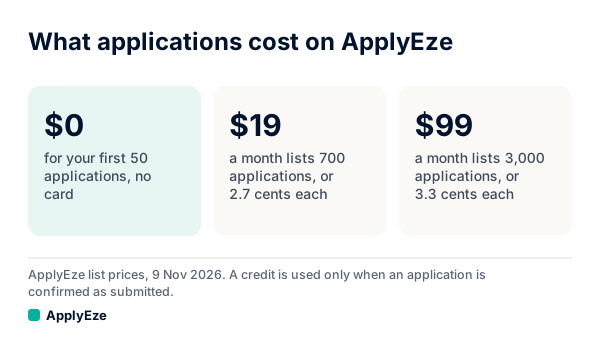
The chart shows our listed prices: $0 for the first 50 with no card, $19 a month for 700 and $99 a month for 3,000. As list prices, that is 2.7 and 3.3 cents an application, against about 35 cents to $1.00 on Simplify's Autopilot at full use. Unused plan credits end with the month. It is not the lowest figure in this market: Tsenta lists less per application at $39 and $99.
The system behind that price runs at scale. 94,207 applications have gone through ApplyEze since 14 August 2026, to 9,769 employers, as of 9 November 2026. It polls more than 100,000 employer boards directly, about 900,000 active jobs, and your board ranks them on your target titles and what each posting asks for. In an audit on 4 November 2026 of 84 sampled resumes, we found 0 invented employers, dates, degrees or numbers. ApplyEze brings the posting's named skills and tools onto your skills line, even when your own record does not list them. There is no step to remove one before a live run, so use a dry run to see what it writes, and be ready to discuss anything on the page.
A few things to know before you start. Applications run on your computer while the app is open, so you keep it on and awake until the queue finishes. You can use the computer in the meantime. You pick the matches and queue them, and Workday and Oracle jobs stay hidden until you connect an application inbox, because those sites email a code. A gap on a form is handled differently too. Simplify's Autopilot "may stop rather than submit an answer it cannot determine". On ApplyEze, hard facts come from your profile. When a required question is not covered by your saved answers, ApplyEze still fills it rather than stopping the run, so that answer may not come from you. Fill in your saved answers, use dry run first, and read your receipts.
On the shared word: ApplyEze Autopilot is a separate product from Simplify's feature. Autopilot is set up today for staffing and recruiting teams that work with ApplyEze. If you are job hunting on your own, you can start with 50 free applications on sign-up, no card needed. You pick the matches and queue them in the desktop app, and ApplyEze fills and submits each form.
If you want to read every form and pay nothing, Copilot does that well, and our side by side has the longer comparison. If you would rather have the resume written and the form sent, your first 50 applications are free, with no card, and you can keep Copilot for the roles you want to handle yourself.