

Teal vs ApplyEze is not much of a contest, because the two solve different problems. Teal is a resume builder and job tracker that you run yourself, with a free plan that keeps going, and its pricing page lists no submitting. ApplyEze is a desktop app that builds a resume for each posting, then fills and submits the form. If you send a handful of applications a week and care about every word, Teal alone may be all you need. If your problem is hours, ApplyEze does the part Teal leaves to you, and 94,207 applications have gone through it since 14 August 2026, to 9,769 employers.
We make ApplyEze, so we compete with Teal for some job seekers and we are not neutral. Teal goes first below.
The short answer
Prices as listed on 9 November 2026.
| Teal | ApplyEze | |
|---|---|---|
| What it is | Resume builder and job tracker | Application sender that builds its own resumes |
| Who clicks Submit | You | ApplyEze |
| Free | Forever, with unlimited resumes and tracking, and limited AI credits | 50 credits, once per email address, no card |
| Paid | $13 every 7 days, $29 every 30 days, $79 every 90 days | $19 a month for 700, $99 a month for 3,000 |
| What you pay for | Access for a period | Submitted applications |
| Where it runs | Web app and Chrome extension | Desktop app, in Chrome, on a computer that stays on and awake |
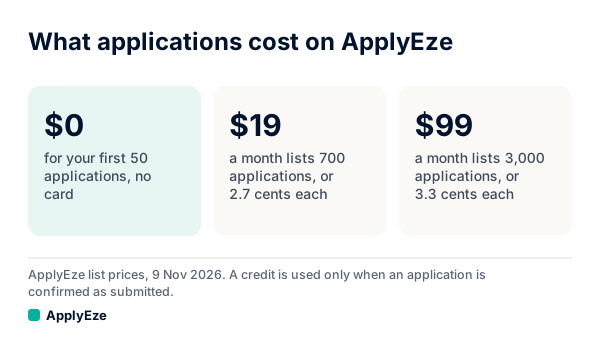
The chart gives our side: $0 for the first 50, then $19 for 700 and $99 for 3,000 a month. These prices do not compare directly with Teal's, since Teal+ buys no applications at all. One thing to watch on Teal's side: left running, the $13 weekly plan comes to about $55.71 per 30 days (our arithmetic), nearly double the $29 plan.
Where Teal is ahead
The free plan keeps going. Teal's Free Forever plan has unlimited resumes and job tracking, 10 templates and the top 5 keywords for a job, with limited AI credits. Our 50 credits come once and do not renew.
Nothing leaves without you. In Teal's own description, you make the resume version and send the application yourself. ApplyEze has no approval step before Submit. Dry run is the preview. If you never want software answering a question in your name, Teal carries less risk.
It works wherever you can apply by hand. Teal's extension saves jobs from job boards into its tracker, and you can apply on any site yourself. ApplyEze applies on 12 named systems: Greenhouse, Lever, Ashby, Workday, Workable, SmartRecruiters, Oracle, JazzHR, BambooHR, Rippling, Pinpoint and Recruitee. Those hold roughly 62% of the active jobs we track, with an application inbox connected.
Your computer stays yours. Nothing has to keep running. ApplyEze runs on your computer while the app is open, so you keep it on and awake until the queue finishes, though you can use it in the meantime.
It has a public record. Teal holds 4.3 on Trustpilot from 120 reviews and 4.7 from 3.2K ratings on the Chrome Web Store, with 200,000 users. ApplyEze has no public reviews. Teal has weak spots too: a Trustpilot reviewer in June 2026 described daily emails and an unsubscribe that failed, and the extension was last updated in June 2025. Our Teal review goes through them, and Jobscan vs Teal covers the closer rival.
It does things we do not. Teal also offers networking tools, interview practice and LinkedIn tools.
Where ApplyEze is ahead
These are the reasons someone picks ApplyEze.
It submits. It opens the employer's own form, moves through it, uploads the documents and clicks Submit. Teal, by design, does not.
The resume work happens without you. For each application, an AI model reads that posting and your real history and writes a resume for it, as PDF and DOCX. Each file is read back the way a parser reads it, and a failed read stops the run before the form. A cover letter is written when the form asks.
It brings you the jobs, ranked. More than 100,000 employer boards are polled directly, about 900,000 active jobs, and your matches are ranked by a fit score from your role, skills, industry, level, education, experience and pay. It ranks on your target titles and the requirements it reads out of each posting, so list several titles, since a role doing your work under a title you did not list ranks low.
It keeps a record of what it sent. Every run leaves a receipt with the result, time taken, screenshots where taken and the documents sent. In Teal, the tracker holds what you put in it.
It is priced per application. At $19 a month for 700, a resume for each posting comes to 2.7 cents at list price. A credit is used only when an application is confirmed as Submitted, and a form that cannot be finished costs no credit.
Building a resume yourself, or having one built
This is the real decision, and it comes down to who holds the pen.
Teal's method is building each version yourself. You make a version per job, with a Match Score and AI bullets you trigger, and its keyword view shows what you have and what you miss. ApplyEze's method is rewriting, inside limits.
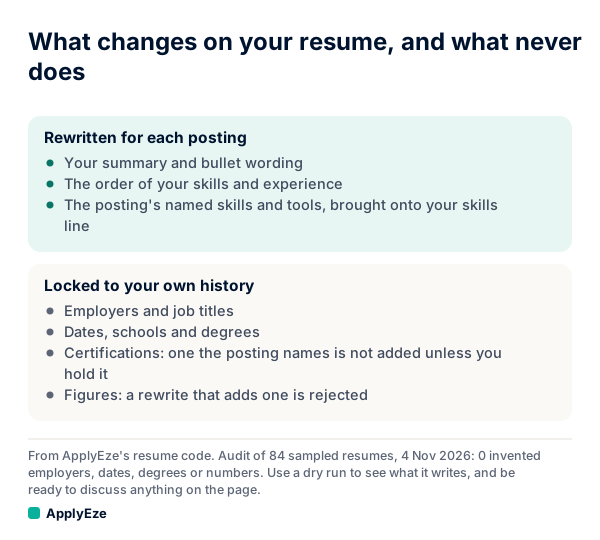
As the chart shows, the summary, bullets, order and the posting's named skills get rewritten, while employers, titles, dates, schools, degrees, certifications and figures stay locked to your record. Code rejects a rewrite that adds a figure, employer, school or credential your record does not hold. In an audit on 4 November 2026 of 84 sampled resumes, we found 0 invented employers, dates, degrees or numbers. ApplyEze also brings the posting's named skills and tools onto your skills line, even when your own record does not list them. There is no step to remove one before a live run, so use a dry run to see what it writes, and be ready to discuss anything on the page.
Here is what that means on one posting. This is a sample, invented for this post: a data analyst posting names Snowflake, dbt and Tableau, and your record lists SQL, BigQuery and Tableau.
| Sample item | In Teal | In ApplyEze |
|---|---|---|
| Tableau, which you have | Matched. You move it up | Kept, and the bullets may lean on it |
| Snowflake and dbt, which you do not list | Shown as missing (top 5 keywords free, all on Teal+). You decide | Can land on your skills line. No step to remove them before a live run |
| A Snowflake certification the posting asks for | You could type it, and nothing stops you | Not added unless you hold it |
| "Cut report time by 40%", a figure you never recorded | You could type it, or accept it from an AI draft | Code rejects a rewrite that adds it |
So neither is simply safer. Teal leaves every choice with you, including a bad one, and any AI draft needs checking: of 297 people who use AI on their resume in Huntr's October 2026 survey, 187 say it has added something untrue. ApplyEze locks the hard facts and brings in the posting's skills, which you should be ready to discuss. If you would refuse to have Snowflake on the page at all, send that application from Teal. A dry run shows you what ApplyEze would write, and if you could not discuss it, do not run that posting live.
Then there is the time. Of 317 people who tailor in that same Huntr survey, 43% spend 10 to 30 minutes per job. Add about 5 minutes for the form itself (InFlight's timed audit, February 2022), and an application by hand comes to 15 to 35 minutes. Our arithmetic:
| Applications a month | Your hours by hand | Notes |
|---|---|---|
| 20 | 5 to 12 | About 1 to 3 hours a week |
| 100 | 25 to 58 | About 6 to 13 hours a week |
| 300 | 75 to 175 | About 17 to 40 hours a week |
At the top row the hours are small, and automation solves a problem you do not have. The case for ApplyEze starts when your plan is well above that and the hours are what is stopping you. Your time then goes to choosing roles and reading receipts, and the forms run without you.
Tracking and replies
Both are manual where it matters. Teal's tracker holds what you add, for anything you apply to anywhere, and it is the better tool for running a search by hand. We found no claim that it reads your email for replies.
ApplyEze logs what it sends, automatically, but only what it sends. You record employer replies yourself on each application, and your Heard back and Interviews counts come from what you record. If you connect an inbox for Workday or Oracle, a run checks it for codes and verification links, and that does not turn replies into a tracker.
If replies are your main concern, neither of us is the answer. Tsenta links recruiter replies to the right application on every plan, including free. Simplify's Gmail link is free and suggests status updates you approve. Wonsulting has a Gmail tracker. Our Huntr review covers another manual tracker.
Who should pick which
| You are | Pick | Because |
|---|---|---|
| Sending up to about 5 a week, each one considered | Teal alone | The time is small, and you lose nothing by pressing Submit |
| Changing careers, or your resume needs rethinking | Teal alone | That is a writing problem, and it needs you |
| Unwilling to let software answer anything in your name | Teal alone | ApplyEze fills required questions your saved answers do not cover |
| Applying mostly through LinkedIn Easy Apply or iCIMS | Teal alone | Neither is on ApplyEze's self-serve list |
| Working full time, with many fitting roles on the 12 systems | ApplyEze | You do not have 25 spare hours a month |
| Sending 100 or more a month with steady, simple answers | ApplyEze | The hours above start to crowd out everything else |
| Doing a real volume search and caring about a short list | Both | See below |
A note on form answers, since it decides several rows. Hard facts come from your profile. When a required question is not covered by your saved answers, ApplyEze still fills it rather than stopping the run, so that answer may not come from you. Fill in your saved answers, use dry run first, and read your receipts.
Using both
They fit together better than they compete, and starting costs nothing on either side.
- Build the master resume in Teal. Keep every bullet you might use, and download a PDF.
- Upload that PDF to ApplyEze. It takes a PDF up to 5 MB. You review what it read and confirm your details, and the setup also asks what a resume leaves out, such as work status, locations, salary and start date.
- Send your short list by hand from Teal. These are the employers worth 20 minutes each, and any posting where you want to control the skills line.
- Dry run a few postings in ApplyEze. Read what it writes before anything goes live.
- Queue the wider list. Leave out anything you already sent from Teal, and do not count on ApplyEze to know about an application you made by hand.
- Pick one place for replies. Keep a single list of who answered, or you will lose track.
On ApplyEze you queue the roles you pick, and applications run on your computer while the app is open, so keep it on and awake until your queue finishes. Workday and Oracle jobs stay hidden until you connect an application inbox, because those sites email a code.
If your evenings are going to forms and not to the resume, try it on the wider list. Your first 50 applications are free, once per email address, with no card, and nothing is charged when they run out. Teal's free plan will still be there either way.