

The Huntr job tracker is a kanban board for your search, with a Chrome extension that saves postings and fills forms when you click it. The free plan tracks 100 jobs. Pro costs $40 a month, $90 every 3 months or $160 every 6 months, as listed on its pricing page in November 2026. You still find the postings and send every application, and that is the line to understand before you pay for anything. This review sets out who does which job, how long the free cap lasts using Huntr's own numbers, and which Pro term costs least for your search.
Two disclosures. ApplyEze makes software that fills and submits applications, so it competes with Huntr's form-filling, though a tracker and an applier do different jobs. And we rely on Huntr: more than 75 posts on this blog link to its research, which is some of the strongest outside data we cite. We read its pages on 9 November 2026 and did not test the extension on a live form.
What Huntr is
Most reviews list its features. The more useful question is who does each job.
| Job search task | What Huntr does | What stays with you |
|---|---|---|
| Finding postings | Saves one in a click with its Job Clipper, with the description and details | Finding it |
| Tailoring a resume | Rewrites it to the posting, 2 free and unlimited on Pro | Asking per job, and checking the result |
| Filling the form | Autofills from your Huntr profile, where the site allows it | Opening the form, checking fields, answering custom questions |
| Sending | Nothing we could find | Pressing submit |
| Tracking the stage | Holds the card, the timeline and your documents | Moving the card and logging interviews |
| Reading replies | The tracker page does not mention it | Reading your inbox and updating the card |
| Contacts | Stores recruiters and hiring managers | Writing to them |
| Metrics | Shows your funnel, with more on Pro | Acting on it |
That is what a tracker is. It keeps your search organized and leaves the search to you. For many people, that is exactly right.
The free tracker
The free plan is generous for what it is: up to 100 tracked jobs, unlimited base resumes, all templates, PDF export, the Chrome clipper, a map view, unlimited contacts, unlimited autofills, up to 100 document uploads and no ads. It also includes 2 job-tailored resumes and 2 application packets, plus a small number of AI credits to try things out.
The cap is the catch. Huntr's autofill page says the first hundred jobs "added to your Kanban board" are free, so it counts saved jobs and not applications. How far does that go? Huntr's Q3 2026 report gives a useful ratio: 152,742 jobs saved and 84,753 applications, or about 1.8 saves per application across all its users. At that ratio, 100 saves is about 55 applications (our arithmetic, and a rough one).
| Applications a week | Weeks until 100 saved jobs |
|---|---|
| 2.5, the average in Huntr users' usual weeks | about 22 |
| 5 | about 11 |
| 10 | about 5.6 |
| 17.5, the average in their busiest weeks | about 3.2 |
The same report puts the median search at 102 days, about 14.6 weeks, to a first offer among 667 people who logged one. So the rule of thumb is this: under about 4 applications a week, the free cap outlasts a median search. Above that, expect to hit it. Saving only what you will really apply to stretches it close to 100 applications. That covers most people who reach an offer, as far as Huntr's data goes: in its 2025 report, 18% needed more than 100 applications before an offer.
When you do hit the cap, its pricing page says you keep your data and lose the ability to save more than 100 jobs. Its plan article does not say whether archived or deleted jobs free up room, so test that before relying on it.
Pro: what $40 a month adds
Pro adds unlimited tailored resumes and application packets, unlimited AI cover letters and resume reviews, keyword-level job matching, advanced scoring, unlimited tracking, more detailed metrics and unlimited document uploads. It does not add sending. Huntr does not offer a trial of Pro, so the free plan's AI credits are your test.
Here is the part reviews skip. Reviewers disagree on the price, and some list figures that do not match the page. The page itself is plain, and the terms interact in a way worth working out (our math):
| Search length | Lowest-cost way | Total |
|---|---|---|
| 1 month | Monthly | $40 |
| 2 months | Monthly | $80 |
| 3 months | 3-month term | $90 |
| 4 months | 3-month term, then one month | $130 |
| 5 or 6 months | 6-month term | $160 |
| 7 months | 6-month term, then one month | $200 |
You cannot know the length upfront, so compare the worst case for each choice. If you land in one month, the 3-month term overpays by $50, and the 6-month term by $120. If you search for six months, the monthly plan overpays by $80 ($240 against $160), and two 3-month terms by $20. So the 3-month term is the one you are least likely to regret. Huntr's pricing page and plan article say you can cancel at any time, that a subscription runs to the end of the billing period, and that refunds are "based on usage". Plan on paying for the term you pick.
Is tailoring worth it at all? If you apply to a few jobs a week, you can do a careful job by hand for free. Pro starts to pay when your hours are the constraint.
Autofill: what you still do
Huntr's help article describes steps 1, 2 and 5 below. Steps 3 and 4 are ours, because the article has no sending step and someone has to do it:
- Go to the job site and reach the form. In some employer systems you may have to click Apply first.
- Click the extension and choose Autofill Application. Your Huntr profile fills the editable fields.
- Check what it filled, and answer whatever it left. Huntr's page suggests adding your own personal touch.
- Submit on the employer's site.
- Click "Save Job to Applied Stage" so it lands on your board.
The article says this works "when a job site allows our extension", and that otherwise nothing populates. Huntr names no specific systems for autofill, only "1000's of sites". If nothing fills in, the article suggests refreshing or restarting the browser. One otherwise happy Trustpilot reviewer in February 2026 called it inconsistent.
The marketing reads stronger than that. The autofill page talks about applying to hundreds of jobs a day "with only a click per application", and the Chrome listing says you can "effortlessly submit" applications with a one-click quick apply. The help article has no step where the extension sends anything, so we read all of this as filling. We did not test it on a live form. The difference between the two is the subject of our post on auto-apply and autofill.
Huntr's research, and why we cite it
We cite Huntr often because it does what most vendors in this market do not. It publishes counts, a method and its own limits. The Q3 2026 report covers 84,753 applications and 23,055 tailored resumes, and it states what it cannot show: users log their own results and "don't log everything", and "All rates describe what happened in our data. They do not prove that any choice caused an interview." It also says when it restates earlier numbers.
The caveats that travel with it: Huntr sells job search software, its users choose to track, and none of this is a random sample of job seekers. A vendor studying its own users is not neutral. Neither are we, which is why we name the source each time.
It also says plainly what its tracker cannot see: "We cannot measure mass-apply or auto-apply tools."
Its same-person data is the part we use most. Across 4,456 job seekers, in weeks with 3 or more times their usual applications, the interview rate fell from 9.5% to 5.6%, and interviews per month rose from 0.7 to 2.9. More volume brought more interviews and a lower hit rate. That does not prove cause, and Huntr says so.
Where it fits and where it does not
It fits if you send a modest number of applications and want to control each one. It fits if networking is a real part of your search, because the contact tracker keeps that work next to the job. It fits career changers, who tend to rewrite each application anyway. And it fits anyone who wants a free board that beats a spreadsheet, which our job application tracker guide weighs up.
It fits less well if forms are the bottleneck at volume, because you remain the one opening and sending each form. It also falls short if you want employer replies logged for you. The tracker page does not mention reading your inbox, and Wonsulting's tracker is one that connects to Gmail.
On reputation, it holds 4.6 from 22 reviews on Trustpilot, 9 of them in the last 12 months, and 4.6 from 1.3K ratings with 90,000 users on the Chrome Web Store, whose listing was last updated on 28 April 2026. The Trustpilot sample is small and nearly all five-star. One July 2025 review there complains that support is not available in real time.
How ApplyEze differs
Huntr leads on several points that matter:
- The free tracker keeps going. ApplyEze's 50 free credits come once.
- You control each submit. ApplyEze has no approval step before Submit. A dry run is the preview.
- It works wherever the extension is allowed. Huntr claims thousands of sites, including LinkedIn and Indeed. A free ApplyEze account covers 12 named application systems, and roughly 38% of the active jobs we track have no automatic path.
- It is a real organizing tool. Contacts, a map, documents and funnel metrics. ApplyEze keeps a record of your runs and is not a job search CRM.
- Your computer is free. ApplyEze runs on your machine, in Chrome, and it has to stay on and awake until the queue finishes, though you can use the computer in the meantime.
We found no reply reading on Huntr's pages, and on a self-serve ApplyEze account you record employer replies on each application.
What ApplyEze does differently is send. You pick matches from a board ranked on your target titles, queue them, and it fills and submits each form, with a resume written for that posting and a cover letter when the form asks. 94,207 applications have gone out through ApplyEze since 14 August 2026, to 9,769 employers. An audit of 84 sampled resumes on 4 November 2026 found 0 invented employers, dates, degrees or numbers. ApplyEze brings the posting's named skills and tools onto your skills line, even when your own record does not list them. There is no step to remove one before a live run, so use a dry run to see what it writes, and be ready to discuss anything on the page. Hard facts come from your profile. When a required question is not covered by your saved answers, ApplyEze still fills it rather than stopping the run, so that answer may not come from you. Fill in your saved answers, use dry run first, and read your receipts. For more on how that plays out against another tracker, see Teal against ApplyEze.
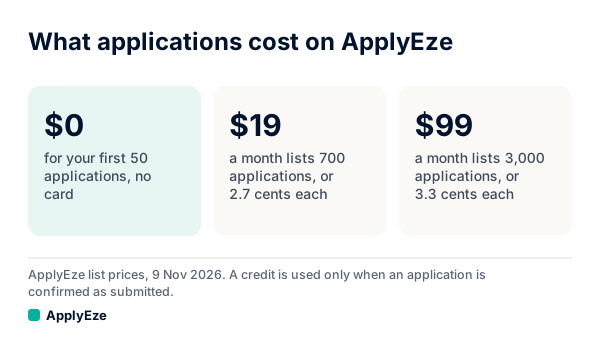
The chart shows ApplyEze's list prices: 50 free credits once per email address with no card, $19 a month for 700, and $99 a month for 3,000. Workday and Oracle jobs stay hidden until you connect an application inbox, because those sites email a code. These are different products, and they work side by side: keep Huntr as your board, log results there by hand, and let ApplyEze send the forms you queue. If the sending is what is eating your week, your first 50 applications are free, and a credit is used only when an application is confirmed as Submitted.