

Auto apply vs autofill comes down to one question: who clicks Submit? Autofill types your saved details into the form and stops, so you read it and press the button. Auto apply presses the button too. Everything else follows from that click: what you pay, how many hours you get back, and who catches a wrong answer before an employer sees it. Autofill is usually free and keeps you in charge, and it gives back less time than most people expect. Auto apply gives back far more, and it takes a real risk with your name on it.
ApplyEze makes an auto-apply product, so we have a stake in this, and this page says when free autofill is the better choice.
The one question
Ask who clicks Submit, then ask who picks the job, and nearly every product in this market lands in one box. All of these are as described on the vendors' own pages on 9 November 2026.
| You pick the job | Software picks the job | |
|---|---|---|
| You click Submit | Simplify Copilot, Huntr, Careerflow, JobWizard | None we found |
| You approve, software submits | Wonsulting AutoApply, Tsenta Starter and Pro | JobCopilot, with its review option on |
| Software submits, no stop | Simplify's Autopilot, ApplyEze | Tsenta Auto Apply (Power plan), FastApply's Apply for Me, LoopCV |
Job seekers mostly say they want the top two rows. In a Greenhouse survey of 1,200 US respondents, published 20 October 2026, 69% would feel comfortable using an AI agent, "but they want to stay in control: only 5% would let one apply to jobs on its own." Greenhouse sells anti-spam products, so it has a view. Control is a real preference, and it is paid for in hours, which is the trade the rest of this page measures.
What autofill does and costs
An extension reads the form on the page, matches each field to something in your saved profile, and types it in. It handles name, contact details, work history, education and links. It is weak on anything written for one posting, which our autofill guide shows question by question on real Greenhouse and Workday forms.
| Tool | Free | Paid, as of 9 November 2026 | Worth knowing |
|---|---|---|---|
| Simplify Copilot | Yes, with no limit on Copilot autofill | Not needed for autofill | Says it works on over 100 job boards and application portals. Chrome store: 4.8 from 3.9K ratings |
| Huntr | Unlimited autofills, 100 tracked jobs | Pro $40 a month | Tracker first, autofill second |
| Careerflow | Free setup, features marked limited | Premium $23.99 a month | See the disagreement below |
| JobWizard | 30 autofills or answers a week | Plus $19.99 for a 30-day pass | Pay once, or choose auto-renew |
Check any coverage claim on your own forms. Careerflow's autofill page says it supports "most major platforms including Greenhouse, Workday, Lever, and more". Its help article, updated 16 March 2026, lists six: Greenhouse, Lever, Workable, Rippling, Okta's job forms and Uber's. Both may be true in some sense, and the test takes one minute on a posting you actually want.
What auto apply does and costs
Auto apply takes over the rest: the multi-page flow, the account some systems require, the questions, the upload and the click. Listed prices as of 9 November 2026. Cost per application is our arithmetic, at full use.
| Product | Who picks | Price | Allowance | Each, at full use | Where it runs |
|---|---|---|---|---|---|
| Simplify+ with Autopilot | You | $39.99 a month | 20 a week | About 47 cents | Away from your browser |
| Wonsulting | You, then you approve | $19.99 a month | 50 | 40 cents | Its web job board |
| FastApply | You, or it above a score you set | $14 a month, $21 with tailoring | 200 | 7 cents, or 10.5 | Your browser or its servers |
| Tsenta | You approve on Starter and Pro. It picks on Power | $19, $39, $99 a month | 600, 1,500, 4,500 | 3.2, 2.6, 2.2 cents | Its cloud |
| ApplyEze | You, from a ranked board | $19, $99 a month | 700, 3,000 | 2.7, 3.3 cents | A desktop app on your computer |
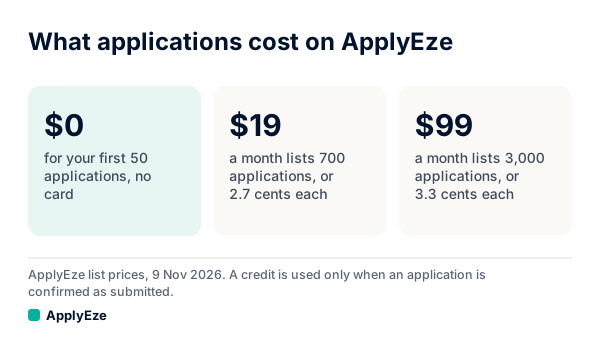
The chart shows our own list: $0 for the first 50, then $19 a month for 700 and $99 a month for 3,000, with a resume for each posting in the price. At about $19 that is the largest allowance in this table. Tsenta charges less than we do at $39 and $99, and several of these products run with your laptop closed, which ours does not. Free starts differ too. ApplyEze gives 50, twice Tsenta's 25, both once, both with no card. Simplify's Copilot has no such end, because free autofill never asks you to stop.
Time spent, measured
We could not find a stopwatch study of autofill, and Scoutify's comparison says it has not established one either. What exists is three readings of different things:
- The form. An InFlight audit reported by SHRM in February 2022 had researchers apply at Fortune 500 companies, timed from first click to confirmation. Average: 4 minutes 52 seconds and 51 clicks. No tailoring. InFlight sells apply-flow software.
- The whole job. In a United Way NCA survey of 1,000 US job seekers, published May 2026, people said they spent about 44 minutes per application, on "filling out forms, uploading resumes, and tailoring materials". Self-reported.
- The tailoring. Of 317 people who tailor in Huntr's October 2026 survey, 43% spend 10 to 30 minutes per job and 19% spend more than an hour.
Set side by side, they say something autofill pages do not. The form is the small part. If a perfect autofill erased the whole form, it would save about 5 of those 44 minutes, or 11% (our arithmetic, across two different studies). A real person on an unfamiliar form is slower than a researcher, so double it if you like: about 22%. The rest is reading the posting, tailoring and thinking about answers, and autofill does none of it.
| How you apply | Your minutes each | Your hours per 100 | Based on |
|---|---|---|---|
| By hand, tailoring | 44 | About 73 | United Way, self-reported |
| Perfect autofill, still tailoring | About 39 | About 65 | 44 minus the 4:52 form, our arithmetic |
| By hand, no tailoring, form only | About 5 | About 8 | InFlight, researchers on Fortune 500 forms |
| Auto apply, reading each record | 3 | 5 | Our assumption, not a measurement, and it leaves out setup. Use your own figure |
Take the pace Huntr reported for 2025, a median of roughly 16 applications a week. By the 44-minute figure that is about 12 hours a week, and a perfect autofill hands back about 1.3 of them. If you want the other 10 back, you need something that also tailors and answers. That means a paid copilot you still supervise, or an auto-apply tool.
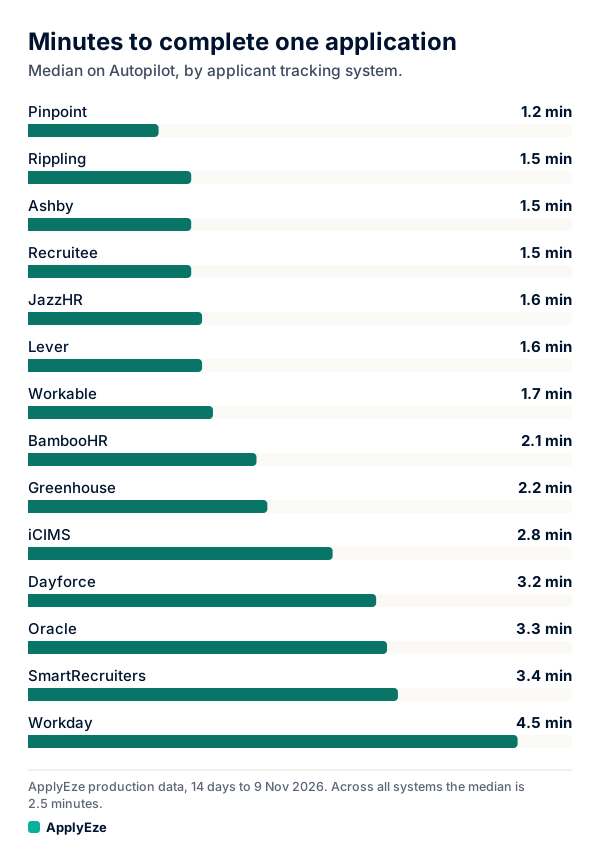
The chart is machine time, not yours: median minutes per application by system, on ApplyEze Autopilot in the 14 days to 9 November 2026, from 1.2 on Pinpoint to 4.5 on Workday. Across all of them, the median in the 7 days to 9 November was 2.5 minutes, and in the 14 days 79.1% of runs ended in a submission. Workday is the instructive one. At 4.5 minutes, software is about level with InFlight's researchers at 4:52 on Fortune 500 forms (different forms and years, so roughly), and the gain is whose minutes they are. Those minutes stop being yours.
Those are team numbers, not a free user's result, and they include iCIMS and Dayforce, which a free account does not cover. Autopilot is set up today for staffing and recruiting teams that work with ApplyEze. If you are job hunting on your own, you can start with 50 free applications on sign-up, no card needed. You pick the matches and queue them in the desktop app, and ApplyEze fills and submits each form. Applications run on your computer while the app is open, so keep it on and awake until your queue finishes. You can use the computer in the meantime.
What can go wrong with each
| Autofill | Auto apply | |
|---|---|---|
| Typical error | A field mapped wrong or left blank | A wrong answer on a question that screens you out |
| When you can catch it | Before Submit, if you read | Afterward, in the record, unless the tool stops first |
| How far it spreads | One form at a time | Every application until you notice |
| What people report | Misses fields or breaks on custom forms (Reddit, read October 2026). Blanks left without notice (Trustpilot, June 2026) | Wrong knockout answers and profile data (r/Tsenta, read October 2026). Incorrect information from Autopilot (Trustpilot, October 2026). Unwanted roles (JobCopilot on Trustpilot, November 2026) |
Autofill's safety is only as good as your attention. By the thirtieth form of a long day, you are clicking Submit without reading. At that point you carry the risk of auto apply and you have not saved the time.
Auto apply's risk is that nothing can be unsent. Three more things belong on this side of the ledger.
Nobody has shown that either one earns more interviews. We found nothing that measures how employers treat a well-matched automated application differently from a typed one. The closest outside reading is small and self-selected: of 68 people in Huntr's survey who had used a tool that sends applications, 33 saw about the same number of interviews as when applying themselves, 6 more, 17 fewer and 12 were not sure. What we can show is one staffing team using ApplyEze, where human callbacks per candidate per month rose from about 2 in spring to 7 for October applications, with volume more than tripled and the rate per 1,000 holding near 3. Part of that rise is better counting, and results for any one person will differ.
Platforms and employers set limits. LinkedIn says it does not permit third-party software, including browser extensions, that automates activity on its site. Note that this rule covers extensions in general, so autofill is not automatically exempt there. Ashby lets employers limit repeat applications. Some employers ask applicants not to use AI or automation. Whether to apply there is your call.
How ApplyEze handles the risk. ApplyEze has no approval step before Submit. Dry run is the preview. Hard facts come from your profile. When a required question is not covered by your saved answers, ApplyEze still fills it rather than stopping the run, so that answer may not come from you. Fill in your saved answers, use dry run first, and read your receipts. Right before the final click, code re-reads the form for answers that contradict your saved citizenship, sponsorship and address. Code also rejects a resume rewrite that adds a figure, employer, school or credential your record does not hold, and an audit on 4 November 2026 of 84 sampled resumes found 0 invented employers, dates, degrees or numbers. ApplyEze brings the posting's named skills and tools onto your skills line, even when your own record does not list them. There is no step to remove one before a live run, so use a dry run to see what it writes, and be ready to discuss anything on the page.
Who should use which
| Your situation | Use | Why |
|---|---|---|
| You send about 16 a week or fewer and tailor each one | Autofill | You are reading each form anyway, and the risk is not worth the hours saved |
| Your answers vary or carry weight: visa status, clearance, pay, relocation | Autofill | One wrong knockout answer costs more than five minutes |
| A short list of employers you badly want | Autofill or by hand | These deserve your eyes |
| Your targets sit on systems your tool does not list | Autofill | Simplify's Copilot page names iCIMS and Taleo, and neither is on ApplyEze's free list |
| You are employed or short of hours, many roles fit, and your answers are steady | Auto apply | 73 hours per 100 is not available to you |
| You want to pick and check, but not press | A tool from the middle row | Tsenta's review step or Wonsulting |
| You cannot leave a computer on | Auto apply that runs elsewhere | Tsenta or Simplify's Autopilot, since ApplyEze runs on your computer |
Our wider guides, how to automate job applications and auto apply to jobs, go further on the auto-apply side.
Using both
Most people who send more than a few applications a week should end up here, because neither tool reaches everything. ApplyEze polls more than 100,000 employer boards directly, about 900,000 active jobs, and applies automatically on systems holding roughly 62% of them. Workday and Oracle jobs, roughly 4 in 10 of all open jobs, stay hidden until you connect an application inbox, because those sites email a code. Autofill and your own hands cover the rest.
A simple split:
- Your top 20 employers, and anything with unusual questions: yourself, with autofill.
- Systems your tool does not cover: yourself, with autofill.
- The wide list on supported systems: auto apply, after a dry run on a few postings to read what it writes.
- Never both on one posting. Keep one list, and use the same email address for both.
For a look at what else sits on the autofill side, see Simplify alternatives. Dry-run mode on ApplyEze fills the form and stops before Submit, and it uses no credit as long as you have one left, so you can read what it would send before anything goes out.
Copilot costs nothing, and the other half costs nothing to try: your first 50 applications on ApplyEze are free, once per email address, no card, and a credit is used only when an application is confirmed as Submitted. Run both on the same week of postings and you will know which kind of help you want.