

There are four ways to automate job applications: your own scripts and workflow tools, browser extensions that autofill, software that submits, and people you pay to apply. They run from free to $3,000 a month, and none of them completes every form. We make software in the third group, ApplyEze, and we publish our numbers: across 14 systems, our team product ended 79.1% of runs in a submitted application over the two weeks to 9 November 2026, from 94.5% on Rippling to 55.5% on iCIMS.
This post compares the four approaches on cost, setup and what fails first, using each vendor's own pages. Where we are one of the options, we say so.
Four ways, in one table
Prices are as listed in November 2026, and each is linked in the sections below. Full use means price divided by allowance, which is the lowest figure possible.
| Way | Listed cost | Setup | Who clicks Submit | What breaks first |
|---|---|---|---|---|
| Your own scripts and workflow tools | Code is often free. AIHawk measures 0.4 to 3.3 cents of AI calls per form | A terminal, an AI key, your evenings | The script, or nobody | The next form it has not seen |
| Autofill extensions | Free to start | Install, fill a profile | You | Your attention, on custom questions |
| Software that submits | Often $14 to $99 a month, about 2 cents to $1.00 each at full use | A profile, a resume, often an inbox | The software | A wrong answer, repeated |
| People who apply for you | $24.97 to $3,000 a month, or $399 to $999 once | An intake, then trust | A person | Fit and communication |
Which minutes are you automating
Decide this first, because the approaches remove different work. Two numbers show the split, and they measure different things. Timed by researchers, a Fortune 500 application form took 4 minutes 52 seconds and 51 clicks in a 2022 audit. Asked about the whole job, tailoring included, US job seekers in a 2026 United Way survey said about 44 minutes.
Do not subtract one from the other as if that were precise. The direction is what matters: typing into the form is the small part. Finding the role, deciding it is worth sending and adjusting the resume take most of the time. Of 317 people in Huntr's October 2026 survey who tailor, 43% spend 10 to 30 minutes per job on that alone. A tool that only fills fields leaves that untouched, which is why autofill can feel less helpful than it sounds.
Scripts and workflow tools
Two different things live here.
Workflow tools such as n8n handle everything around the form. One n8n template, listed at $39 with "applications" in its name, searches LinkedIn, Indeed, Glassdoor, Upwork and Adzuna, has an AI model score each job and rewrite your resume, logs it all in a Google Sheet and emails you the documents "ready for you to review and send". It does not fill an employer's form. You also need an n8n instance, an Apify token, an AI provider key and Google credentials.
Browser scripts do touch the form. A widely starred public one is AIHawk, with more than 32,000 GitHub stars on 9 November 2026, though its changelog says the stars date from an earlier program and the current version 1.0.0 is dated 4 November 2026. You bring your own AI key. Its table of what happens on each site is worth reading even if you never install it:
- A form costs 0.4 to 3.3 cents in AI calls and takes 3 to 27 minutes, by its own measure.
- "'Sent and confirmed' rests on one send per site. Treat it as 'it can send', not 'it sends reliably'."
- Workday "needs an account on each company's site".
- Forms have stopped at required questions it had no answer for, closed postings, Submit buttons that stayed disabled and verification puzzles.
Its changelog adds two lines worth weighing. On questions it has no answer for, the model "fills every required field from what the CV says and implies". On not sending by accident during a test: "it is told not to send, and nothing holds it to that." Few sellers in this market write that plainly about their own limits.
Hosted agents shorten the build. Skyvern's Jobs Agent, announced in February 2025, takes a resume and a list of job links, and its post gives no price or success rate. Browserbase's template fills and submits, and by default it points at a synthetic board that is "not a human employment site".
Three things catch people who build their own.
Easy forms mislead. Greenhouse, Ashby and Lever are where a script tends to work first. Together they hold roughly 11% of the open jobs in our pool, sampled on 9 November 2026 (Greenhouse 7%, Ashby 3%, Lever 1.4%). Workday alone holds roughly 33%, and it wants an account and an emailed code.
The sum rarely favors you. Say a script takes a weekend, 16 hours, which is our assumption. At 4 minutes 52 seconds a form, 16 hours is about 197 forms typed by hand (our arithmetic), before any upkeep. Building because you enjoy it or want the skill is a good reason. Saving time usually is not.
More sent is not more heard. One engineer's 2024 account describes a system of feeds, a Chrome extension, an AI model and scheduled email that sent over 400 resumes, with replies he called rare. His summary: it "felt like giving away a great book to someone who's already received 400 others".
And if your script touches LinkedIn, LinkedIn's rule applies: it does not permit bots or extensions that automate activity on its site, and members "risk having their accounts restricted or shut down".
Autofill extensions
Autofill fills what it recognizes and leaves Submit to you, so a person reads every answer. That is the whole appeal.
- Simplify Copilot is a free browser extension that says it autofills on 100,000+ company career sites.
- Huntr's Basic plan is $0 with unlimited autofills. It says it works on thousands of sites and names none.
- Careerflow lists a short set: Greenhouse, Lever, Workable, Rippling and a few company pages, with no Workday and no iCIMS.
What breaks first is the unusual question. A Reddit comparison, read 17 October 2026, describes missed fields and breakage on custom forms, and the work comes back to you. The ceiling is your attention, not the software. Our autofill guide goes field by field.
Software that submits
These tools fill the form and click Submit. They differ on who picks the job and where the work runs. Tsenta has you approve each role on Starter and Pro, and picks for you only on Power. FastApply's Apply for Me applies above a match score you set. Simplify Autopilot submits with "no review step before submission" on jobs you choose. ApplyEze has you pick from a board ranked by rules, and runs in Chrome on your own computer, which must stay on and awake. Several rivals keep going with the laptop closed.
On price, most tie on one point: ApplyEze, Tsenta, Simplify Autopilot and FastApply all charge only for a submitted application.
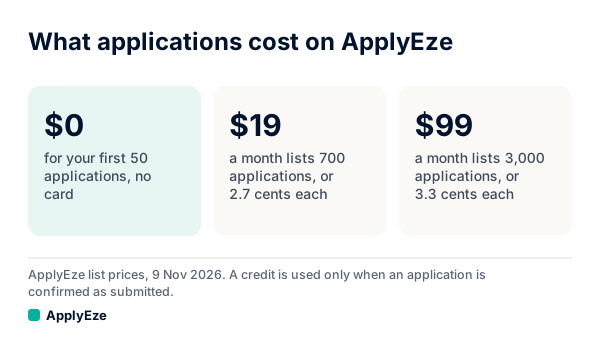
That chart is our own list: $0 for the first 50 with no card, $19 a month for 700 and $99 a month for 3,000, with a resume built for each posting in that price. Tsenta costs less at $39 for 1,500 and at $99 for 4,500. FastApply starts lower at $14 for 200, or $21 with tailoring. LazyApply costs under 2 cents on paper, if you use every daily slot for a year.
The harder question is how often any of this finishes. We publish ours, by system.
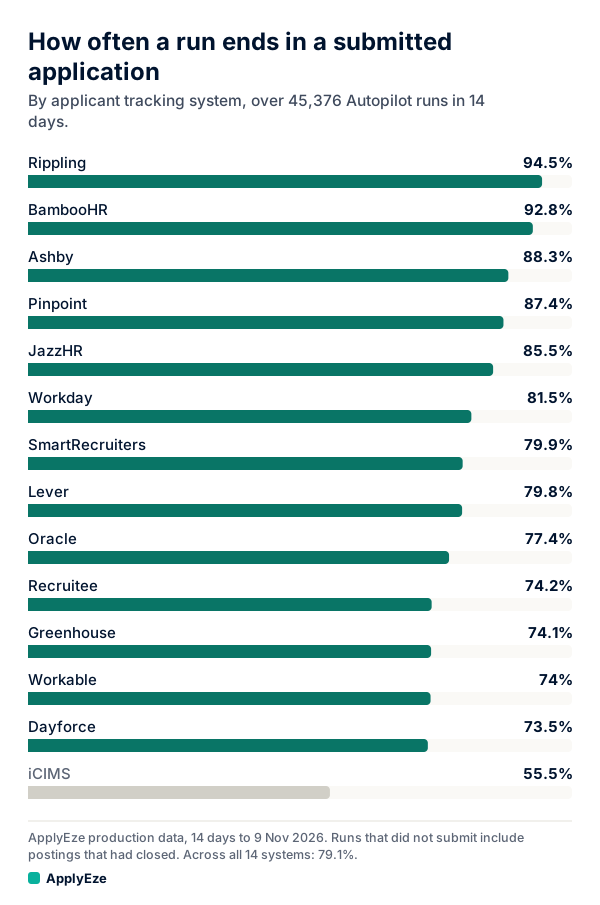
The chart covers ApplyEze Autopilot, our team product, across 45,376 runs in the 14 days to 9 November 2026: from 94.5% on Rippling to 55.5% on iCIMS, and 79.1% overall, at a median of 2.5 minutes an application in the last 7 of those days. A run that ended without a submission counts against the system for any reason, including a posting that closed, so not every miss is a broken form. Difficulty and completion do not move together either: Workday took longest at a median 4.5 minutes and finished 81.5%, while Greenhouse took 2.2 minutes and finished 74.1%. An AI judge also sits in front of the form, and it turned down about 4 of every 5 shortlisted roles over those two weeks. Our completion post has the counts.
Those are team numbers, not a free user's result. Autopilot is set up today for staffing and recruiting teams that work with ApplyEze. If you are job hunting on your own, you can start with 50 free applications on sign-up, no card needed. You pick the matches and queue them in the desktop app, and ApplyEze fills and submits each form. That path covers 12 systems, without iCIMS or Dayforce.
On the rival product pages we read on 9 November 2026, we did not find a completion figure by system, so we have no way to compare results. Tsenta's homepage does say it "does not support every employer system or role".
When this group fails, it fails at speed. Reports name wrong knockout answers on Tsenta (read 17 October 2026) and incorrect information entered on Simplify Autopilot (15 October 2026). So ask every tool what happens on a question it cannot answer. On ApplyEze, hard facts come from your profile. When a required question is not covered by your saved answers, ApplyEze still fills it rather than stopping the run, so that answer may not come from you. Fill in your saved answers, use dry run first, and read your receipts.
People who apply for you
A person fills the form and reads the posting with judgment. Scale.jobs claims "any ATS, any portal, any form". It also costs far more per application.
- Ladders Apply4Me: $24.97 to $49.97 a month for up to 50, "completed by actual humans". You choose the jobs.
- Scale.jobs: $399, $599 or $999 once for 500, 1,000 or 1,500. The page prints 40 cents each on the top plan, and $999 divided by 1,500 is 67 cents.
- Careerify: $150 to $720 a month for about 50 to 300, or $3.00 to $2.40 each. It does not rewrite your resume per application.
- Find My Profession: $3,000 a month, or $1,500 a month plus 8% of first-year salary after you accept a job, with no published count.
What you pay for is a person's judgment on each posting, at 50 cents to $3.00 a listed application against 2.7 to 3.3 cents on ApplyEze's plans. None of these services publishes a callback rate. The complaints we read name drift from the brief: a Careerify review from 29 October 2026 mentions applications outside stated criteria and slow replies, and a Scale.jobs review from the same day mentions errors the customer had to check. The price ladder works through what each costs.
What breaks first in each
| Way | First failure | How you find out | Cheap check |
|---|---|---|---|
| Script | A form it has not seen, or a required question with no answer | Only from your own logs | Run ten postings across systems and confirm each by the employer's email |
| Workflow tool | It never reaches the form | Drafts pile up | Count drafts actually sent |
| Autofill | Missed fields on custom forms | You see it on screen | None needed, you are reading |
| Software | A wrong answer repeated across many forms | Receipts, or an employer's question | A preview or dry run, then read what was sent |
| People | Applications drift from your brief | The weekly list | Ask for the list, and a sample of forms as sent |
One rule covers all four. Ashby and Greenhouse let employers limit repeat applications and block rejected candidates for a set number of days. Those limits count applications, not who typed them. So a careless application from any of these four can cost you a later one at the same company.
How to choose
- A few roles a week that you care about: free autofill. You read every answer and nothing goes without you.
- You want to learn to build, and your targets sit on a few systems: a script. Run it as a project, not as a time saver.
- You want volume and will read what was sent: software that submits. Start with a free allowance: 50 on ApplyEze, twice Tsenta's 25, both once and with no card.
- You need it to run with the laptop closed or from a phone: a cloud tool such as Tsenta or FastApply's Apply for Me. ApplyEze does not do that for a self-serve account.
- You want a person choosing and can pay for it: a service, after checking these things first.
Whichever you choose, send your most wanted employers by hand first. Some employers ask applicants not to use AI or automation, and whether to apply there is your call. Auto apply, explained covers how to test any tool safely.
If you want to try software that submits, the ApplyEze path is to create an account, answer the setup questions and upload your resume, install the desktop app, queue the matches you pick and press start. Your computer stays on and awake until the queue finishes, and Workday and Oracle jobs need a connected application inbox. Dry run fills a form and stops before Submit, so you can see what it would send. If you would rather spend the weekend on interview practice than on a script, your first 50 applications are free, with no card, and a credit is used only when an application is confirmed as submitted.