

The Workday applicant tracking system is the software a large employer uses to post a job, take your application and move it through hiring. From your seat it differs from most systems in three ways: you usually make an account at each employer, you prove your email with a code or a link, and your resume becomes structured fields that a recruiter can search and, if the employer chooses, score. It is worth learning because of how much sits on it: roughly a third of the open jobs in our 1% sample of about 900,000 active postings, measured 9 November 2026.
What Workday is, from the applicant side
Workday is a suite of HR software, and Workday Recruiting is the part that handles hiring. Each employer runs its own copy. That is why the address usually carries the employer's name, as in workday.wd5.myworkdayjobs.com, and why a job can start on a company's own careers site and send you to Workday when you click Apply, as ICON explains to its own applicants.
So Workday the company is rarely who you are dealing with. Most of what people dislike or fear about the system is a setting the employer chose:
| What you meet | Who decides | What it means for you |
|---|---|---|
| Whether you need an account | The employer. Workday's guide says "You can also require Candidate Home accounts for all job applications" | One employer may let you apply without one |
| How many pages | The employer | We read 6 to 8 steps at eight employers in October |
| Whether resume autofill appears | The employer. Workday's template guide covers hiding resume parsing from external candidates | A missing Autofill button is a setting, not a fault on your side |
| Whether skills scoring runs | The employer | Covered in the resume section below |
| What the status labels say | The employer | Our status guide shows why two employers' labels differ |
When something goes wrong, contact the employer. Workday cannot change their settings for you.
Why roughly a third of open jobs matters to you
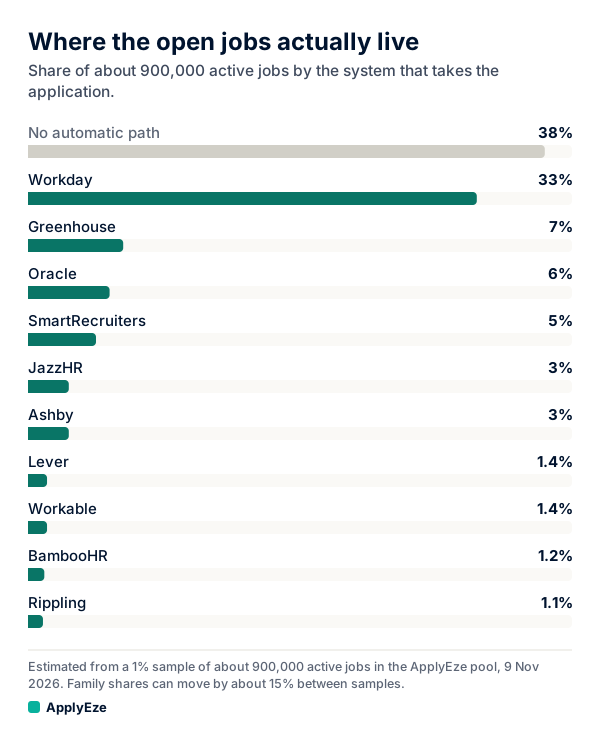
The chart splits about 900,000 active jobs, polled directly from more than 100,000 employer boards, by the system that takes the application. Roughly 33% are on Workday, and the next largest named system is Greenhouse at roughly 7%. The top bar is every system ApplyEze has no automatic path for, so it applies automatically on roughly 62%, with an inbox. It comes from a 1% sample, so read every figure as rough.
You will see very different shares for Workday elsewhere. Each is true of its own base:
| Source | What it counts | Base | Workday |
|---|---|---|---|
| ApplyEze sample, 9 Nov 2026 | Open jobs | 1% of about 900,000 | Roughly 33% |
| Jobscan, Aug 2026 | Companies its users scanned | 13,130 companies | 17.5% |
| Jobscan, Aug 2026 | Fortune 500 employers | 487 with a detectable ATS | Over 40% |
| Huntr, Q3 2026 | Applications its users logged on an ATS | Self-tracked job seekers | 19.9% |
A company count treats a 50-person firm and a 50,000-person firm as one each. A job count does not. We read the gap between 17.5% and 33% as large employers posting many jobs apiece, though neither source measures that directly. ATS market share by open jobs has the full table.
The job count is the one that predicts your week. If 30 applications followed the pool, about 10 would land on Workday (our arithmetic), and at employers you have not applied to before, that means up to 10 new accounts or email checks. These are shares of all jobs in our pool, not of your matches, and your field will move them.
Accounts, emailed codes and step order
Accounts. Each employer's Workday keeps its own candidates, so a login at one company does not exist at the next. Use one address you will keep, and record each employer's careers address and how you signed in, because that is where you go back to check status. The step by step is in creating a Workday account.
Emailed checks. They appear even where no account is required. Workday's guide says that when an employer does not require an account, "Workday selects the Enable Candidate Verification Email check box to restrict application data to the candidate." So the address you type is the key to your application either way. Use an inbox you can open while you fill in the form.
Step order. The page names are Workday's and the questions are the employer's. The order held at every employer we checked in October: Create Account or Sign In, Autofill with Resume, My Information, My Experience, Application Questions, Voluntary Disclosures, sometimes Self Identify, then Review. A progress bar lists the steps once you pick a start option, so you can see the length before you commit. How to fill out a Workday application goes through each page and the errors that stop people.
What changes in 2027. Workday has announced Candidate Profile, saying "Roughly 80% of the standard fields will already be filled in" and that it is "expected to be generally available to Workday Recruiting customers in early calendar year 2027." The same release says "Their career site, screening questions, validations, and existing recruiting workflows all stay in place." Expect fewer retyped fields, and the same questions.
How Workday handles your resume
People say "the ATS reads your resume" as if that were one thing. It is three, with different consequences.
Parsing. ICON says "Workday extracts key details from your CV and application form such as your name, contact details, qualifications, job titles, skills and experience." The result fills your form, and it can be wrong, so treat it as a draft.
Search and filter. ICON's recruiters can "search for and filter applications using location, current job title, employer, and qualifications", and it warns that "Incomplete sections (such as missing education details or location) may reduce your visibility in search results." That is one employer's description, and the plainest we found from an employer and not a vendor. It explains why the fields can matter more than the look of the file.
Scoring, where an employer uses it. The best primary source is a court record. In Mobley v. Workday, an order dated 16 May 2025 quotes Workday's own description of Candidate Skills Match: it compares skills drawn from the posting with skills drawn from "an applicant's application and/or resume", and results are "reported as 'strong,' 'good,' 'fair,' 'low,' 'pending,' and 'unable to score.'" Workday also says customers may "enable, disable, use, or ignore its many features."
So a label next to your name is possible, and you cannot tell from the form whether a given employer uses one. Whether that amounts to rejection is the heart of the lawsuit, which alleges that Workday's AI tools disadvantaged applicants aged 40 and over. The order describes Workday's position as being that its system "cannot auto-reject applicants without some degree of participation by the employer", and answers that someone with a low score "could qualify as having been denied an employment recommendation." A later order extended the collective to people "scored, sorted, ranked, or screened using the HiredScore AI features", a product Workday acquired after the suit began. A Workday spokesperson, quoted by CIO in June 2026, said its tools "don't make hiring decisions and are designed with human oversight at their core." The rulings we read concern who is in the case and which claims go forward. None decides whether the tools discriminate.
That is narrower than what many guides say. One states that "The system emphasizes required skills and relevant experience when ranking candidates", with no source. What the record supports is that scoring exists, and that it is the employer's choice.
What to do under any of the three:
- Keep the file plain. ICON says "Workday's parser reads plain text more effectively than heavily formatted documents", and suggests avoiding images, tables and columns.
- After autofill, correct every job title, employer, date and school on My Experience.
- Fill in every field you can answer truthfully, including location and education.
- Use the posting's own words for skills you really have. ICON says to use exact phrases "where appropriate" and warns against keyword stuffing.
What the numbers show
ApplyEze has delivered 94,207 applications to 9,769 employers since 14 August 2026. The figures here are measured on ApplyEze Autopilot, our team product, in the 14 days to 9 November 2026. On Workday it recorded 12,488 applied, the most of any system, and 2,830 released, an applied share of 81.5%, at a median of 4.5 minutes per application. That sits above the 79.1% across all 14 systems, on the system that takes longest. Released means the run ended without a submission for any reason, including a posting that closed, so 81.5% is not a score of how hard the form is.
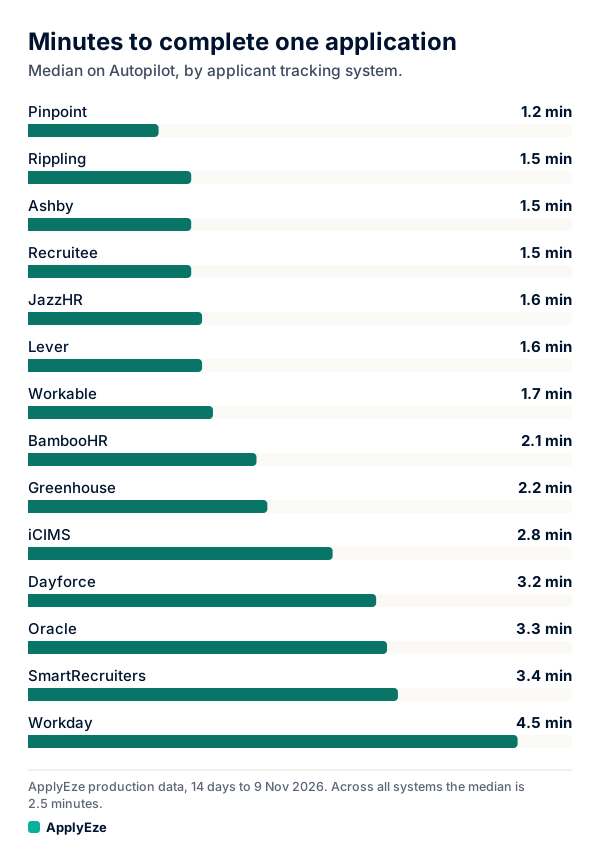
The chart ranks median minutes per application. Workday is the longest of the 14 at 4.5, about three times Ashby's 1.5 (our arithmetic) and about double Greenhouse's 2.2. That fits what the form is: several pages against one. It is software time, not a person typing.
Autopilot is set up today for staffing and recruiting teams that work with ApplyEze. If you are job hunting on your own, you can start with 50 free applications on sign-up, no card needed. You pick the matches and queue them in the desktop app, and ApplyEze fills and submits each form. The figures above are team results, not what a free account will get.
One outside figure helps with a common fear. Huntr's users logged a 4.2% interview rate on Workday applications over the past 12 months, the same as Greenhouse, and above LinkedIn's 3.6% over the same months. Huntr says its rates "do not prove that any choice caused an interview", and users log their own results. That gives no support to the idea that Workday applications vanish more often than others, and it does not show Workday helps either.
What a free ApplyEze user needs first
Workday and Oracle jobs stay hidden until you connect an application inbox, because those sites email a code. Together those two hold roughly 4 in 10 of the open jobs we track (33 plus 6). ApplyEze applies automatically on systems holding roughly 62% of active jobs with an inbox, and roughly 23% without one. Those are shares of all jobs, not of your matches.
To apply on Workday postings, you need:
- A Gmail or Outlook inbox. The product advises a new Gmail kept only for applications. Employers see this address, and the account you connect must be the same address as your application email. During a run, ApplyEze checks that inbox for codes and verification links.
- Street, city and ZIP in your profile.
Then use a dry run first. It fills the form and stops before Submit, and uses no credit as long as you have one left. New accounts get 50 free credits, once per email address with no card. A credit is used only when an application is confirmed as submitted, and a form that could not be finished costs nothing. Applications run in Chrome on your computer, so keep it on and awake until your queue finishes.
Hard facts come from your profile. When a required question is not covered by your saved answers, ApplyEze still fills it rather than stopping the run, so that answer may not come from you. Fill in your saved answers, use dry run first, and read your receipts. If connecting an inbox is not for you, apply to Workday roles by hand and use ApplyEze on the other systems.
Where to go next
- Workday application, page by page: every step, with fixes for the errors that stop people.
- Workday create account: the verification email and password rules.
- Workday application status: why the label tells you less than it seems to.
- ATS market share by open jobs: the whole table behind the chart above.
If you would rather connect one inbox than type every Workday page by hand, your first 50 applications are free, with no card.