
A good interview follow up email subject line puts the role and the date first, because the reader is usually searching an inbox or glancing at a preview, and the Gmail app on a phone shows about 37 characters. Often the best subject line is the one already there: if you are replying to a thread with the person you are writing to, leave it alone. Otherwise, use a pattern of role, date and purpose. Below are the reasoning, a decision table for keeping or breaking a thread, and 25 samples with their character counts.
The one rule: make it findable
Most lists of subject lines are written as if the goal is to win attention. After an interview you have that already. Someone has met you. The problem is finding you, and three facts shape that.
The preview is short. BuzzStream, which sells outreach software, lists these limits, updated June 2026, and notes they vary with device and window size:
| Where it is read | Characters shown |
|---|---|
| Gmail app, iPhone or Android | 37 |
| Outlook app, iPhone | 38 |
| Gmail app, iPhone Pro | 40 |
| Apple Mail, iPhone 14 | 48 |
| Outlook on the web, desktop | 50 to 60 |
| Gmail on the web, desktop | 60 to 70 |
So test any line by cutting it at 37. Indeed's list of subject lines advises 40 to 60 characters and includes "Following up regarding the [job title] position". Fill that in with a short title and a Gmail phone user may see this:
- "Following up regarding the Data Analy"
Now compare a line built the other way:
- "Data Analyst interview Nov 12: next s"
The second still says who and what, even with its ending lost.
Your reply may live only in someone's inbox. Greenhouse, an applicant tracking system, says that emails sent from inside its system are copied to the candidate's activity feed, but "candidate replies to your emails cannot be synced automatically". A recruiter has to log them by hand. So unless someone did, your note is not on your candidate record. It is in a personal inbox, and a search is how anyone finds it. Other systems differ, and we have not checked them all.
They are searching among many. Greenhouse's benchmarks show 4,890 applications per recruiter per year in 2025, up from 1,610 in 2022. Nobody is reading your subject line at leisure. They may well be typing a job title into a search bar.
One related habit: send from the address you applied with. Greenhouse's Gmail add-on "scans the headers of an email message for email addresses that match candidates", so a different address can show up as no match.
If your title is long, shorten it to what the reader would recognize. "Sr Director, Accounts" can stand in for a much longer title and leaves room for the date. A requisition number, if the posting has one, is easy to search for.
Keep the thread or start a new one
The mechanism is simple. Gmail says "A conversation breaks off into a new conversation when the subject line changes", and its developer guide lists matching subject headers as a condition for threading. Microsoft says of Outlook that "A conversation includes all messages in the same thread with the same subject line." So keeping the subject stacks your note on its history, and changing it starts a fresh line in the inbox. Each is useful at the right moment.
| Situation | Do this | Why |
|---|---|---|
| Replying to the person who wrote to you about this interview | Reply. Leave the subject alone | The history sits underneath, and they need not search |
| Second or third note on your own thread | Reply to your own last message | Same reason, and it shows you have written once already |
| Last message came from a no-reply or scheduling address | New email to a named person, new subject | A reply there may reach nobody |
| Thread is only a calendar invite | New email, new subject | An invite's subject rarely says what you need it to |
| First note to someone new, such as a hiring manager | New email, new subject | They have no thread to find |
| Something new and urgent, such as an offer deadline | New subject on purpose | It should not hide under an old preview |
Do not type "Re:" on a new email to fake a thread. Google's email sender guidelines say "don't send messages with subject lines starting with Re: or Fwd: unless the messages are actual replies or forwards." The advice holds for one person writing one email, because the recipient can see there is nothing underneath it.
The samples
All 25 were written for this post, with a made-up role, name, requisition number and dates. Swap in yours. The count is the number of characters, spaces included, for this example title.
Samples: thank you
| # | Subject line | Characters | Use it when |
|---|---|---|---|
| 1 | Data Analyst interview Nov 12: thank you | 40 | After any interview |
| 2 | Data Analyst phone screen: thank you | 36 | After a recruiter call |
| 3 | Data Analyst panel Nov 12: thank you | 36 | One note to a panel |
| 4 | Data Analyst final round: thank you | 35 | After the last round |
| 5 | Data Analyst interview: sample I promised | 41 | Sending what you said you would |
| 6 | Data Analyst interview: one more thought | 40 | Adding to or fixing an answer |
What goes in the note itself is in our thank you email guide.
Samples: first follow up
| # | Subject line | Characters | Use it when |
|---|---|---|---|
| 7 | Data Analyst interview Nov 12: next step? | 41 | About a week, no date given |
| 8 | Data Analyst, Nov 12: rough timeline? | 37 | You want a date, not a decision |
| 9 | Data Analyst final round: decision date? | 40 | After a final round |
| 10 | Data Analyst screen Nov 12: next round? | 39 | After a first screen |
| 11 | Jordan Lee, Data Analyst: next step? | 36 | The reader has a full slate and would search your name |
| 12 | Data Analyst req 4471: interview follow up | 42 | The posting has a requisition number |
| 13 | Data Analyst: has the Nov 20 date moved? | 40 | A promised date has passed |
Samples: second follow up and last note
| # | Subject line | Characters | Use it when |
|---|---|---|---|
| 14 | Data Analyst: is the role still open? | 37 | The posting looks stale or changed |
| 15 | Data Analyst: has the timeline changed? | 39 | They gave a timeline earlier |
| 16 | Data Analyst, Nov 12: where do we stand? | 40 | Two weeks, no date ever given |
| 17 | Data Analyst: still deciding? | 29 | Short and low pressure, to someone you have met |
| 18 | Data Analyst: closing the loop | 30 | Your last note, asking for nothing |
| 19 | Data Analyst: thank you, and staying in touch | 45 | Your last note, after a rejection or a long silence |
Use these only when you are starting a new subject. On your own thread, keep the old one. The bodies for each step are in our follow up email samples.
Samples: another offer or a deadline
| # | Subject line | Characters | Use it when |
|---|---|---|---|
| 20 | Data Analyst: offer deadline Nov 24 | 35 | You hold a real offer with a date |
| 21 | Data Analyst: I must answer by Nov 24 | 37 | The same, more plainly |
| 22 | Data Analyst: decision before Nov 24? | 37 | Asking about timing without naming an offer |
| 23 | Data Analyst: can we talk before Nov 24? | 40 | You would rather talk it through |
| 24 | Data Analyst: my start date changed | 35 | A fact they need has changed |
| 25 | Data Analyst: withdrawing my application | 40 | You are out, and you want them to know |
Only use the offer lines if the offer exists. A real deadline gives someone a reason to open an email today, and it stops working the moment they do not believe it.
What to avoid
| Subject line | The problem |
|---|---|
| Following up | Every other candidate's email says the same, and it says nothing in a search |
| Checking in | The same problem, and it holds no question either |
| Quick question | About what? They cannot tell if it can wait |
| Any update??? | Pressure, with no role or date attached |
| URGENT: interview follow up | The urgency is yours, not theirs, unless you have a real deadline |
| Still waiting to hear back | A complaint, placed where everyone can read it |
| Last Tuesday's interview | Relative dates go stale. "Nov 12" still works next month |
| Following up on my interview last week about the Data Analyst position | At 37 characters the phone shows "Following up on my interview last wee" and the role is gone |
Be wary of promised reply rates too. A page that ranks for this search, from a company selling LinkedIn automation, advertises an "up to 45% reply rate" and gives no sample size, time period or comparison group. A reply rate without a denominator tells you nothing, so judge these lines on whether they can be found.
When to send
We found no evidence for a best send time. What we do have is when employers write. It comes from an inbox scan that is rolling out with staffing teams first and is not part of self-serve accounts yet. It read about 29 candidates' application inboxes at one staffing team, in email from 4 October to 8 November 2026, and found 336 screening and interview invitations. These are machine labels no person reviewed, so we say found and not confirmed.
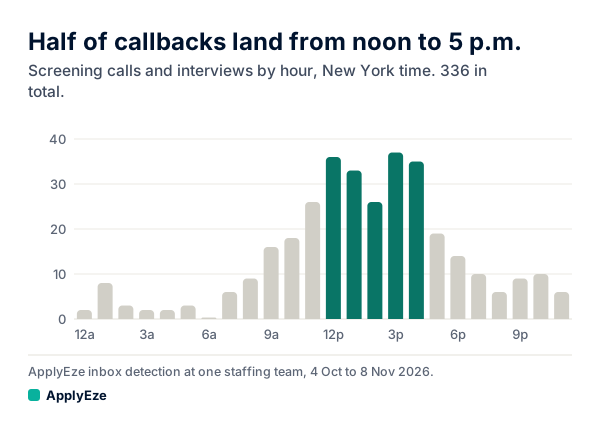
The chart shows little overnight, a climb from 9 a.m., and a plateau from noon to just before 5 p.m. New York time, holding 167 of the 336, or 49.7%. Take it as context. It shows when employers send invitations, not when they read mail, and it does not show when a follow up does best. Part of the plateau may be geography, since noon in New York is 9 a.m. in Los Angeles. The hour by hour count is in what time do recruiters call.
Precise timing tips deserve the same doubt. One that ranks, from The Interview Guys, says sending at 9:07 a.m. and not on the hour "can increase your open rates by up to 20%". The page gives no source or data for that. Our advice is plainer: send on a weekday morning in the reader's time zone, and schedule it if you wrote it at midnight. The subject line and the question inside will do more than the minute.
Your next step takes a minute. Pick the sample that fits, swap in your role and date, cut it at 37 characters to see what a phone shows, and send.
The subject line is yours, because only you know what was said in the room. ApplyEze works earlier in the search, and has delivered 94,207 applications since August, to 9,769 employers. You pick matches from a ranked board and queue them in the desktop app, which runs on your computer while it is on and awake, and it fills and submits each form. Workday and Oracle roles need a connected application inbox. If you would rather spend your time on the interviews than on the forms that lead to them, your first 50 applications are free, once per email address with no card.