

An AI job applier is software that opens a job application, fills it in and submits it for you. On a real form it does more than a one-click demo shows and less than most product pages imply. The name itself is shared: there is a Chrome extension called Ai Job Applier, a project called AI Hawk's Auto Jobs Applier, and many hosted services that use the phrase.
This post opens up the one we build, ApplyEze, because it is the one whose insides we can show you. Below is the order of every check in one run on the self-serve path, what the software refuses to do, each way a run ends with nothing sent, and a test you can use on any tool, including ours.
One run, step by step
Before any of this you choose. On the self-serve path you pick matches from a ranked board and queue them in the desktop app, which runs in Google Chrome on your computer. It runs while the app is open, so the computer has to stay on and awake until the queue finishes. Then each posting goes through these steps, in this order.
| Step | What happens | What can end the run here |
|---|---|---|
| 1 | The posting must be on a supported system | Anything else is refused before any work starts |
| 2 | A system that emails codes needs a connected inbox | No inbox connected |
| 3 | Liveness check: our own record first, then one web request | The posting is closed. An unclear page still proceeds |
| 4 | Memory of the posting: a requirement already read from it | A clearance you cannot meet, for example |
| 5 | Your employer limit | The limit is reached |
| 6 | Duplicate check against your history | You already applied |
| 7 | The posting is reserved, so two lanes cannot apply to it at once | Another lane holds it |
| 8 | A resume is written for this posting and read back | The read-back fails |
| 9 | Chrome opens, and fixed rules fill what your profile answers | The page never gives a usable form |
| 10 | An AI agent works on what is left, through browser tools | It reports a result, or hits a budget |
| 11 | Code audits the form, then final Submit, then a read of the page | The form cannot be finished, or the site never confirms |
| 12 | The posting is settled, the files are kept and a receipt is recorded |
The order is the design. Seven steps run before a resume is written, so a closed posting or a duplicate usually costs nothing but a moment. Step 3 leans toward trying: an unclear page still proceeds, so a live job is not lost to a misread page. If the posting turns out to be closed, the run ends in the browser and costs no credit.
Step 1 decides how far this reaches. ApplyEze polls more than 100,000 employer boards directly, about 900,000 active jobs, and the free path covers 12 systems: Greenhouse, Lever, Ashby, Workday, Workable, SmartRecruiters, Oracle, JazzHR, BambooHR, Rippling, Pinpoint and Recruitee. Those hold roughly 62% of the jobs with an application inbox connected, and roughly 23% without one. Workday and Oracle jobs stay hidden until you connect an inbox, because those sites email a code, so that one setup step opens up roughly 4 in 10 of the open jobs we track.
Building the resume
For each application, an AI model reads that posting and your real history and writes a resume for it. The output is a PDF and a DOCX, with one page as the target. Each file is then read back the way a parser reads it, and a failed read stops the run before the form. No ATS score appears anywhere, because no ATS exposes one.
Your employers, job titles, dates, schools, degrees and certifications come from your own record. Code rejects a rewrite that adds a figure, employer, school or credential your record does not hold. In an audit of 84 sampled resumes on 4 November 2026, we found 0 invented employers, dates, degrees or numbers.
The skills line works differently. ApplyEze brings the posting's named skills and tools onto your skills line, even when your own record does not list them. There is no step to remove one before a live run, so use a dry run to see what it writes, and be ready to discuss anything on the page. A certification the posting asks for is not added unless you hold it.
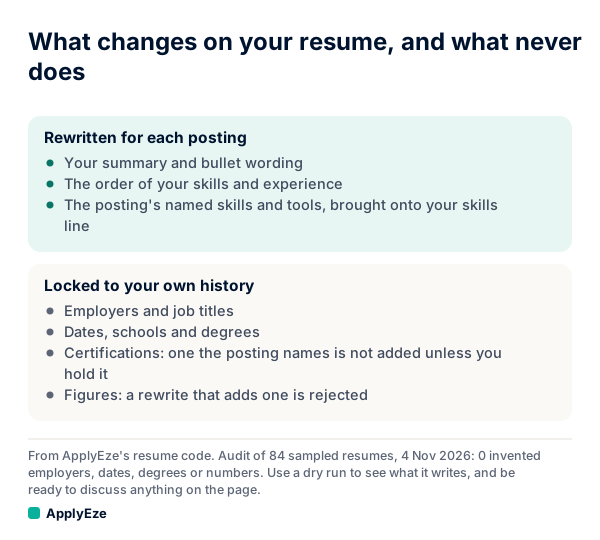
The chart shows the same split in two lists. The summary, the bullets, the order and the posting's named skills get rewritten. Employers, titles, dates, schools, degrees, certifications and figures stay locked to your record. A cover letter is written only when the form asks, and any name or figure about the company in it must appear in the posting.
Filling the form
Most writing about these tools treats the form as one problem. In practice it is two.
The first is fields with a known shape. Fixed rules fill what your profile answers: name, contact details, work history, education, work authorization and the common screening questions. Multi-step systems such as Workday have their own code path, since one Workday application can run across several screens.
The second is everything else, and forms have plenty of it: an unusual dropdown, a question written in a way no rule expected, a widget that behaves oddly. When a rule does not clearly fit, the question goes to the agent. The agent sees the page through tools, gets a report of what the rules already filled, and acts in the same browser. Code checks what the agent writes on the questions that matter most. Passwords and verification codes never reach the model. During a run ApplyEze checks your connected inbox for codes and verification links, and the agent only ever handles a reference to them.
Then come the last two checks. Code audits required fields before a run can report success. Right before the final click, code re-reads the form for answers that contradict your saved citizenship, sponsorship and address.
How answers get filled
This is where tools tend to overclaim, so here is exactly how it works.
Hard facts come from your profile. When a required question is not covered by your saved answers, ApplyEze still fills it rather than stopping the run, so that answer may not come from you. Fill in your saved answers, use dry run first, and read your receipts.
We chose that trade-off on purpose, because a run that halts on one odd question sends nothing. Any tool has to make this choice, so ask every vendor what happens on a required question its profile does not cover.
Sponsorship questions use the answers you saved, and ApplyEze does not skip a job because the posting says it will not sponsor. Some employers ask applicants not to use AI or automation. Whether to apply there is your call, and the decision is made when you queue the role.
What it will not do
Four lines are drawn in code.
- Take a test. ApplyEze does not take assessments for you. Employers often send them by email after you apply, and they are yours to complete.
- Give a full identity number. A form that requires your full Social Security or national ID number stops that application.
- Claim a clearance. A clearance is never claimed. A posting requiring one you lack is skipped.
- Invent a profile link. LinkedIn URLs are never invented.
Three more things to plan around on this path:
- Runs end, they do not stop midway for you. You can cancel a single lane, and there is no approval step before Submit. Dry run is the preview, and in a dry run code refuses the final Submit.
- It runs on your computer. Applications run on your computer while the app is open, so keep it on and awake until your queue finishes. You can use the computer in the meantime.
- You record replies. You record employer replies yourself on each application. Your Heard back and Interviews counts come from what you record.
When a run ends without an application
A credit is used only when an application is confirmed as Submitted. Practice runs, skipped postings and forms that could not be finished cost nothing, and free credits are spent last. So it means up to 50 submitted applications, not 50 attempts.
| How it ended | Credit used | What to do |
|---|---|---|
| Not on a supported system | 0 | Apply by hand, or move on |
| Inbox needed and not connected | 0 | Connect a Gmail or Outlook inbox. The product advises a new Gmail kept only for applications |
| Posting closed | 0 | Nothing |
| Already applied, or employer limit reached | 0 | Nothing. This is the check doing its job |
| A requirement you cannot meet, such as a clearance | 0 | Nothing |
| Resume read-back failed | 0 | Try again later, or apply by hand |
| Form needs a full Social Security or national ID number | 0 | Decide whether to apply by hand |
| Form could not be finished | 0 | Read how the run ended, then retry or apply by hand |
| Submit clicked, site never confirmed | 0 | Search your inbox for the employer. ApplyEze will not apply there again by accident, so any second try is yours |
That last row matters most. It may be a real application, and our guide to proof of a job application explains how to find out.
We publish how often this happens by system. On ApplyEze Autopilot, in the 14 days to 9 November 2026, 35,874 of 45,376 settled runs across 14 systems ended in a submitted application, or 79.1%. The rest ended without one for any reason, including postings that closed. Among the 12 systems the free path covers, the share ran from 74.0% on Workable to 94.5% on Rippling. In the 7 days to 9 November, the median application took 2.5 minutes from a lane picking up the role to the application going in.
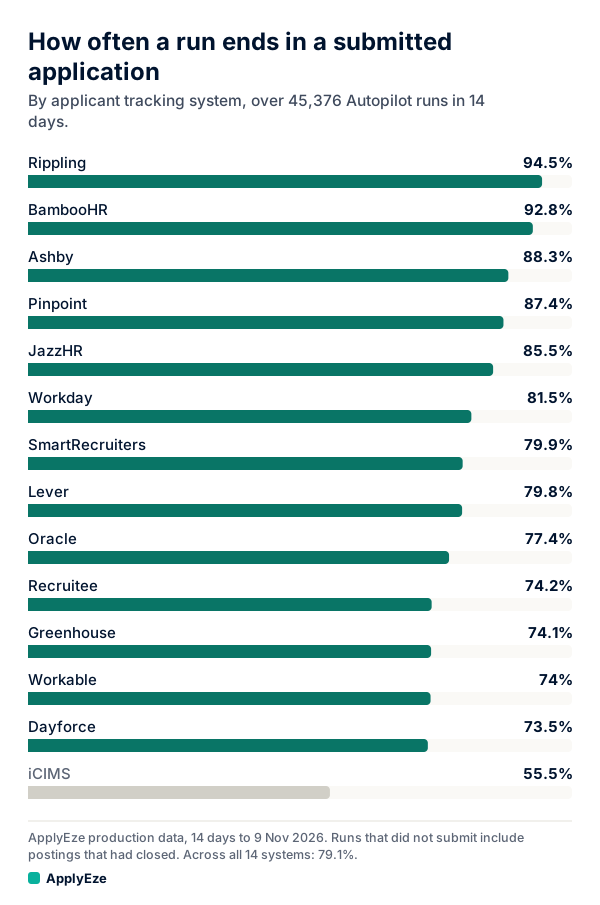
The chart shows that share for each system, from 94.5% on Rippling to 55.5% on iCIMS, with 79.1% across all 14. Autopilot is set up today for staffing and recruiting teams that work with ApplyEze. If you are job hunting on your own, you can start with 50 free applications on sign-up, no card needed. You pick the matches and queue them in the desktop app, and ApplyEze fills and submits each form. So read those percentages as a map of where forms are harder. They are team numbers, and results for any one person will differ.
What you should check
Here is a test for any AI job applier, ours included. Pick four postings: three you are qualified for on different application systems, and one you are not. Run them in preview if the tool has a preview, or read every record straight after if it does not. Our dry run sheet has a field-by-field version.
| Check | What a failure looks like |
|---|---|
| Read every answer on the form against your own facts | An answer you never gave, on a question that matters |
| Compare the resume with your real history | A title, a date or a number that moved |
| Read the skills line | A tool you could not discuss for two minutes in an interview |
| Look at the fourth posting | It filled the form for a role you plainly do not fit |
| Queue the same posting twice | Two applications to one role |
| Ask what a failed run costs | Credits gone for forms that never went in |
| Ask what happens when a site never confirms | It retries and double-applies, or marks it as sent and moves on |
| Ask to see what proof you get | A count with no file behind it |
Any vendor should be able to answer those last three without a sales call. If you are comparing tools more broadly, auto-apply to jobs covers the choices.
Every ApplyEze run leaves a receipt with the result, the time taken, screenshots where taken and the documents sent, and dry-run mode fills the form and stops before Submit. So pick your four postings tonight and run this test on us: your first 50 applications are free, once per email address with no card.