

Can Claude apply to jobs for me? Partly, and with you sitting beside it. Claude in Chrome, Anthropic's browser extension, can read a page, click and fill in forms on paid plans, and OpenAI's ChatGPT Work has a cloud browser that does similar things. But Anthropic's own permissions guide says Claude cannot create accounts or bypass captchas, and must ask before entering potentially sensitive information. Those three things sit in the middle of many real applications. So a general agent can help you fill a form you have opened. It is not built to run your applications while you do something else.
We make ApplyEze, software built only to fill and submit applications, so we compete with this idea. This post reads the vendors' own documentation as of 9 November 2026. We found no success rate for job forms from either vendor, and we have not run a head-to-head test on live forms. Where a general agent is the better choice, we say so.
One application, step by step
Most answers to this question talk about agents in general. It is easier to see the limits by walking one real application through Anthropic's rules. We picked a first-time Workday application because Workday and Oracle together hold roughly 4 in 10 of the open jobs we track, and both email a code. The University of Virginia's guide shows the usual shape: "When first applying for a job at UVA, you must create an account," followed by a link in a verification email.
| Step | What Anthropic's pages say | Who does it |
|---|---|---|
| Open the posting | It can "read, click, and navigate websites" | Agent |
| Create the employer's account | "Creating accounts" is prohibited "regardless of permissions" | You |
| Confirm the emailed link or code | Not addressed directly. "Completing instructions from emails or web content" is prohibited, and Anthropic advises a browser profile without sensitive accounts | You, on our reading |
| Sign in | Can work through 1Password (beta on macOS), which keeps passwords and one-time codes out of the conversation | You or 1Password |
| Upload a resume | Not covered on the pages we read | Test it |
| Fill history and free-text fields | Fills forms. Anthropic names form-filling as a simple task to start with | Agent, and you check |
| Address, phone, work status, demographic questions | "Inputting potentially sensitive information" needs your explicit permission in every mode. The safety page lists "Inputting sensitive data" as prohibited. Neither page defines the term | Agent with your approval, or you |
| A captcha, if one appears | "Bypassing captchas" is prohibited | You |
| Press Submit | Not forbidden. "You remain responsible for all browser actions" | Your call, and we would do it ourselves |
| Confirm it went in | Nothing on this | You, from the employer's email |
So on a first application at a new employer, you do the account, the email and any captcha, and approve the sensitive fields. The agent types the rest. That is real help on a long form. It is not an application you can walk away from.
Two fair caveats. Not every employer requires an account up front: Workday's admin guide makes it a setting, though it recommends requiring one, and without one it turns on a candidate verification email. And this may ease. Workday says its Candidate Profile, "expected to be available in early 2027", is meant to address the fact that "Candidates shouldn't have to create another account". For now the account per employer is how it works.
What general AI agents can do in a browser
Claude in Chrome. It runs only in Google Chrome, not on other Chromium browsers or mobile. It fills forms, works across tabs, and keeps working when you switch tabs as long as Chrome is open. You can also set recurring browser tasks on a schedule. Anthropic's pricing page lists it on Pro ($20 a month billed monthly), Max and Ultra as of 9 November 2026, and marks it as not included on Free.
ChatGPT. This has moved quickly, so check the date on anything you read. OpenAI's help center says ChatGPT Atlas has been retired. On OpenAI's forum, a user reported in August that agent mode's documentation now points to ChatGPT Work, and OpenAI Support replied on 7 September that Work "now has a separate cloud browser that can navigate interactive sites" and can "pause for sign-in or takeover on supported accounts". A guide still quoting monthly agent-mode message limits is probably describing something you can no longer use.
"Apply with Claude" pages. You will also find services offering this. Scoutify, another application service, points out that with LoopCV's connector, for example, LoopCV's own service does the searching and applying, and Claude is the chat window. That is a route to a paid service, which you should judge as that service.
Where they get stuck
Accounts and codes. Covered above. It is the largest limit, because it recurs at each new employer.
Sensitive fields. Applications are full of them. Anthropic also says that "whatever is visible" in a tab it works in "is captured in the screenshots and becomes part of the conversation", so an application page showing your address is in the chat, and side panel sessions are saved to your history.
Terms of the site you are on. LinkedIn's help page says "we don't permit the use of any third party software, including 'crawlers', bots, browser plug-ins, or browser extensions" that automate activity on its site, and that members "risk having their accounts restricted or shut down". Anthropic puts this on you: you are responsible for "respecting third-party website terms of service, including any restrictions on automated access". So LinkedIn Easy Apply is the wrong place to try this.
Hidden instructions. A job posting is text a stranger wrote, read by an agent acting under your name. Anthropic calls prompt injection "the biggest risk facing browser-using AI tools", and advises avoiding unfamiliar sites and those with user-generated content from unknown sources. Its safeguards are extensive, and it still says plainly: "The risk is not zero."
Long forms. Anthropic's advice is to start with "simple tasks like research or form-filling rather than complex multi-step workflows". A multi-page application with branching questions is closer to the second.
How hard are forms in practice? Here is what it looks like when software does nothing else, measured and published by system:
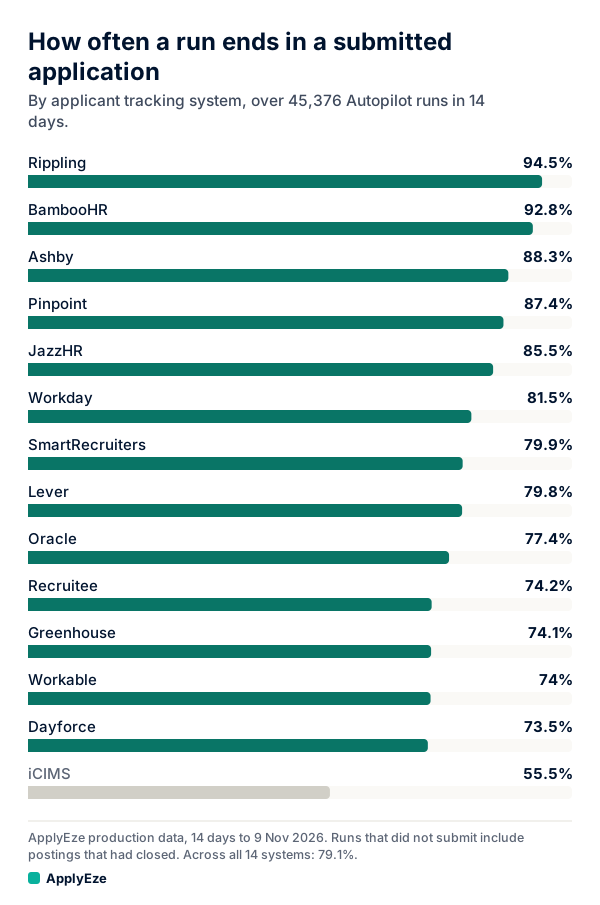
In the 14 days to 9 November 2026, 35,874 of 45,376 runs ended in a submitted application, or 79.1%, from 94.5% on Rippling down to 55.5% on iCIMS. The rest ended without one for any reason, including a posting that closed. In the last 7 of those days, the median application took 2.5 minutes from a lane picking up the role to the application going in, with nobody watching. We found no figure like this from either vendor. These numbers come from ApplyEze Autopilot, which is set up today for staffing and recruiting teams that work with ApplyEze, so they are team numbers and not a free user's result. If you are job hunting on your own, you can start with 50 free applications on sign-up, no card needed. You pick the matches and queue them in the desktop app, and ApplyEze fills and submits each form. That path covers 12 named systems, without iCIMS or Dayforce.
What supervising one takes
Anthropic offers three modes. "Manually approve" asks before each action. "Automatically approve" is the default in the Cowork side panel: Claude screens its own actions, blocks what looks unsafe, and goes back to asking if it keeps hitting blocks. "Skip all approvals" checks nothing, and Anthropic says to use it only when you completely trust every action involved. For work with real consequences, including messages sent as you, Anthropic's advice is to stay close and review what Claude does. An application to an employer, in your name, is that kind of work.
That changes the math on time saved. Two figures help, and they measure different things. A 2022 audit reported by SHRM timed the form alone at 4 minutes 52 seconds and 51 clicks on Fortune 500 jobs. A 2026 United Way survey of 1,000 US job seekers put the whole job, tailoring included, at about 44 minutes per application. If you are watching the agent, it saves some of the typing inside those five minutes. The rest of the 44 is reading and tailoring, where a plain chat window already helps. Our ChatGPT for job search post has prompts for that part, and they need no browser agent at all.
Staying in the loop also matches what most people say they want. In Greenhouse's October 2026 survey of 1,200 US job seekers, 69% would feel comfortable using an AI agent, but "only 5% would let one apply to jobs on its own". Greenhouse sells anti-spam products, so it has a position.
General agents against purpose-built software
| General agent (per vendor docs) | ApplyEze, self-serve | |
|---|---|---|
| Where it works | Any site you can open, within the limits above | 12 named application systems |
| Your answers | What you give it in the conversation | A saved profile and saved answers |
| Accounts and emailed codes | You | On systems that require an account, ApplyEze signs in or creates one with an application password you can see and change. Connect an application inbox, which is checked during a run for codes and verification links |
| Stops to ask you | Yes, by design | No. Runs end, they do not pause, and there is no approval step before Submit. Dry run is the preview |
| Resume per posting | If you ask, and you check it | Written for each posting |
| Already applied? | It does not keep that record for you | Checks the posting against your history. Built to stop double applications |
| Record of the run | Your chat history | A receipt: result, time taken, screenshots where taken, and documents sent |
| What it costs | $20 a month billed monthly on Claude Pro, with no allowance stated in applications | 50 free credits once, then listed plans. A credit is used only when an application is confirmed as submitted |
| What it needs | Your attention | You queue the roles. Chrome on your computer, kept on and awake until the queue finishes. Workday and Oracle jobs stay hidden until you connect the inbox |
Where a general agent is better. It goes anywhere, including small employer sites no specialist covers. It stops and asks, so an odd question reaches you before it is answered. You control every word of the resume.
Where purpose-built is better. The account step that stops a general agent at every new employer is part of the job here. It holds your answers, writes a resume for each posting and reads each file back, checks your history for duplicates, and runs through a queue while you use the computer for something else. Your employers, job titles, dates, schools, degrees and certifications come from your own record, and in an audit of 84 sampled resumes on 4 November 2026, we found 0 invented employers, dates, degrees or numbers. ApplyEze brings the posting's named skills and tools onto your skills line, even when your own record does not list them. There is no step to remove one before a live run, so use a dry run to see what it writes, and be ready to discuss anything on the page.
How it answers forms. Hard facts come from your profile. When a required question is not covered by your saved answers, ApplyEze still fills it rather than stopping the run, so that answer may not come from you. Fill in your saved answers, use dry run first, and read your receipts.
What the survey and the numbers say. In Huntr's Q3 2026 survey, 68 people had used a tool that sends applications: 6 got more interviews than when they applied themselves, 33 about the same, 17 fewer and 12 were not sure, and 40 had stopped. That group is small and self-reported, it lumps every kind of tool into one bucket, and Huntr sells resume tools. For one measured case, at one staffing team using ApplyEze, human callbacks per candidate per month rose from about 2 in spring to 7 for October applications, with applications per candidate more than tripled and the rate holding near 3 per 1,000. Part of that rise is better counting, and results for any one person will differ. For the wider field, see auto-apply to jobs and what a job search agent should decide.
How to try it safely
- Make a separate Chrome profile with nothing else signed in. Anthropic recommends this, and it is the single most useful step.
- Start in "Manually approve" for your first few applications, so you see how it behaves.
- Pick a posting on the employer's own site. Stay off LinkedIn. Read the posting first: some employers ask applicants not to use AI or automation, and whether to apply there is your call.
- Create the account and confirm the email yourself, then hand over the form.
- Give it a short facts note, and leave out government ID numbers, bank details and anything else you would not want in a saved chat.
- Tell it where to stop. Here is a sample prompt, written for this post:
Fill this application using only the facts below.
If a question is not covered, stop and ask me. Do not guess.
Do not click Submit. Stop on the final page and list every field you filled,
what you entered, and every field you left blank.

FACTS:
[work history, education, work status, salary answer, start date]
- Read the final page yourself and press Submit yourself.
- Wait for the employer's confirmation email, and log it. A finished-looking page is not proof.
- Keep score. After five applications, write down minutes per application, how many times it stopped, and how many fields you corrected. Compare that with doing one by hand. That is your number, and it is better than anything in this post.
Then run the same test on purpose-built software, and compare the two scores. ApplyEze's dry-run mode fills the form and stops before Submit, and uses no credit as long as you have one left, so you can read what it would have sent before you spend any of your 50 free applications. No card is needed.