

Resume parsing works by turning a document into fields: a file goes in, and a name, a phone number, a list of jobs with dates and a list of skills come out. Most explanations of it are written by parser vendors for recruiters. This one follows a real intake from your side of the screen. On ApplyEze, a PDF up to 5 MB is read by an AI model into a fixed shape, plain code copies the result into empty profile fields, and anything you answered yourself beats what the model read. Setup then asks for what no resume contains, which is why "upload your resume and you are done" is false.
What happens to your file
In order:
- You pick an experience level, before any upload. The reason for that order comes up below.
- You upload a PDF up to 5 MB. The server checks the file's contents, not only its name. Upload the same file again and the stored read is reused.
- An AI model reads it. The model, run by an outside provider, returns structured fields.
- The whole read is kept as a snapshot on the document and on your profile.
- Plain code copies values into empty profile fields. No AI is involved in this step.
- Later screens ask for the rest, which the table further down lists field by field.
If the read fails or comes back empty, the screen says so and the questions do the work. A failed read does not end setup.
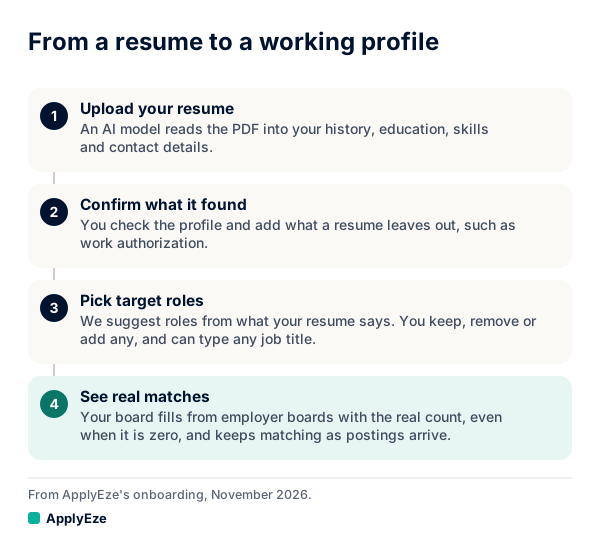
That chart shows the four stages a person sees: upload, confirm, pick target roles, then matches with the real count.
This is not the only parser your resume meets. When an application lands in an employer's system, that system reads the file again by its own rules. Greenhouse's help page says its parser "scans an imported resume and auto-fills appropriate fields", that it cannot parse resumes larger than 2.5 MB, and that a resume uploaded as an image cannot be read properly. Vendor explainers such as Affinda's describe the usual pipeline as OCR, language analysis, entity extraction and formatted output. What survives that second read depends on your layout, and our ATS-friendly resume format guide covers it.
Why a fixed shape, and what "told not to invent" means
A fixed shape means the model does not decide what to return. It has a form to fill. Every field must be present, holding a value or holding null, and it cannot add a field of its own. That part is enforced by the request itself.
The instruction that goes with it is softer. The production prompt says "Be conservative: null / empty array when uncertain" and "Do not invent data. If the resume lacks a field, return null / []." A prompt rule is an instruction to a model. It lowers the chance of a made-up detail, and a model can still misread a date or attach a bullet to the wrong job. So the design does not rest on the prompt: the shape is enforced, your own answers outrank the read, and you check the result.
Here is the idea on a sample. Both the resume lines and the output below are written by hand to show the shape, trimmed to a few fields. They are not a real person's resume or a captured model response.
Dana Reyes
Tucson, AZ
Data Analyst, Northwind Health, 2021 to present
- Built the weekly churn report in SQL and Tableau
{
  "full_name": "Dana Reyes",
  "phone": null,
  "current_city": "Tucson",
  "current_state": "AZ",
  "current_country": null,
  "skills": ["sql", "tableau"],
  "work_authorization_statement": null,
  "work_experience": [{
    "company": "Northwind Health",
    "title": "Data Analyst",
    "start_date": "2021",
    "end_date": null,
    "is_current": true,
    "bullets": ["Built the weekly churn report in SQL and Tableau"]
  }]
}
Three things in that sample are worth noticing, because they are where a parse is designed to leave a gap instead of guessing.
- The phone is null. The resume does not state one, so the details screen will ask.
- The country is null, even with a state. Code fills in United States only from a full state name, such as Arizona. A two-letter code stays empty, because "CA", "IN" and "GA" are each ambiguous, and the details screen asks.
- The start date is a year. The month was not on the resume. Applications ask for month and year, so the confirm screen asks you for what is missing.
Your answer beats the parse
Two rules in the code decide what happens when a parse and a person disagree.
A field that already holds something is never written. The parse only fills empty fields.
A question you already answered stays answered. Say you pick Senior on the first screen and the model reads your resume as mid-level. Senior stands. The level question comes before the upload, so your answer is already on file when the read arrives and the read has nothing to change. Without that rule a model's guess could quietly change which roles you see.
The same rule has a side effect you should plan for. Uploading a newer resume later fills only what is empty. It does not update a job or a date you already have on file, so make those edits on the Profile tab in the desktop app as well.
What a resume leaves out
A resume is written to persuade a person. An application form wants things a resume has no reason to say. This is what comes from where in ApplyEze's setup:
| Field | From the resume | Asked on a screen | Must you answer to continue? |
|---|---|---|---|
| First and last name | Read, then split in code | Confirm screen | Yes |
| Experience level | Only if you have not answered | First screen, editable on confirm | Yes |
| Jobs, degrees, summary | Read | Missing month and year are asked | No |
| Skills | Read | Not on the setup screens. Profile tab, in the app | No |
| Phone, city, country | Read when stated | Details screen | Yes |
| Links such as LinkedIn | Read when stated | Details screen | No |
| Street address, ZIP or postal code | Rarely stated | Details screen | Yes |
| Work status, including sponsorship now and later | Suggested only | Work status screen | Yes |
| Target roles | Suggested only | Roles screen | At least one |
| Locations | No | Locations screen | A place, or remote |
| Minimum salary | No | Salary screen | Yes |
| Start date | No | Timeline screen | Yes |
| Screening answers, references, EEO, application inbox | No | Later screens | No |
The optional rows are the ones people walk past, and walking past them has a price. Hard facts come from your profile. When a required question is not covered by your saved answers, ApplyEze still fills it rather than stopping the run, so that answer may not come from you. Fill in your saved answers, use dry run first, and read your receipts.
The inbox row has its own price. Workday and Oracle jobs stay hidden until you connect an application inbox, because those sites email a code. Roughly 4 in 10 of the open jobs we track are on those two systems (from a 1% sample of active jobs on 9 November 2026).
Work status: suggested, never assumed
This is the field where a wrong guess would do the most damage, so it gets the strictest handling.
If your resume has a sentence about work authorization, such as the prompt's own example, "Authorized to work in the US; F-1 STEM OPT", the model copies that sentence word for word. The prompt adds: "Never infer it from schools, countries, names or employers." So a degree from a university abroad produces nothing here.
The copied sentence is then used only as a hint on a later screen. It is never stored as your answer. In the product's words: "If your resume states your work status, we suggest it. You still answer the question yourself."
Your answer has consequences beyond the form. Work authorization is one of the hard filters on your board, so it changes which postings you see at all. Our job match guide explains how those filters run before any score.
What to check before matching starts
Your first match run starts near the end of setup, so these are worth a minute each on the way through.
- Your name. Code splits the full name at the first space. A sample "Mary Ann Smith" becomes first name Mary, last name Ann Smith. Fix it on the confirm screen if that is wrong.
- Your level. It is a real input to your match score, and the confirm screen lets you change it.
- Missing dates. The confirm screen lists any job or degree without a month and year. These do not hold Continue, so it is easy to skip them. Do not skip them, because forms ask.
- Highest education. It appears only if no degree on the resume settled it.
- City and country. A wrong city affects hybrid and on-site roles, because those need a location overlap or your willingness to relocate.
- Work status. Answer it fresh, whatever is suggested.
- Target roles, and their order. The first one listed ranks first, and the starting list comes from your past, not your plans. Target job titles shows what the order does to a board.
Your parsed skills and job bullets live on the Profile tab in the desktop app, not on these screens, and your first match run uses them as read. So once the app is installed, read both before you queue anything. Skills matter most, because each posting's required skills are compared with that list by name, so a tool the model dropped will show up as missing.
Word files and no resume at all
Word and Google Docs files are not read directly. Save a copy as a PDF first and upload that.
If you have no resume yet, the upload screen offers "I don't have a resume" and the questions take over. You can finish setup that way and see matches. The limit is in the product's own sentence: "You can start without a resume, but ApplyEze needs one before it can apply." A run with no resume or no work history stops before a browser opens, and a resume can be added later from the Documents tab in the app.
Your next step is to see what the parse makes of your own file. Create an account and upload it: your first 50 applications are free, with no card, and a credit is used only when an application is confirmed as Submitted. The profile you confirm then ranks a board drawn from more than 100,000 employer boards we poll directly, about 900,000 active jobs (5 November 2026). How to use your 50 free applications covers what to do after that.