

Target job titles are the roles you tell a job tool you want, and on ApplyEze their order is real: the first one listed ranks first. A posting that matches your first title sits above a posting that matches your second, even when the second fits you better. We ran one sample person's five titles in two orders through our matcher's code. The score on every row stayed the same and the board changed completely. Below is that table, how to choose and order your own titles, and the limit that catches people: a role doing your exact work, under a title you did not list, ranks low.
The order you list is the order that ranks
The board sorts in two steps. First by which of your titles a posting matched, in the order you listed them. Then by fit score inside each group. So the position of a title outranks the size of a score. A card on the board tells you which group it is in, with a chip such as "Your #2 role", or "Long shot" if it matched none of your titles.
There is one exception. A posting that matches a title but fits you poorly drops out of that title's group and into Long shots. We do not publish that cut-off, because it changes.
On the roles screen your list is numbered. Each title has an up arrow to move it and an x to remove it, and you can have up to 10.
How titles get suggested
"We suggest roles from what your resume says. You keep, remove or add any of them." That is the product's sentence, and the mechanism behind it is simple. While reading your resume, an AI model names one to three job families. A catalog search then turns each family into starting picks: one role on an exact hit, otherwise up to three. No model is asked at that second step.
Those picks become the opening order of your list, and this is the trap. Your resume describes where you have been. The list decides where your board points. If you are trying to move from analyst work to analytics engineering, the suggested first title is the job you want to leave. Read the list before you press Continue, and put it in the order you mean.
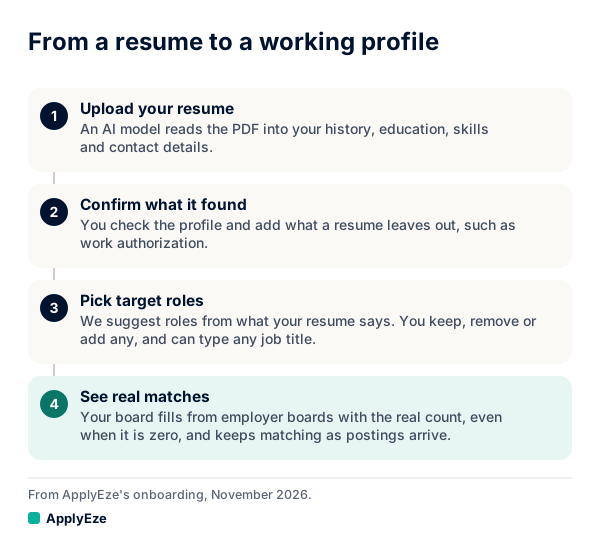
Picking roles is the third of those four steps, and it is the one that decides what the fourth step shows you. More on the steps before it is in how resume parsing works.
A standard role already carries other titles employers use for it. In our starting catalog, Data Analyst also covers Reporting Analyst and Business Data Analyst, and Business Intelligence Analyst also covers BI Analyst, BI Developer and Tableau Developer. You do not need to list those separately.
Typing a title we do not know
You can type any job title. Common titles resolve instantly. For an unusual one, AI maps it to the closest standard role, and a line under the pick says so, for example Matched from "Customer Outcomes Lead". with a Use my words button beside it. Press that if the standard role lost what you meant. Some titles are saved as typed, with a note that starts "Saved in your words." One generic word such as Analyst is never mapped, so type a fuller title.
A few matching rules are worth knowing, each checked by running real titles through the code on 9 November 2026:
- Seniority words are not needed. Senior Data Analyst matched a role named Data Analyst.
- Leadership needs naming. Director of Customer Success did not match Customer Success Manager for someone below manager level.
- Internships need naming. Data Analyst Intern did not match Data Analyst.
- Close spellings of a different job do not match. JavaScript Developer did not match Java Developer.
The real limit: work under a title you did not list
The title match compares phrases. It does not understand that two titles describe the same day of work. So a role doing your work under a title you did not list ranks low, however well your skills line up. In the example below, an Insights Analyst posting asking for three skills the person holds lands near the bottom of the board.
This is not a small corner case, because people name things differently. In a 1987 study, Furnas and colleagues found two people favored the same term for the same thing less than 20% of the time. Job titles show the same spread. O*NET's page for Business Intelligence Analysts lists reported titles including Competitive Intelligence Analyst, Market Intelligence Consultant and Business Analyst. Its page for Market Research Analysts and Marketing Specialists runs from Market Researcher to Content Strategist.
That same paper named the fix: "unlimited aliasing", meaning many names for one thing. For you, that means listing several titles. Rules give nothing back for a title you never wrote down, which is the trade-off explained in semantic search vs keyword search.
The method can also err the other way. In the run below, a Business Analyst posting partly matched the Business Data Analyst variant under Data Analyst, and so sat in the top group, ahead of a Product Analyst posting that fit better. A title match is a reason to read a posting. It does not settle anything.
A worked example, two orders
This is a sample person and sample postings, invented for this post. The person has four years as a data analyst, holds SQL, Python, Tableau, dbt and Excel, and is thinking about moving into analytics engineering. They use the same five titles in two orders:
- Order A, take the next good job: Data Analyst, Product Analyst, Business Intelligence Analyst, Analytics Engineer, Data Scientist.
- Order B, make the move: Analytics Engineer, Data Scientist, Data Analyst, Product Analyst, Business Intelligence Analyst.
We ran ten sample postings through the matcher's code for each order, using the catalog versions of those titles:
| Sample posting | Listed skills the person holds | Position, order A | Position, order B |
|---|---|---|---|
| Data Analyst | 3 of 3 | 1 | 4 |
| Senior Data Analyst | 3 of 4 | 2 | 5 |
| Business Analyst | 2 of 2 | 3 | 6 |
| Product Analyst | 2 of 3 | 4 | 7 |
| BI Developer | 2 of 3 | 5 | 8 |
| Analytics Engineer | 3 of 4 | 6 | 1 |
| Senior Analytics Engineer | 2 of 3 | 7 | 2 |
| Data Scientist | 2 of 4 | 8 | 3 |
| Insights Analyst | 3 of 3 | 9 | 9 |
| Growth Analyst | 3 of 3 | 10 | 10 |
Four things to read from it:
- The scores did not move. Each posting scored exactly the same in both orders. Only its position changed.
- Order B has a real cost. It puts a Data Scientist posting, where the person holds two of four listed skills, above a Data Analyst posting where they hold all three. That can be the right call if the move matters more than speed. It should be a choice you made, and not a side effect of what was suggested.
- Both orders bury the same two jobs. Insights Analyst and Growth Analyst sit last, below postings that ask for skills this person lacks, purely because of their titles.
- The fix for that is one edit. We added Insights Analyst and Growth Analyst to the list and ran it again. Both, along with Senior Insights Analyst and Customer Insights Analyst, then matched a listed title.
This matters more than the table suggests, because of Queue all. It takes every row in your title groups and leaves Long shots behind, so that bulk queues only what you asked for. In order A it would queue the Business Analyst posting and skip the Insights Analyst one.
How to pick your titles
A title is more than a label. Marinescu and Wolthoff, using CareerBuilder data, found that among vacancies posting a wage, job titles explain more than 90% of the wage variance, and more than 80% of the variation across vacancies in applicants' education and experience. Their paper notes that titles split accountants into staff accountants, senior accountants and directors of accounting, with the last two earning more than the first. So a title signals level and pay to the people reading it, and choosing one is choosing a level.
A method that takes one sitting:
- Write one sentence about the work you want, in plain words, with no title in it.
- Collect titles from real postings. Search your sentence on a couple of boards, open 20 postings that describe that work, and write down what each one calls it. Add the reported titles from your occupation's O*NET page.
- Read the duties, not the title. Cross off any title whose postings describe different work. See job title vs job description.
- Mark each survivor: would you accept it tomorrow, and could you do it today?
- Order them. If you need a job soon, put "would accept and could do" first and reach titles last. If you are making a deliberate move and can wait, put the move first and accept that lower-odds rows lead your board.
How many titles to list
You can list up to 10, and the mechanism tells you how to use them. A title added at the bottom leaves the groups above it alone and lifts its own postings out of Long shots. In our run, dropping from five titles to three sent BI Developer and Data Scientist down into Long shots. So extra titles at the end cost almost nothing in board position.
The cost shows up in Queue all, which treats every listed title as a request. So list every title you would accept, and stop at the first one you would pass on. Keep the titles you only feel curious about off the list. You can still queue a Long shot by hand.
When to change them, and what happens to old matches
After setup, target roles live on the Profile tab of the desktop app, under Application defaults, with the reminder: "The first role ranks first on the board."
Changing your target roles affects new postings as they arrive. Existing matches are not re-scored, so an edit will not rearrange what is already there, and an older row can read Long shot after an edit. New postings are matched as they come in, so give a new list time to fill.
Three signals that a change is due:
- You keep pressing Pass at the top of the board. Move that title down or remove it.
- You keep finding roles you want in Long shots. Add their title.
- A title has gone quiet while a lower one keeps producing roles you queue. Swap them.
Your next step is one sitting with that method. Then put the list to work: your first 50 applications are free, with no card, and you can set your titles up here. You pick from a board drawn from more than 100,000 employer boards polled directly and queue what you want, so if you work from the top, your order decides where those credits go. For what the number on each card tells you, read job match scores explained.