

Semantic search vs keyword search comes down to what gets compared. Keyword search compares the words in your query with the words in a document. Semantic search converts both into numbers that stand for meaning and compares those. So keyword search misses the job that says the same thing in other words, and semantic search can return a job that reads alike and differs on a fact that matters, such as a license. ApplyEze's job board does a third thing: hard filters and a rule-based fit score, with no embeddings and no AI in the ranking, so every result has a reason you can read. Below, all three run on the same four sample postings, with the math shown.
Keyword search, in plain words
A keyword engine builds an index, like the one at the back of a book, mapping each word to the documents that contain it. Then it scores each document against your query. The usual formula is BM25, the default in Elasticsearch. It rewards three things: your word appearing in the document, your word being rare across all documents, and the document being short rather than padded.
Here are four sample postings, written for this example, and the query customer success manager.
- A. Customer Success Manager: own renewals and adoption for mid market accounts
- B. Client Partner: keep accounts healthy, drive renewals and expansion
- C. Customer Support Manager: lead a team that answers support tickets
- D. Warehouse Manager: run shifts and inbound freight
Rarity first. "Success" appears in one posting of four, so it is worth the most (1.204). "Customer" is in two (0.693). "Manager" is in three (0.357). Using Elasticsearch's default settings (k1 of 1.2, b of 0.75), one term for posting A works out like this. The posting has 11 words and the average is 9.25, so:
1.204 × 2.2 ÷ (1 + 1.2 × (0.25 + 0.75 × 11 ÷ 9.25)) = 1.117
Adding each word's score for each posting:
| Posting | customer | success | manager | BM25 total |
|---|---|---|---|---|
| A. Customer Success Manager | 0.643 | 1.117 | 0.331 | 2.09 |
| C. Customer Support Manager | 0.671 | 0 | 0.345 | 1.02 |
| D. Warehouse Manager | 0 | 0 | 0.396 | 0.40 |
| B. Client Partner | 0 | 0 | 0 | 0 |
Posting B describes the same job as A and scores zero, below a warehouse role. This has a name, the vocabulary problem, and it is old. In a 1987 paper, Furnas and colleagues found that two people favored the same term for something less than 20% of the time, and that access through one favorite word led to "80-90 percent failure rates in many common situations".
Semantic search, in plain words
A semantic engine runs each text through a model that outputs a list of numbers, called an embedding. Texts with similar meaning end up with similar lists. To search, it compares the list for your query with the list for each document, usually by the angle between them, which is cosine similarity.
To show the arithmetic, here are three invented numbers per text, standing for "keeping accounts", "handling tickets" and "warehouse work". These are made up. Real embeddings have far more numbers, and no person assigns what any of them means.
| Text | Invented vector | Cosine with the query |
|---|---|---|
| Query: customer success manager | 0.90, 0.30, 0.10 | |
| A. Customer Success Manager | 0.92, 0.30, 0.05 | 0.999 |
| B. Client Partner | 0.78, 0.45, 0.10 | 0.98 |
| C. Customer Support Manager | 0.30, 0.90, 0.10 | 0.60 |
| D. Warehouse Manager | 0.05, 0.10, 0.95 | 0.19 |
Posting B jumps to second, with no shared words, which is the whole point of the method. Because we chose those numbers, this shows what the method is built to do and proves nothing about how well any real model does it.
Four postings, three methods
The third column is our own title rule, which we ran for real: the target role Customer Success Manager, from our starting catalog, through the matcher's code on 9 November 2026.
| Sample posting | Keyword (BM25) | Semantic (invented vectors) | ApplyEze title rule |
|---|---|---|---|
| A. Customer Success Manager | 2.09 | 0.999 | Full match |
| B. Client Partner | 0 | 0.98 | No match |
| C. Customer Support Manager | 1.02 | 0.60 | Partial match |
| D. Warehouse Manager | 0.40 | 0.19 | No match |
Read the rule's column closely. It misses posting B the same way keyword search does, and it gives partial credit to posting C, a different job that shares two words. List Client Partner as a second target role and posting B becomes a full match. That is the rule's bargain: it does what you tell it, and only what you tell it.
What each is good at, with examples
| What you need | Keyword search | Semantic search |
|---|---|---|
| Find a role under a title you did not think of | Misses it | Good at this |
| Search in a sentence, such as "help software customers renew" | Weak, the words may not appear | Good at this |
| Find an exact certification or tool, such as CPA or Workday HCM | Good at this | Can drift to related terms |
| Find a job ID or a specific employer | Good at this | Can miss it |
| Tell Java from JavaScript | The words differ, so it can | The texts read alike, so it can blur them |
| Tell Registered Nurse from Licensed Practical Nurse | The words differ, so it can | The texts read alike, so it can blur them |
| Explain why a result appeared | Easy, you can see the words | Hard, a score from a model |
No method wins everywhere. BEIR, a 2021 benchmark across 18 datasets, found BM25 a robust baseline. Re-ranking and late-interaction models scored highest on average, at high computational cost, and dense retrieval models often underperformed other approaches. That is one reason many systems run both. Hybrid search sends one query to both engines and merges the two lists by position, often with Reciprocal Rank Fusion. Others retrieve first and let a slower model re-rank the top results.
What job boards say they use
These are companies' own descriptions, read on 9 November 2026. A page that does not mention a method tells you nothing about what runs behind it.
| Company | What it says | Method named |
|---|---|---|
| LinkedIn, January 2026 | Large language models "to create a semantic search experience": jobs and queries become dense vectors, then a small language model scores the retrieved jobs against the query | Yes, embeddings and a re-ranking model |
| Monster | "uses a concept based semantic match and weighs related skills in the body", and it advises quotes for exact terms | Yes, semantic |
| ApplyPass, an auto-apply tool that competes with ApplyEze | "AI/ML based vector based matching from your resume and live job descriptions", retrained nightly on your likes and dislikes | Yes, vectors |
| Indeed | "connect people to jobs based on fit, not just keywords", using "more than 10,000 attributes" | AI, no method named |
| Dice, updated January 2024 | "Beyond traditional keyword matching", with machine learning and a knowledge graph | Partly |
| Jobright | Compares skills, experience, seniority, industry and preferences with each job's requirements | AI, no method named |
So "job boards use semantic search" is true of some and unknown for others. For more on the largest of them, see how LinkedIn job matching works.
What ApplyEze does instead, and what it misses
"ApplyEze does not rank by text similarity. It ranks on your target titles and the requirements it reads out of each posting." The matching path has no embeddings at all. Here is what happens to a posting.
- Parse. Each posting is parsed by our own rules first. When the rules cannot read a posting well enough, an AI model reads it on some application systems. The output is fields: skills, years, level, degree.
- Filter. Postings that fail on work authorization, location or a company you blocked are removed before scoring.
- Score. Matches are ranked by a fit score from your role, skills, industry, level, education, experience and pay. Title counts most. Weights stay out of this post, and job match scores explained shows how to read the result.
- Sort. Your first target title ranks first, then the second, and score decides inside each group.
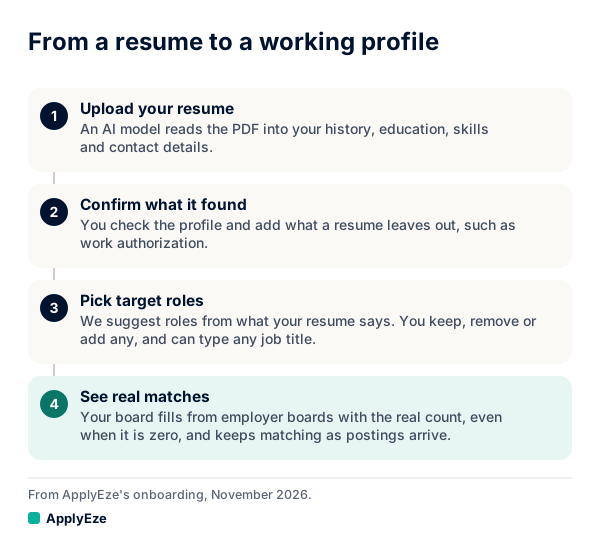
That chart shows where your titles enter: at the third of four steps, suggested from your resume and then yours to keep, remove or add to. The board in the fourth step ranks from that list, which is why a semantic ranker's main job, guessing related titles for you, falls to you here.
What this gives you: you can see why a job is on your board, because the factors are the score. The same profile and posting give the same result. You set the priority, and nothing reorders it behind you. Level is handled directly, so Director of Customer Success does not match Customer Success Manager unless you are at manager level or above. And the supply comes straight from employers: more than 100,000 employer boards polled directly, about 900,000 active jobs on 5 November 2026.
What rules ask of you in return:
- Name your titles. Your work under a title you did not list ranks low. This is posting B again. Semantic search exists to catch it, and on this board you catch it by listing several titles, as target job titles explains.
- Use the posting's skill names. Skills compare by name. We ran a profile listing "postgres" against a posting requiring "postgresql", and it read as missing. Fix the name on your profile and it counts.
- Read past shared words. Customer Support Manager gets partial credit for Customer Success Manager, as the table shows. One paragraph of the posting settles it.
Rules are a trade: you get something you can read and steer, and you take on the work of naming the titles. AI appears later on your path, for a different task: "For each application, an AI model reads that posting and your real history and writes a resume for it." That model does not choose the job. You do.
How to get good results from each
On a keyword search:
- Search each title separately, using the employer's wording from real postings, and include the abbreviation and the long form.
- Use quotes for exact phrases, and use operators where they exist. LinkedIn's help page documents quotes, parentheses, and AND, OR and NOT in capitals. Test them on each board, since a page rarely says whether they still work on its job search.
- Scan for your skills in the text. Resume wording has its own version of this problem, covered in resume keyword matching.
On a semantic search:
- Describe the work in a sentence, not only a title, and try two phrasings.
- Check level and licenses by hand. Read the first 20 results for drift toward roles that sound similar and sit a level up or need a credential you lack.
- Use filters for facts, such as location and seniority, since those are what similarity can blur.
On a rule-ranked board like ours:
- List every title you would accept, in order.
- Read the matched and missing skills on each role, and fix wrong names on your profile.
- Open your lowest-ranked rows now and then. If you find a job you want, add its title.
A two-minute test for any board
You can often tell what a search box is doing.
- Search a title with an unusual synonym, such as "people operations partner" if you do HR work. Look at the top ten. If several contain none of your words in the title or text, something other than word matching is at work.
- Search a sentence describing the work. Word matching returns little sense from a full sentence. A semantic engine often returns sensible results.
- Put an exact tool in quotes, then remove the quotes. If the results barely change and neighbors of that tool appear, the box is not honoring exact terms.
These are clues, not proof, because most boards also rank on signals you cannot see.
Which matters for you
| Your situation | What helps most |
|---|---|
| Changing fields, or your title is unusual | Semantic search to discover titles, then list those titles anywhere you can |
| Licensed or credentialed work, such as nursing or accounting | Exact terms, in keyword search or a filter |
| Your title is common and you want volume | Any method works. The filters and your own triage matter more |
| You want to know why a job was suggested | A method that shows its factors |
A practical approach uses two tools for two jobs: use a semantic search to find out what your work gets called, then use those words everywhere titles are listed.
To judge a board built on rules, run it on your own titles. Your first 50 applications on ApplyEze are free, with no card: you pick the matches and queue them in the desktop app on your computer, and ApplyEze fills and submits each form. You can start here.