

An SHL assessment is one of a family of online tests an employer sends during hiring: timed ability tests such as Verify, untimed questionnaires such as the OPQ, situational judgment tests and job simulations. Which one you got decides how you prepare, so that comes first. The table below is built from SHL's own fact sheets and product pages, with the time per question worked out. SHL publishes the practice tests itself, free. If your invite arrived minutes after you applied, that is normal, and we explain below why it says little about interest. This post contains no test questions, real or invented.
What SHL is
SHL sells assessments to employers. By its own figures, more than 2,500 clients use its cognitive tests, and it runs 10 million personality assessments a year across more than 3,000 customers. The employer picks the tests, sets the deadline and receives the results. You are taking the test for them, which is why nearly every problem in this post ends with asking the employer.
The test types, in a table
| Test | What it measures | Time and length | Time per question (our arithmetic) | How to prepare |
|---|---|---|---|---|
| Verify G+ | General ability: numerical, deductive and inductive | 36 minutes, 30 questions, 10 of each type | About 72 seconds | Practice all three types, then the General Ability test |
| Verify Deductive | Drawing conclusions from stated facts | 20 minutes, up to 18 questions. The sheet lists "One plus Verification Test" under sittings | About 67 seconds | Use only the facts given, and watch for "must be true" |
| Verify Interactive Inductive | Finding rules in shapes and sequences | 18 minutes, up to 15 questions | About 72 seconds | Practice spotting several rules changing at once |
| Verify Interactive Numerical | Using data: building charts, filling spreadsheets | 18 minutes, up to 10 questions | About 108 seconds | Percentages, ratios and reading tables, in the drag-and-drop format |
| Situational judgment | How you would act in work scenarios | "Short", with no time given | Not published | Read the job description. Some versions ask for best and worst actions |
| OPQ | How you prefer to work | 20 minutes | Not timed by question | See the format once, then answer as yourself |
| MQ | 18 motivational dimensions | 20 minutes | Not timed by question | Same as the OPQ |
| Global Skills Assessment | 96 workplace behaviors, choosing statements most like you | 15 minutes | Not timed by question | Same as the OPQ |
The Verify fact sheets carry a 2022 copyright, so check your own instructions in case the limits have changed. Because these tests are adaptive, the number of questions is a maximum. SHL's practice page also lists calculation, checking, reading comprehension, mechanical comprehension, Excel, email writing, coding and contact center simulations. We found no public time limit for those on the pages we read.
Compare the pace with a test like the Wonderlic, which allows about 14 seconds a question. A Verify question gets about five times as long or more. So the skill here is careful reading of a chart or an argument, more than raw speed.
Other vendors use similar words for different things. If your email says Harver or pymetrics, that is a set of games, covered in our Pymetrics guide. If it says PI, the 12-minute test in our Predictive Index guide works very differently.
Timing and scoring
SHL's cognitive assessment page describes these tests as "automated, remotely proctored", asking "fewer questions thanks to our unique partial-scoring methodology", and it says scores feed into a job score for each candidate. In plain terms, your result becomes part of a score for that job, and we found no published pass mark on SHL's candidate pages.
The practical points come from SHL's candidate support page. Some of its answers are written for one SHL platform, AMCAT, so we say where that applies.
- You may not be able to go back. On AMCAT you cannot return to a question, because each question's difficulty depends on your earlier answers. The Verify sheets also describe adaptive testing, so assume no going back unless your instructions say otherwise.
- The timer does not stop. SHL's advice is not to leave your computer in the middle of a timed test.
- Do not click Exit if the test freezes. That can submit what you have so far. Reload with F5 or Ctrl+R. If that fails, close the test window and use the Continue Assessment link, or the original link in your email.
- Stay in the window. On AMCAT, repeatedly switching away or pressing print screen can invalidate your test.
- Use one username. If you register twice, your tests can appear incomplete. Log in with the first username you were sent.
- Expect no completion email. SHL's platforms do not send one. A green check mark and a Completed status are your proof.
- Calculators are usually fine on number tests. You may use one on a numerical or calculation test unless told otherwise. On AMCAT, the on-screen one is the only one allowed where it appears. Keep paper and a pencil to hand.
- The first screen may not be real. Instructions include an example you cannot answer. If nothing will click, check that you are on page 1.
How to prepare for each type
Number tests. Rehearse percentages, ratios and pulling one value from a dense table. On the interactive version you answer by dragging and filling in, so try that format at least once, because unfamiliar controls cost real time.
Deductive tests. The trap is using what you know about the world. SHL's fact sheet shows the shape: a short list of facts, and a question about what must be true. Answer from the list alone.
Inductive tests. Write down what changes between steps: position, count, color, rotation. Patterns can run on more than one rule, and paper helps you track them.
Situational judgment. SHL says these are usually given early in the process and measure behaviors. Read the job description for what the role values, then answer the way you would really act in that job.
Questionnaires. SHL's advice is direct: "If you try to guess what the assessors are looking for you may be wrong." It adds that it is not in your interest to take a job you do not fit. See the format once, so forced choices do not surprise you, and stop there.
Practice sources worth using
SHL Direct's practice tests are the place to start. SHL says the best practice you can have is its full-length tests. Nothing else is written by the people who wrote your test. Some things to know before you click:
- Some give a report. The interactive Numerical, Deductive and Inductive tests and Mechanical Comprehension currently do. The interactive General Ability test does not.
- Formats come in pairs. Numerical, inductive, deductive and general ability each come in an interactive version and a standard multiple-choice one. Ask which you will get, or try both.
- Difficulty may differ. SHL warns practice tests "may not exactly reflect" the real level, so a low practice score tells you where to work. It is not a forecast.
- Keep the results to yourself. SHL says you may not share practice results with any third party, and it reserves the right to take legal action if you do. So do not post a practice report on a forum. Results do not go to the employer either, and your real test is only the one on the link you were sent.
The example questions page covers eight types with answers: calculation, checking, numerical, personality, inductive, motivation, situational judgment and verbal. Start there if you are not yet sure of the format. Third-party prep sites rank just below these pages, and several sell practice packs. SHL's free set is enough to begin with, so try it first and buy only if you find a gap you can name.
When the invite arrives
We counted how fast these emails come. These numbers are from callback detection, which scans a candidate's application inbox where it is switched on. It is rolling out with staffing teams first and is not part of self-serve accounts yet. It first ran on 3 November 2026 and read back to 4 October, across about 29 candidates at one staffing team.
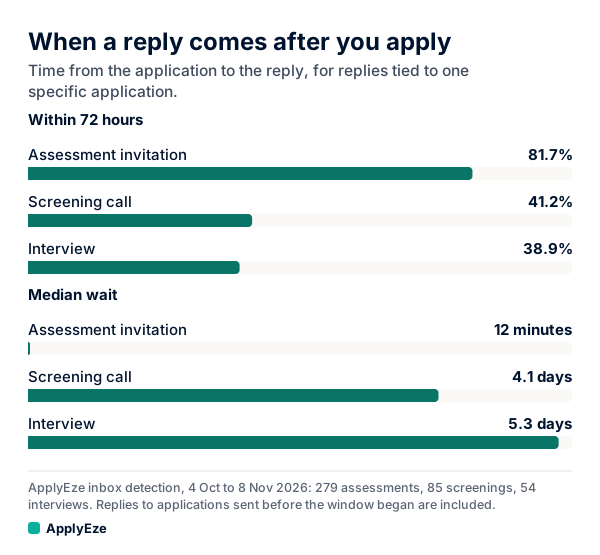
The chart compares the wait after an application. Among 279 assessment invitations tied to one application, out of 465 found, half came within about 12 minutes, and 81.7% within 72 hours. Screening invitations took a median 4.1 days and interview invitations 5.3. These cover all test brands, and they are machine labels, so found and not confirmed. They come from one staffing team, and results for any one person will differ. The timing runs from the application, not from an interview.
Half arriving within 12 minutes is too fast for people to be reading applications. That speed points to automation: most likely a rule fired when your application arrived or moved to a stage. Our post on assessment emails after applying lays out the triggers. So do not take it as a sign someone liked your resume, and do not feel you have to start at once. The score can still count, so treat the email as a real step with a deadline.
When it lands, in this order:
- Read the email for the deadline and the tests named. Put the date on your calendar. If a link lapses, only the employer can help.
- Ask if it does not say. SHL's own advice is to make sure you understand which assessments you will take.
- Practice the same type on SHL Direct. Allow a couple of sessions for ability tests.
- Run SHL's Browser Check on the device you will use.
- Raise any adjustment now, before you open the test.
- Sit it in one go, somewhere quiet, with other tabs closed.
If something goes wrong in the test, write to the employer the same day. SHL says it cannot reset a completed test without authorization, and that a retake is up to the company. Some employers also set a cooling-off period before another attempt.
What to do if you need an accommodation
SHL's accessibility page says most of its assessments can be adjusted. Examples it lists are support for screen readers, additional time on timed tests, changes to how a test is presented, large print on screen or paper, and text scripts for voice sections in video or avatar tests.
The timing matters more than anything else on that page. SHL recommends telling the recruiting organization as soon as possible if you are comfortable doing so, and warns that "Waiting until the day of the assessment may limit the accommodations available to you." You have two routes: the recruiter who invited you, or SHL's Candidate Support form. If you are not sure what to ask for, SHL points to ClearTalents, a free questionnaire for defining your support needs.
The law differs by country. SHL's page cites the Equality Act 2010 in the UK, which it says places a duty on employers to make reasonable adjustments at every stage of recruitment, and the Americans with Disabilities Act of 1990 in the US. A sample note, with invented details:
Subject: Assessment adjustment for the Financial Analyst application
Hi Dana, I have been invited to complete SHL assessments for this role by 14 November. I have a condition that affects reading speed, and I would like to request additional time on the timed tests. Could you tell me what you need from me, and whether the deadline can move while this is arranged? I have not started the tests yet.
You do not have to name a condition to open this conversation, and you can ask first what the process is.
Getting feedback afterward
SHL will not give you your results. It calls the employer the controller of your personal data, and says its contracts prevent it from sharing them without permission. Any feedback is at the employer's discretion. SHL's advice page still says many organizations offer it, and "If feedback is not offered, ask if it can be made available." One short email costs little and can tell you what to work on next time.
Where ApplyEze fits
ApplyEze does not take assessments for you, so the test stays yours. What it takes on is the form in front of it. On a self-serve account you queue the roles you want from a board that draws on more than 100,000 employer boards polled directly, and the desktop app fills and submits each form on your computer while it is on and awake. Workday and Oracle jobs need a connected application inbox. You record replies yourself.
So bookmark SHL Direct and run the Browser Check before the next invite lands. If you would rather spend your time on practice tests than on application forms, your first 50 applications are free, no card needed, and ApplyEze builds a resume for each posting.