

Staffing agency software usually means an applicant tracking system joined to a recruitment CRM, as Bullhorn's glossary puts it, with resume parsing, a searchable candidate database, reporting and sometimes back-office tools for time and invoicing. That is your system of record. Vendor lists tell you who sells one. Recruiterflow's "13 Best" list, for example, gives ratings and pricing notes and puts Recruiterflow first. What those lists do not give you is a specification of what your team should be able to see at 9 a.m. on a working day, once software is making decisions for you. This post is that specification, written as a checklist you can take into any demo.
We make ApplyEze, which applies for the candidates a staffing team represents. It sits beside a system of record and not in place of one: it does not hold your clients, placements, timesheets or invoices. Each section below is a test you can run on any vendor, with what ours looks like beside it.
What most staffing software does, and the gap
A system of record answers "what happened". A candidate was added, a status changed, an application was logged. That was enough while people did the work, because you could ask the person why.
Automation removes the person you would ask. ApplyEze Autopilot, our team product, plans roles, judges them and applies with nobody queueing anything. Autopilot is set up today for staffing and recruiting teams that work with ApplyEze. If you are job hunting on your own, you can start with 50 free applications on sign-up, no card needed. You pick the matches and queue them in the desktop app, and ApplyEze fills and submits each form. The app runs on your computer, so keep it on and awake until your queue finishes, and Workday and Oracle roles need a connected inbox.
The scale of what goes unseen is the argument for all that follows. In the 14 days to 9 November 2026, 259,514 roles were planned for candidates on Autopilot. Here is where they ended up:
| Ended as | Roles | Share (our arithmetic) |
|---|---|---|
| Rejected | 209,893 | 80.9% |
| Applied | 34,541 | 13.3% |
| Released (run ended with no application, for any reason) | 9,162 | 3.5% |
| Closed | 2,402 | 0.9% |
| Ready | 1,444 | 0.6% |
| Withdrawn | 1,375 | 0.5% |
| Duplicate | 624 | 0.2% |
| Still being judged, and dry runs | 73 | under 0.1% |
A tool that shows only what was sent shows you about one row in eight. The rest are decisions you may one day need to explain to a candidate.
The record you should get per role
Ask for one row per role, with these fields. Each answers a question that comes up on a bad day.
| Field | The question it answers |
|---|---|
| Score and reason | Why did this go out, or not? |
| Role family | Is this candidate drifting into the wrong field? |
| Time planned | Was the role found while it was still fresh? |
| Time judged | Is a slow decision step letting roles go stale? |
| Time claimed | How long did a ready role wait for a free slot? |
| Time settled | How long did the run take, and did it get stuck? |
| Status | Where did everything end up? |
| Tries | Did it retry, and how often? |
| Failure code | Is this one employer, one system, or one candidate's profile? |
Here is what three such rows might look like. They are invented for this post, with simplified field names, and the companies and codes are not real.
| Field | Sample A | Sample B | Sample C |
|---|---|---|---|
| Role | Payroll Analyst, Example Co | Finance Director, Sample Inc | Staff Accountant, Demo LLC |
| Score | 8 | 3 | 7 |
| Reason | Close neighbour of the target role, at their level | Asks for 10 years more than they have | Target role at their level, with one tool missing |
| Role family | Finance | Finance | Finance |
| Planned, judged | 09:10, 09:14 | 09:10, 09:14 | 09:20, 09:24 |
| Claimed, settled | 09:40, 09:43 | None | 10:02, 10:06 |
| Status | Applied | Rejected | Released |
| Tries | 1 | 0 | 2 |
| Failure code | None | None | form_not_finished |
Those timestamps are what let you measure the system instead of arguing about it. ApplyEze's own, from the same record: the median time from a role being planned to being judged was 4.9 minutes, and from a lane picking up a role to the application going in was 2.5 minutes, 4.9 at the 90th percentile (7 days to 9 November 2026, the second on 17,994 applications). The median application went in 32.9 hours after the posting date, though some systems stamp a posting at midnight, so short times are approximate.
Status, grouped by application system, gives you the table we would ask every vendor for. Across 14 systems and 45,376 runs in the 14 days to 9 November 2026, 79.1% ended in a submitted application, from Rippling at 94.5% to iCIMS at 55.5%. "Released", which is everything else, covers a run that ended for any reason, including a posting that closed.
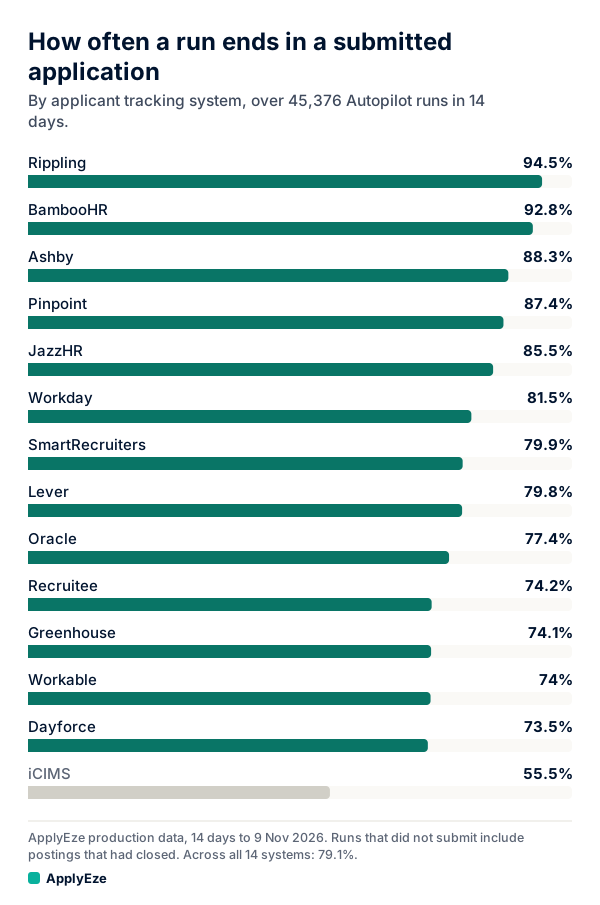
That chart is the whole fleet on Autopilot, not one team, and iCIMS and Dayforce count only where switched on. The method is in job application completion rate.
ApplyEze keeps this record for every role. What a screen shows differs by vendor and by login, so ask any vendor, us included, to show you the actual screen your recruiters will use, agree in writing on any field you depend on, and ask how long records are kept.
Alerts that annotate and never stop a run
Ours are checked every 10 minutes, with one open alert per problem, cleared when the problem ends. Four kinds matter to a staffing team:
| Alert | What it tells you | Where to look first |
|---|---|---|
| Nothing going out while work is ready | The pipe is blocked | Servers and the queue |
| A low applied rate | Runs are ending without applications | Results by system and failure code |
| Deliveries behind | Applications are reaching your system late | Your receiver, then ours |
| A candidate short of roles | Too little supply | Titles, places and the age limit |
An alert annotates. It never stops a run. That is a deliberate choice. A low applied rate might mean a broken form or might mean a batch of postings closed. The evidence for "something looks wrong" is weaker than the evidence you would want for "halt everyone's work", and when an automatic stop is wrong, it stops healthy candidates too. So a person decides, and can pause one candidate or the whole company.
So ask who sees what, and how fast. At ApplyEze, automated health checks watch the queue and the servers around the clock and raise alerts for our team. Your company's portal has its own attention list, which flags a candidate short of roles or paused. Servers report health every 15 seconds, and one silent for 5 minutes stops counting toward capacity by itself.
Who sees what: recruiter, admin, ApplyEze
Each company sees only its own candidates, and that is enforced in the database with row-level security, which the staffing automation post covers in detail. Within a company:
| Recruiter | Company admin | ApplyEze admin | |
|---|---|---|---|
| Candidates in view | Assigned ones | Whole company | Across companies, under named permissions |
| AI review with reasons | Assigned ones | Whole company | Yes, under the same permissions |
| Pause and resume | Assigned ones | Anyone, and pause all | Yes, and only ApplyEze can lift its own pause |
| Fit level, pace, roles, skips | No | Yes | Yes |
| Working hours and time zone | No | Yes | The company's choice |
| Daily ceiling, pass mark, employer limit | No | No | Yes |
The candidate is a fourth viewer. A candidate on Autopilot sees what was sent in their own account, but not the score or the reason. Decide what your team says when a candidate asks why a role went out, because they cannot look it up.
Two tests for any vendor. Ask a recruiter login to open a candidate assigned to someone else. And ask whether company staff appear by name in the activity feed, since "admin changed a setting" will not help you in a dispute. Ours do: each portal change writes to the company's own activity feed and to our audit log.
Settings per company and per candidate
Staffing teams run exceptions all day: one candidate at a low pace, one who cannot work in a certain state, one client they must not apply to. Good software lets a value fall back from the most specific level that sets it. Ours goes candidate, then company, then default.
| Setting | Candidate | Company | Default |
|---|---|---|---|
| On or off | Yes | Own switch | Own switch |
| Fit level | Yes, can only raise | No | The pass mark |
| Applications per day | Yes | Yes | Yes |
| Daily ceiling | No | Yes | Not applicable |
| Posted within (3, 7, 14 or 30 days) | Yes | Yes | Yes |
| Priority | Yes | No | Normal |
| Employers to skip, up to 200 | Yes | No | No |
| Working hours and time zone | No | Yes | Default time zone only |
| Pause | Yes | Yes | Global switch |
A demo test that catches weak inheritance: set a company value, override it for one candidate, clear the override, and confirm the candidate falls back. Then ask what "today" means in the reports. Ours runs midnight to midnight in the company's time zone, and not in UTC, so an evening application in New York counts on that day and not the next.
Getting data into your own system
ApplyEze sits beside your system of record, so the record has to reach it. There are two feeds, set up per company by ApplyEze staff.
Out to you. A signed webhook sends each application to your endpoint, with your own id for the candidate, the company, job title, job URL, application system and time. It covers applications that went out. It is not a feed of every judge decision, so if you want rejected roles in your own warehouse, raise that before you sign. Deliveries are signed with HMAC-SHA256 and get 6 attempts in all, waiting from 1 minute and doubling up to 1 hour. Agree up front how a delivery missed during a long receiver outage gets sent again.
In from you. You can tell ApplyEze about applications your own people make, so they are not repeated. Within a minute of accepting them, Autopilot stops considering those postings for that candidate. A feed like this is easy to skip and costly to miss: without it, a recruiter's by-hand application and an automated one can reach the same employer. ApplyEze is built to stop double applications, but it can only check what it knows about.
One design note for whoever builds your receiver. The same run can arrive more than once, for example after a lost response. Our contract tells you to key your write on your client id and the lower-cased job URL, and not on our run id alone, because a person may have logged the same posting first. Ask other vendors how they handle this. If they have no answer, expect duplicates in your data.
A one-page checklist for any vendor
Copy this into your notes before a demo. Ask to be shown each one, on screen, rather than told.
The record
- One row per role, including roles turned down, not only those sent.
- A reason in plain language for each decision.
- Timestamps for planned, decided, started and finished.
- A status for every role, with counts that add up to the total.
- Tries and a failure code, visible on the screen my team will use.
- Results by application system, with the definition of failure written down.
- How long records are kept.
Alerts
- A list of what is checked, and how often.
- Who sees each alert, and whether anyone is told outside the app.
- Whether an alert can stop work, and who can overrule it.
- A flag for each candidate who is short of roles, and for each who is paused.
People
- A recruiter login that cannot open another recruiter's candidates.
- Named staff in the activity feed, with a time on every change.
- Which roles can change targets, and which can only pause.
- What the candidate sees, and what they do not.
Settings
- Values that fall back from candidate to company to default.
- A company-wide ceiling that a candidate setting cannot pass.
- "Today" defined in my time zone.
- A skip list per candidate.
Data
- Signed deliveries into my system, with a written contract.
- Retry count and total retry time, and what happens after the last attempt.
- A way to send my own applications back, so they are not repeated.
- Export of the record and the audit log, with a sample file.
A vendor who can show all of that has earned a second meeting. Bring the list to ours. How a staffing team runs Autopilot walks through a working day, and team plans are set up with us at hello@applyeze.com. To see the form filling first-hand before that call, you can open a personal account with 50 free applications, no card needed, and pick a few roles yourself in the desktop app.