

Staffing automation means handing parts of a staffing firm's work to software, and most guides stop at listing the tasks. Recruiterflow's 2022 guide calls it "technology that enables recruiting and staffing firms to create automated processes" and covers pre-screening, job posting, emails, interview booking and follow-ups. It says nothing about audit logs, permissions, retries or data separation. Those matter more once software acts in a candidate's name, because a mistake lands on an employer's desk with your candidate's name on it. This post sets out the controls to demand, how ApplyEze builds each one, and how to test it on a call.
We make ApplyEze, and these are mechanisms in our product, built with the controls a staffing team expects. No outside certification or audit backs them, so this post shows you how to check each one yourself.
Why labels are not controls
A label says that someone looked at something, once, for some scope. It does not tell you what happens when a candidate is paused halfway through a run, or who changed a daily target last Thursday. A control is something you can watch happen. So each section below has two parts: what the control does, and a test you can run on a call. Ask the same of anyone.
The product these controls belong to is ApplyEze Autopilot, and they run at volume. Across all its channels, ApplyEze has delivered 94,207 applications to 9,769 employers since August. On Autopilot, 79.1% of 45,376 runs across 14 application systems ended in a submission in the 14 days to 9 November 2026. Autopilot is set up today for staffing and recruiting teams that work with ApplyEze. If you are job hunting on your own, you can start with 50 free applications on sign-up, no card needed. You pick the matches and queue them in the desktop app, and ApplyEze fills and submits each form. The app runs on your computer, so keep it on and awake until your queue finishes, and Workday and Oracle roles need a connected inbox.
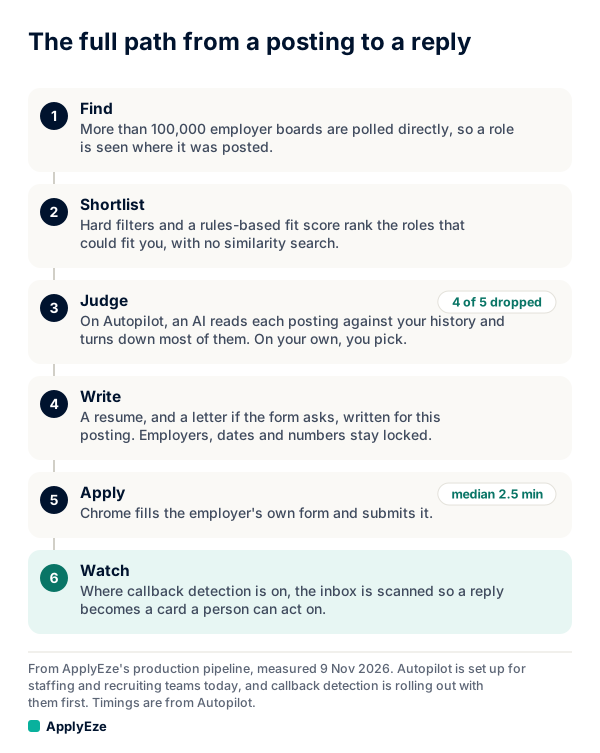
The chart shows the path a role takes. The controls below sit around it: switches gate the apply step, the record follows a role through every step, and retries and webhooks act at the end. The last step, watching the inbox, is callback detection, which is rolling out with staffing teams first and is not part of self-serve accounts yet.
Three switches, all must be on
What it does. ApplyEze has a switch, the company has a switch, and the candidate has a switch. All three must be on for a real application to start. They have separate owners because they answer separate questions. Ours answers "is the system fit to run". The company's answers "do we want this running". The candidate's answers "should this person be applying now".
Some of the rules are deliberately lopsided:
- A pause set by ApplyEze can be lifted only by ApplyEze.
- When an ApplyEze admin turns a candidate off, the company cannot turn them back on.
- A company's "resume all" leaves individually paused candidates paused.
- Turning a candidate off stops planning and judging for them too, not only new starts.
A switch stops new starts. A running application finishes, because cutting a form midway could leave it half submitted. Changes reach the planner at its next run, within 10 minutes. Control runs through settings, not single applications: there is no approval step, and a run ends applied or released without waiting for a person.
Test it on a call. Ask the vendor to pause one candidate on their own, then pause the whole company, then resume all. The first candidate should still be paused. Then ask what happens to a run in progress at the moment of the pause.
Who changed what, and when
What it does. Every change made through the admin page or the portal is logged, with who made it and when. A portal change writes two rows: one to the company's own activity feed, where company staff appear by name, and one to our audit log. Admin changes, inbox access and profile edits are logged with who did what and when.
Test it on a call. Have the vendor change a daily target while you watch, then open the log and show you the name, the time, and the old and new values. Then ask: "Can your own staff change this any other way, and would that appear here?" A vendor who says "nobody ever could" has not thought about it.
Each company sees only its own candidates
What it does. Each company's candidates, runs and documents are separated by row-level security in the database, and a recruiter sees only assigned candidates. Portal reads and writes run as the signed-in person, and the database checks the caller. That matters because the rule sits below the application code. PostgreSQL's documentation describes row security as restricting "on a per-user basis" which rows queries can return or change, and when it is enabled with no policy, "a default-deny policy is used". A bug in a web page has a harder time leaking what the database will not return.
The same page says superusers and roles with the BYPASSRLS attribute "always bypass the row security system", so ask any vendor who holds such access. ApplyEze staff have their own roles, with named permissions per area. AI providers receive candidate data to write resumes and fill forms. The judge gets a limited set of fields, which excludes the candidate's name, contact details and visa status, and no candidate, recruiter or machine holds an AI key.
Test it on a call. Ask for logins at two test companies. From one, try to open a candidate's page from the other by pasting its URL. Then ask for the list of outside services that receive candidate data, with what each receives.
Retries, and the run that is never replayed
What it does. This is the control we would look at first in any product that submits forms. Every run ends one of six ways:
| What happened | What ApplyEze does |
|---|---|
| Submitted | Marked applied |
| Already applied | Marked duplicate |
| Posting closed | Marked closed |
| Never started, or known not to have submitted because of an infrastructure problem | Back in the queue after 15 minutes, then 1 hour, then 4 hours, at most 3 tries |
| Submit state unknown | Released, never replayed |
| A real form failure | Released with its reason |
The fifth row carries the weight. Suppose a browser dies a moment after the final click. Nobody knows if the employer got the application. A naive retry could send a second one, and employers now act on repeats: Greenhouse's rules can automatically reject applications over a set frequency, and Ashby's limits "automatically block excessive applications". So when in doubt, we do not send.
ApplyEze is built to stop double applications. Each posting is checked against the history it knows about, a lock stops two lanes applying to the same posting at once, and your team can feed in the applications your own people make, so the check covers them too.
Test it on a call. Ask: "What do you do when the browser dies after clicking Submit?" If the answer is "we retry", ask how they know the first one did not land.
Signed webhooks and a queue that survives restarts
What it does. Each application can be delivered to your system by a webhook signed with HMAC-SHA256, with 6 attempts in all, waiting from 1 minute and doubling up to 1 hour. The signature lets your receiver prove the message came from us and was not altered. Verify it over the raw bytes before parsing anything, and compare in constant time. GitHub's guidance on the same scheme says "Never use a plain == operator". A sample check in Node, written for this post:
import { createHmac, timingSafeEqual } from "node:crypto";

// rawBody is the request body as received, not re-serialized JSON.
export function isGenuine(rawBody, header, secret) {
  const expected = "sha256=" + createHmac("sha256", secret).update(rawBody).digest("hex");
  const a = Buffer.from(expected);
  const b = Buffer.from(header ?? "");
  return a.length === b.length && timingSafeEqual(a, b);
}
Separately, the queue lives in the database, so a restart does not lose queued roles. Servers report health every 15 seconds, and one silent for 5 minutes stops counting toward capacity by itself. Deploys roll host by host: new starts pause, running work finishes, and a failed start restores the old release. Limits exist per candidate, per company, on work in flight and on starts per hour. We do not publish those numbers. Alerts are checked every 10 minutes and annotate, and they never stop a run. Agree a re-send plan for any receiver outage before you depend on the feed.
Test it on a call. Ask for the written webhook contract, then send your own test delivery with a bad signature and watch it get refused by your code. Then ask to read the write-up of the vendor's last outage. If there has never been one, they have either not been running long or not been looking.
Questions to ask any vendor, including us
Our answers are as of 9 November 2026. Hold us to them.
| Question | A weak answer | ApplyEze's answer |
|---|---|---|
| Which outside certifications or audit reports do you hold, and what do they cover? | A logo, with no report | None backs these controls. Test the mechanisms |
| How many independent off-switches are there, and who owns each? | "There is a stop button" | Three: ApplyEze, the company and the candidate |
| What does stopping do to running work? | "Everything stops at once" | Running applications finish, and ready roles stay queued |
| Can a person approve each application? | "A human is in the loop" | Control is through settings. There is no approval step |
| Who changed this setting, and when? | "Contact support" | Logged for changes made through the admin page or the portal |
| How is my data kept from other clients? | "We take security seriously" | Row-level security in a shared database, checked against the caller |
| Which of your staff can see my candidates? | "Nobody" | ApplyEze staff, under named permissions |
| Which outside services receive candidate data? | Silence | AI providers do, to write resumes and fill forms |
| What happens if the browser dies after Submit? | "We retry" | Released, and never replayed |
| How do you stop double applications? | "It cannot happen" | History check and a per-posting lock, built to stop them |
| How do I know a delivery came from you? | "We send from fixed addresses" | HMAC-SHA256 signature over the raw body |
| What happened in your last outage? | "We do not have outages" | 7 and 8 November 2026: 676 applied runs went unrecorded, so our counts for those days read slightly low |
| What does an update do to running work? | "Zero downtime" | New starts pause, running work finishes, and a failed start restores the old release |
Ask any vendor as well for an export of the log and how long records are kept. Write the answers down, and date them. Staffing agency software has the companion checklist for what your team should see each day. Recruiting automation covers what to hand off in the first place. And recruiter workload covers what these controls are protecting: the hours recruiters get back.
Controls make a product checkable, and checkable is what you can take to your own clients. Team plans are set up with ApplyEze rather than bought online: hello@applyeze.com. To see the form filling first-hand before that call, you can open a personal account with 50 free applications, no card needed, and pick a few roles yourself in the desktop app.