

Autopilot for recruiters means three different things, depending on who sells it. Pin's Autopilot takes over the conversation once a candidate replies to a recruiter's outreach. Perfect's Autopilot reviews sourcing match cards and decides whether to add or skip each candidate. ApplyEze Autopilot, which we make, works the other way round: a staffing team sets up the candidates it represents, and the software finds roles for each one, scores the fit and applies. The recruiter's day moves from filling in forms to reading what went out, fixing candidates who are short of roles, and handling replies. Here is what that looks like on a Tuesday.
ApplyEze Autopilot is set up today for staffing and recruiting teams that work with ApplyEze. If you are job hunting on your own, you can start with 50 free applications on sign-up, no card needed. You pick the matches and queue them in the desktop app, and ApplyEze fills and submits each form. The app runs on your computer, so keep it on and awake until your queue finishes, and Workday and Oracle roles need a connected inbox.
The system behind a team's day is large. ApplyEze polls more than 100,000 employer boards directly, holding about 900,000 active jobs, and has delivered 94,207 applications to 9,769 employers since August across all its channels. On Autopilot, in the 14 days to 9 November 2026, the judge turned down about 4 of every 5 shortlisted roles, and 79.1% of runs across 14 application systems ended in a submission. In the 7 days to that date, a role was judged a median of 4.9 minutes after it was planned, and an application took a median of 2.5 minutes.
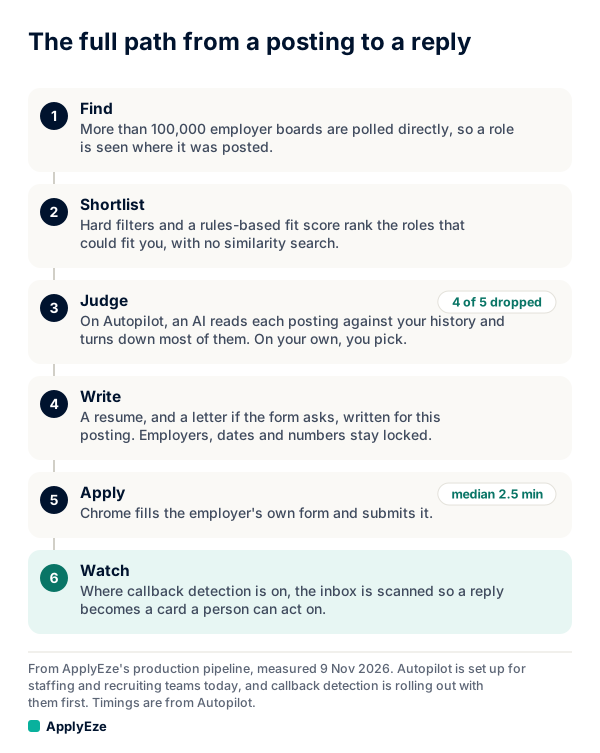
The chart shows the loop. Every 10 minutes a planner builds a shortlist from each candidate's rule-scored matches, same-day postings first. It fences out roles already applied to, skipped companies, citizenship and clearance limits and anything outside a strict location choice, and it limits how often it applies to one employer. Every 2 minutes an AI judge takes roles in batches of 20 and scores each from 0 to 10. Roles that clear the candidate's bar wait in a queue until a browser on ApplyEze's servers applies. The last step, watching the inbox, is callback detection. It is rolling out with staffing teams first and is not part of self-serve accounts yet.
One fact shapes everything else on this page. There is no approval step. A run ends applied or released, and it never waits for a person. So every control below works on settings, not on single applications.
A Tuesday, hour by hour
This is a sample day written for this post, for a team with working hours of 9 to 5 in New York. It is not any team's real calendar.
| Time | Who | What they do | What they are looking for |
|---|---|---|---|
| 8:45 | Company admin | Opens the attention list | Candidates short of roles, or paused |
| 9:00 | Nobody | New applications start. Planning and judging kept running overnight | Nothing to do |
| 9:30 | Recruiter | Reads the AI review for assigned candidates | The same turned-down reason repeating |
| 11:00 | Recruiter | A candidate is deep in a final round elsewhere, so the recruiter pauses them until Friday | Running work finishes, and ready roles stay queued |
| 12:00 | Recruiter | Keeps the afternoon open for replies | At one staffing team, 167 of 336 human callbacks landed from noon to 5 p.m. New York time |
| 1:00 | Company admin | Helps a candidate short of roles: adds a target title, moves "Posted within" from 7 to 14 days | Whether the ready count recovers |
| 4:50 | Nobody | Last new start of the day | The run is in by 5:00 |
| 5:00 | Company admin | Checks applications sent today against each target | If short, the ready count comes first, before calling it a fault |
The 336 are callbacks found in email received in candidates' application inboxes from 4 October to 8 November 2026, when our scanner first ran on 3 November and read back. They are machine labels that no person reviewed, and some may have come from candidates' own applications.
The five-step setup
A company admin sets up each candidate in a five-step wizard. An ApplyEze admin can do the same from the admin page.
- Roles. One to 10 job titles and a level. New roles apply to postings as they arrive, so changing a title today does not re-score the matches already there. Roles can come from the candidate's profile, so a finished candidate can start with one choice.
- Where. A work style (remote only, on-site or hybrid, or any), places as US cities with a radius or whole states, and a choice between "only apply in these places" and anywhere in the US. The judge never sees location, so the strict choice is what holds a candidate to a place.
- Fit. The default bar (6 and up), Strong fit (7 and up) or Top fit (8 and up), how recent a posting must be (3, 7, 14 or 30 days), and up to 200 employers to skip. The step shows how many roles are ready at each level before you save, so the cost of a higher bar is visible.
- Pace. Applications per day, up to the company's ceiling, and a priority of Low, Normal or High. The portal's quick picks are 25, 50, 100 and 200 a day. Those are settings, not results.
- Review. Every choice on one page, with "Save and start" where the company is allowed to turn candidates on. Otherwise the page says: "ApplyEze will start this candidate."
Being on is not enough for a role to run. The candidate also needs a phone number, first and last name, email, a master resume and at least one job on file. If an application never starts, check that list first.
Who can change what
The recruiter's power is small on purpose: see, read and pause. Each company sees only its own candidates, and a recruiter sees assigned ones.
| Decision | Recruiter | Company admin | Note |
|---|---|---|---|
| See candidates and the AI review | Assigned only | Whole company | |
| Pause or resume one candidate | Assigned only | Yes | A pause set by ApplyEze can be lifted only by ApplyEze |
| Pause all, resume all | No | Yes | Candidates paused one by one stay paused after resume all |
| Turn a candidate on | No | Where ApplyEze allowed the company | A recruiter sees: "Autopilot is turned on by your admin." |
| Turn a candidate off | No | Yes | If an ApplyEze admin turned them off, the company cannot turn them back on |
| Roles, level, work style, places | No | Yes | |
| Fit level | No | Yes, upward only | The company cannot go below ApplyEze's minimum |
| Applications per day | No | Up to the ceiling | |
| Posted within, priority, employers to skip | No | Yes | |
| Working hours and time zone | No | Yes | |
| Company's daily ceiling, pass mark, employer limit | No | No | ApplyEze admin only |
Every change made through the admin page or the portal is logged, with who made it and when. Changes reach the planner at its next run, within 10 minutes. The audit trail is covered in staffing automation controls.
A daily target is a ceiling, not a promise
Set a candidate to 100 a day and some days they will get fewer, because the judge is selective. The math explains most of it.
In the 14 days to 9 November 2026, 50,609 of 259,378 judged roles scored 6 or higher, or 19.5%. Across all 14 systems in the same two weeks, 35,874 of 45,376 settled runs ended in a submitted application, or 79.1%, where the rest include postings that closed. Multiply the two: 0.195 x 0.791 is about 0.154. So 100 applications a day needs roughly 650 shortlisted roles a day (100 / 0.154). That is our arithmetic on fleet averages that count by different dates, so treat it as a rough guide. One candidate can sit well above or below it. A candidate with two narrow titles in one city may never see 650 roles.
When a candidate falls short, the portal says so: "Fewer roles are ready than this pace needs, so expect fewer applications until new ones arrive." In rough order of what to try:
- Add target titles. A role doing the candidate's work under a title you did not list ranks low.
- Widen places, if the candidate can really work there.
- Lengthen "Posted within". Older roles up to 30 days can go out, and a strong older role can still beat a weak new one.
- Lower the target, so the number on screen matches what the search can supply.
Some details trip people up. The day runs midnight to midnight in the company's time zone, default New York, and is not a rolling 24 hours. Failed attempts do not count against the target. Only applications sent and roles in progress do. The target keeps some room for roles posted later that day, and roles posted that day can go a little over it, while older roles stop at the target.
Working hours, pausing and resuming
Working hours are optional. A company admin picks the days, a start and an end, in one of seven US time zones, on 15-minute steps, spanning at least 60 minutes. The last new start is 10 minutes before the end, so a run started at 4:50 is in by 5:00. Hours decide when applications start. Roles can still be reviewed outside them. A company with no hours set has no time limit, and hours apply to Autopilot only, not to the desktop app.
Pausing keeps a candidate's place. New applications stop, a running application finishes, because cutting a form midway could leave it half submitted, and ready roles stay queued, so resuming picks up straight away. Turning a candidate off goes further: planning and judging stop for them too. Use a pause for a few days away, a final round elsewhere or a profile being fixed. Use off for a candidate who has accepted an offer or left.
A pause can run until a set time or until someone resumes it. One with no end date stays on until a person lifts it, which is why paused candidates sit on the attention list.
What a recruiter reads in the AI review
The AI review shows the latest decisions: the candidate, the role, the fit label, Passed or Turned down, and a one-sentence reason of up to 240 characters. Top role families appear too. Candidates do not see the score or the reason in their own account. Three samples, written for this post, not real verdicts:
- Strong fit, Passed. "Close neighbour of the candidate's payroll analyst target, at their level, and the posting's tools match their skills."
- Passed at the default bar. "Plausible on paper, but the role leans on audit work the candidate has only touched briefly."
- Turned down. "Posting asks for 8 years managing a team, and the candidate has 3 years and no management titles."
Read the sentence as well as the label. The judge's rubric runs from 10, squarely a target role at their level, through 7 to 9, a close neighbouring role they could do now, to 0 to 4, a different field or a level far above or below. By default a role needs a 6, and a team can raise the bar per candidate.
The judge reads the title, the company, the first 2,000 characters of the description, the parsed years and level, and up to three later sentences stating years of experience. About the person it reads target roles, role families, level, years, a new-grad flag, skills and past job titles. It does not read resume bullets, name or contact details. It is not given a location or visa status to score against, and it is told to judge only the work and the level.
What to do with what you read:
| The reasons keep saying | Likely cause | What the admin can change |
|---|---|---|
| Asks for far more years | Target level sits above the candidate's record | Level, or the titles chosen |
| Different field | One target title pulls in the wrong family | Remove or replace that title |
| Passed, but the reasons keep naming a gap | Bar is at the default | Raise to Strong fit, and expect fewer applications |
| Almost no decisions at all | Too little supply | Titles, places, "Posted within" |
A higher bar sends fewer applications, each a closer match.
Two checks on the judge itself. On 20 October 2026 a separate, stronger AI model re-judged 601 decisions without seeing the verdict and agreed on 502, or 83.5%. On 26 October a blind audit of 193 applications asked whether a recruiter would have sent each one, and 84% of Autopilot's read that way against 69% of those hand-picked by recruiters. The sample is small, and it is a model's reading, not a recruiter's.
What one staffing team saw, month by month
This is one team's own tracker, grouped by the month of the application. A human callback means a screening call, an interview or an offer. It is the team's whole record across every channel, not Autopilot alone.
| Applied in | Applications | Candidates | Human callbacks | Per candidate | Per 1,000 | Applications per candidate |
|---|---|---|---|---|---|---|
| Mar 2026 | 7,288 | 11 | 24 | 2.2 | 3.3 | 663 |
| Apr 2026 | 9,736 | 13 | 29 | 2.2 | 3.0 | 749 |
| May 2026 | 9,963 | 17 | 28 | 1.6 | 2.8 | 586 |
| Jun 2026 | 9,005 | 18 | 27 | 1.5 | 3.0 | 500 |
| Jul 2026 | 13,033 | 13 | 47 | 3.6 | 3.6 | 1,003 |
| Aug 2026 | 13,380 | 17 | 41 | 2.4 | 3.1 | 787 |
| Sep 2026 | 21,335 | 22 | 90 | 4.1 | 4.2 | 970 |
| Oct 2026 | 63,508 | 29 | 204 | 7.0 | 3.2 | 2,190 |
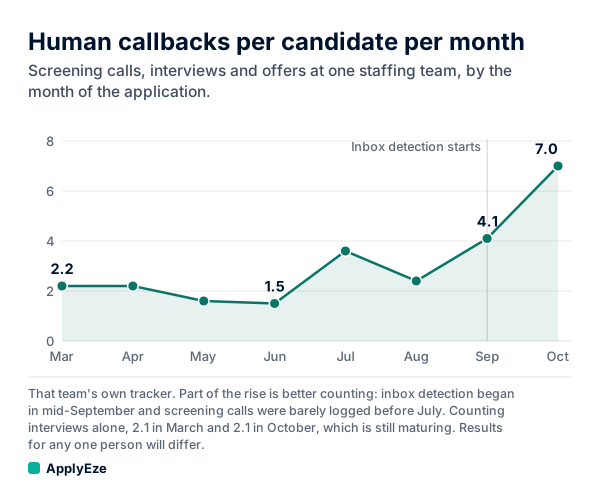
So human callbacks per candidate went from about 2 a month in spring to 7 for October applications, while the rate per 1,000 applications held at about 3. Volume rose more than threefold and the rate did not fall. Applications sent through ApplyEze at that team also earned a rising rate through the fall, from 1.5 per 1,000 in late September to 3.2 in late October.
The table counts every human callback the team logged, including ones from candidates' own applications, which keeps the spring numbers high. Part of the rise is better counting: automatic inbox detection in that team's tracker started in mid-September, before which recruiters logged callbacks by hand, and screening calls were barely logged before about July. Counting interviews alone, the per-candidate figure is flat so far, 2.1 in March and 2.1 in October, with October applications still maturing and many at the screening stage. It is one team, and results for any one person, or any other team, will differ. The full reading is in callbacks per candidate.
How a team gets set up
Team plans are set up with ApplyEze rather than bought online. Talk to us at hello@applyeze.com. From there:
- ApplyEze sets Autopilot up for your company and decides whether your admins can turn candidates on. Until then the portal says: "Autopilot isn't set up for your company yet. Your ApplyEze contact can turn it on."
- Your admin adds candidates. A draft cannot start, so finish the profile first.
- Your admin picks "Start autopilot" at a daily number, or opens the full five-step setup.
- If you want each application in your own system, ask us to set up the signed webhook. What to expect from staffing agency software covers what to ask for there.
Fill in saved answers before you start. Hard facts come from the candidate's profile. When a required question is not covered by saved answers, ApplyEze still fills it rather than stopping the run, so that answer may not come from the candidate. Use a dry run in the desktop app first, and read what was sent. Some employers ask applicants not to use AI or automation. Whether to apply there is your call and your candidate's, and "Employers to skip" is how you act on it.
Each resume is built for its posting, with employers, titles, dates, schools, degrees and certifications from the candidate's own record, and an audit of 84 sampled resumes on 4 November 2026 found 0 invented employers, dates, degrees or numbers. ApplyEze also brings the posting's named skills and tools onto the skills line, even when the candidate's own record does not list them. There is no step to remove one before a live run, so use a dry run to see what it writes, and have the candidate ready to discuss anything on the page.
Measure it the way you would measure a recruiter. Recruiting automation shows what to hand off and how to pilot it.
A team lead can see the form filling first-hand before that conversation: a personal account comes with 50 free applications, no card needed, and you pick the roles yourself in the desktop app.