

The application received meaning is simple: an employer's system logged your submission. It is a receipt and not a read. Greenhouse files this message under a template type called "Thank you for applying", which goes out "When a candidate has submitted their application" (Greenhouse). Ashby describes it as "the first message your inbound candidates receive" (Ashby). Nobody has to open your resume for it to send.
So the email proves one useful thing and nothing else: the application got in. The rest of this page is how to read the wording, what to do when no receipt comes, and how to tell a template from a person.
What it means
| The email proves | The email does not tell you |
|---|---|
| The form was submitted | That anyone has read it |
| The employer holds this email address for you | That you passed any screen |
| The employer and role you applied to, if it names them | How many others applied |
| The date, which you can use later | When you will hear more, unless it says |
The same moment goes by different names on a status page. At the University of Washington, Workday's automatic message "confirms receipt of their application" (UW). At UW-Madison the candidate sees Submitted. Greenhouse shows Applied. Auburn University's iCIMS setup has an internal status named Application Received, and candidates see Under Review from that point. That last one has its own post.
You will read that the status usually changes within 24 to 72 hours (Careery, no source given). We found nothing in the vendor or employer documents to back a general window.
Common wordings, labelled
Every line below is a sample we wrote to show a pattern. None is a real employer's email. Templates are written employer by employer, so yours will differ. The useful part is which words carry information.
| Sample wording | What it implies | What to do |
|---|---|---|
| Sample A: "We have received your application for Data Analyst. Thank you for your interest." | A plain receipt. Nothing more. | File it. |
| Sample B: "Our team will review your background and contact you if your experience matches our needs." | The word "if" is the content. Silence may be the only no you get. | Set your own reminder. Do not wait for a rejection. |
| Sample C: "You will hear from us within two weeks, whatever the outcome." | Someone wrote a promise into the template. It may or may not be kept. | Note the date. It gives you a fair reason to follow up the day after. |
| Sample D: "Due to the volume of applications, we are unable to respond to every applicant." | The employer is telling you in advance that silence is normal here. | Assume no reply unless you are moving forward. |
| Sample E: "This mailbox is not monitored. Please do not reply." | There is no person at this address. | Find a named contact if you need one. |
| Sample F: "Thanks for applying. Your next step is a short online assessment. The link expires in 5 days." | An automated next step, with a real deadline. | Decide soon, because it can expire. Do not read it as interest. |
| Sample G: "Hi Sam, I read your application and would like to set up 20 minutes this week." | This is no receipt. It names you, comes from a person's address and asks for time. | Check the sender and the company, then reply promptly. |
Look for three things: an "if", a date, and a task. Friendly phrases such as "we were impressed by your background" can sit in any template, so they carry nothing on their own.
No receipt at all
No email does not mean the application failed. A receipt is a setting, and several documents show it can be off:
- Greenhouse: "Organizations can configure job posts to send confirmation emails" (Greenhouse). It is an option at the job post step, labelled "Send confirmation email to candidates" (Greenhouse).
- Ashby: the setting reads Enabled once someone picks a template, and the email goes out only if the candidate applied through the job board. It is "not sent if you add the candidate manually" (Ashby).
- Lever: its public application interface has a field,
silent, that "Disables confirmation email sent to candidates upon application" (Lever). An employer's own careers site built on it can choose to send nothing. - iCIMS: the receipt may be a page and no email at all. When you finish, "a new page with a confirmation message will display, indicating that the application was submitted successfully" (iCIMS). Greenhouse also has a confirmation page, set per job board (Greenhouse).
If nothing arrived, work down this list:
- Did you see a thank-you page? That is evidence. Screenshot the next one you see, since it will not come back.
- Search your mail, spam included, for the employer's name and for the system's name, such as Greenhouse, Workday or iCIMS. Check which address you typed too. Greenhouse's candidate FAQ lists "a different or incorrect email address" as one reason an application does not show up in its candidate account.
- Open the candidate account if the system has one. A draft is the failure you are looking for. Oracle's candidate page lists applications as "Active, Inactive and Draft" (Oracle), and a draft has not been submitted. How to check a job application status lists where each system keeps this.
- Still nothing? Greenhouse's advice is the right one anywhere: "reach out to the recruiting team". Name the role and the date you applied, and ask whether they have it.
Automated against human replies, in our data
A receipt is the first automated message. It is rarely the last, and the next one can feel like attention. Our data shows how far apart the automated and human clocks run.
The figures come from callback detection, which is rolling out with staffing teams first and is not part of self-serve accounts yet. Where it is switched on, a scanner reads a candidate's application inbox and labels likely replies. Receipts themselves are not counted. This covers about 29 candidates at one staffing team and email received from 4 October to 8 November 2026. No person reviewed the labels, so these are found, not confirmed. Time runs from the application, not from an interview.
| Kind of reply | Found | Tied to one application | Median time after applying | Within 72 hours |
|---|---|---|---|---|
| Assessment invitation | 465 | 279 | 0.2 hours (12 minutes) | 81.7% |
| Screening call | 196 | 85 | 98.1 hours (about 4 days) | 41.2% |
| Interview | 140 | 54 | 126.8 hours (about 5.3 days) | 38.9% |
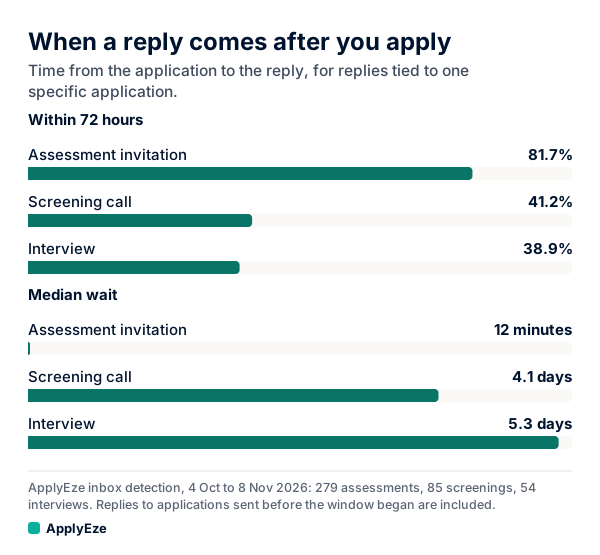
The chart shows the gap. Assessment invitations came at a median of 12 minutes, which is what a rule firing looks like. Screening invitations came at a median of about 4 days, which is what a person reaching a file looks like. So an invitation that lands within minutes of your application is usually automated, however warm it sounds. The timing columns cover only replies tied to one application, and the rest could not be tied, so some may have come from the candidates' own applications.
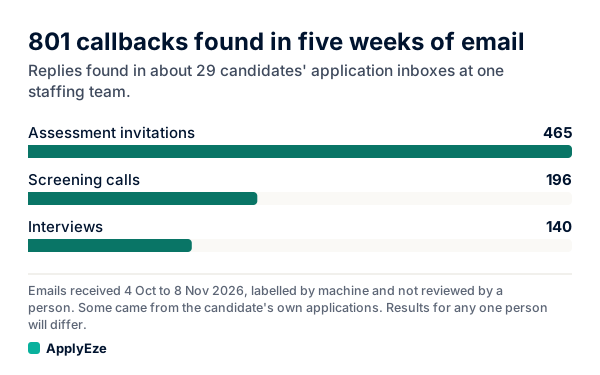
The second chart shows the mix. Of 801 replies found, 465 were assessment invitations, or 58% (465 / 801, our arithmetic). The other 336 were screening calls and interviews. So more than half of the replies we found were probably not a person deciding anything. Results for any one person will differ, and a count of replies says nothing about your odds of one.
Assessments still matter. They can be the real gate, and some expire. A fast one tells you a rule fired, possibly for every applicant. It does not tell you a recruiter is waiting on you.
What to do next
- Keep the email. It is the employer's own record that you applied, which beats anything you hold. The ranking of evidence is in proof of job application.
- Read it once for an "if", a date or a task. Put any date in your calendar. Do any task.
- Save the posting text and link. The posting will come down, and you will want the wording if someone calls.
- Set a reminder for day 8. Use how long to hear back after applying if you want the numbers behind that day.
- Do not send a thank-you or a second copy of your resume. No one is waiting for it.
- Send the next application. A receipt does not hold your place in a line.
When to worry
A silent week after a receipt is normal and not worth your worry. These are worth it:
- A receipt for a job you did not apply to. Someone used your address, or it is bait. Do not click through. Go to the company's site yourself.
- Any request for money. "Honest employers, including the federal government, will never ask you to pay to get a job" (FTC). A receipt also has no reason to ask for bank details or your Social Security number.
- The wrong role or a wrong name. You may have applied to the wrong requisition, or the form may have saved something you did not mean. Write to the employer now, while it is easy to fix.
- A portal that says draft or incomplete. Then the email, if any, was not the final receipt. Finish it.
A receipt may never come, so keep your own record too. Every ApplyEze run leaves one: the result, the time taken, the documents sent and screenshots where taken, whether or not the employer ever writes back. The employer's receipt, if it sends one, is a separate thing, and you keep both. If you want that record on your next batch of applications, your first 50 are free, no card needed, and a credit is used only when an application is confirmed as submitted.