

ApplyEze Autopilot picks jobs in two stages, and the first one has no AI in it. A planner runs every 10 minutes, starts from the candidate's match list, removes everything that cannot or should not be applied to, and sorts the rest. Only then does an AI judge read what is left. This post lists what the planner removes, how it orders what remains, and what it leaves to the next step, with samples you can check your own search against.
ApplyEze Autopilot is set up today for staffing and recruiting teams that work with ApplyEze. If you are job hunting on your own, you can start with 50 free applications on sign-up, no card needed: you pick the matches and queue them in the desktop app, and ApplyEze fills and submits each form. On that path, the decision this post describes is yours, and a section near the end shows what to borrow from it.
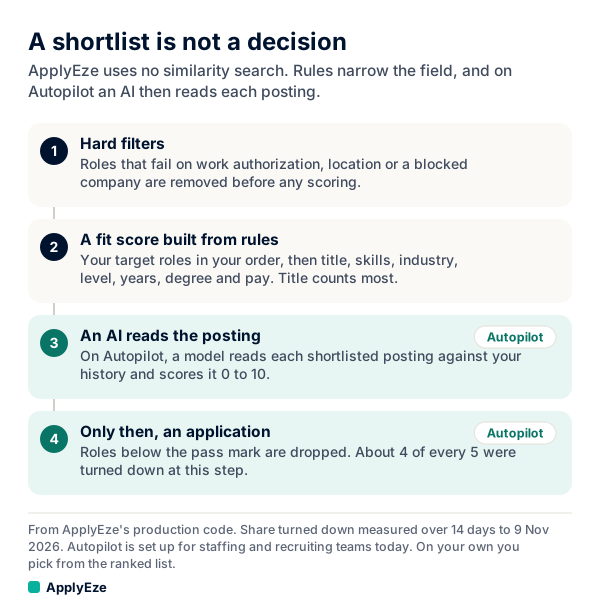
The chart shows the four steps: hard filters, a fit score built from rules, an AI reading each posting, and an application only for roles at the pass mark. This post is about the first two and the hand-off to the third. Rules build the shortlist. AI makes the call.
Where the shortlist starts: the match list
The planner does not search the whole job pool. It starts from one candidate's match list, which ApplyEze builds all the time and separately from Autopilot, from more than 100,000 employer boards polled directly and about 900,000 active jobs. Each new job is scored on title, skills, industry, seniority, years, education and salary, and ranked by which target role it matches. There is no similarity search in that path.
The order of target roles is real. A team enters 1 to 10 of them, and the first listed ranks first. A candidate with no target roles or role families is skipped and not planned at all.
What the planner removes, and why
All of this is enforced in code, before any AI runs. The sample postings are invented.
| What goes | A sample it catches | Worth knowing |
|---|---|---|
| Anything not on the match list | A nursing role, for a data analyst | The planner never sees it |
| Closed or inactive postings | A role at Alderpine Logistics taken down last night | A sweep also pulls roles that close while waiting in the queue |
| Outside the age window, or no date | A role posted 40 days ago, or one with no date at all | An undated posting cannot be placed in the window, so it goes |
| Systems ApplyEze does not apply on | A role on a system with no automatic path | ApplyEze applies automatically on systems holding roughly 62% of active jobs (1% sample, 9 November 2026) |
| Workday and Oracle with no connected inbox | Any Workday role, for a candidate with no inbox | Workday and Oracle need a connected inbox, because they send verification emails |
| Already applied through ApplyEze | A role sent last month from any ApplyEze channel | Matched by job and by URL, across linked accounts |
| Already on the candidate's Autopilot list | The same role, seen again on the next run | Stops it being planned twice |
| Applied to, as far as the company has said | A role a recruiter applied to and reported | Only what the company has told ApplyEze about |
| Roles the candidate passed on | A role passed on last week | The candidate's own call |
| Employers on the skip list | A former employer, added at setup | Per candidate |
| Employers at the cap | One more role at a retailer already at the cap | See below |
The employer cap is the one people ask about. Autopilot will not queue a role at an employer once the candidate has reached the cap there, counting everything sent through ApplyEze and everything already queued. The reason is plain: so one candidate does not look like spam to one employer. Capped roles are skipped and may come back later. It is per candidate, so two candidates can each apply to the same employer. Employers are matched by a normalized company name, so it means the same name and not the same parent. The count covers ApplyEze's own records, so an application a person sent on the employer's own site is not in it. Our post on applying to one company more than once goes through what the outside evidence says about repeat applications.
Then one last rule runs before the judge, and it is the only one that drops a role for what the posting says about itself: a posting that says it is not real, such as "DO NOT APPLY" or "test posting". Everything else goes to the judge.
The fences: citizenship, clearance and location
Three checks work as fences, and each is precise about what it does.
Citizenship. Roles ApplyEze has flagged as requiring US-person status or citizenship are removed by rule for candidates who cannot meet that. This is about a stated requirement.
Clearance. This fence covers clearance requirements ApplyEze has already seen on that posting. Separately, a clearance is never claimed on a form, and a posting requiring one the candidate lacks is skipped.
Location. A company can pick "Only apply in these places" for a candidate, and then the shortlist keeps only local or remote jobs. Without that choice, this fence removes nothing.
These sit in code because they are yes or no questions with a wrong answer, and the same input should give the same result every time. Fit has no such answer, which is why it goes to the judge. The judge is not given the person's location or visa status at all, though the first 2,000 characters of a posting go in as written and can mention either.
Sponsorship is a different question from citizenship. No sponsor filter is applied here, and the planner does not select employers that sponsor visas. ApplyEze does not skip a job because the posting says it will not sponsor, and sponsorship questions use the answers saved.
How the shortlist is ordered
Three rules, in this order: same-day roles first, then which target role it matches, then match score.
Here it is on a sample candidate whose target roles are, in order, Data Analyst, Business Analyst and Analytics Engineer. The employers are invented.
| Read | Sample role | Posted | Target role | Match score |
|---|---|---|---|---|
| 1st | Data Analyst, Brightmoor Clinics | Today | 1st | Lower |
| 2nd | Business Analyst, Carrowfield Bank | Today | 2nd | Higher |
| 3rd | Analytics Engineer, Eastholt Energy | Today | 3rd | Higher |
| 4th | Data Analyst, Dunmere Retail | Yesterday | 1st | Higher |
| 5th | Data Analyst, Harlowgate Media | 2 days ago | 1st | Lower |
| 6th | Business Analyst, Garnetmoor Insurance | Yesterday | 2nd | Higher |
Three things to notice. A same-day role for the third choice is read ahead of an older role for the first. Among older roles, a two-day-old first choice is read ahead of a day-old second choice. And the match score only breaks ties, which is why the first row can beat a higher score on the second.
This order decides what gets read first. It does not decide what goes out first. Once the judge has scored them, fit and freshness are blended: a role's rank is its score, plus 2 if it was posted today. So a same-day 8 ties an older 10, and an older 10 beats a same-day 7. Fresh roles get a head start, not a free pass.
The match score and the judge's score are different numbers, and nothing here adds one to the other.
Topping up the queue every 10 minutes
The planner does not build one long list and work through it. Every 10 minutes it tops the queue up to what is left of today's target, plus a small buffer. Same-day roles are read and queued on every run, even when the queue is full. A candidate's daily target also keeps some room for roles posted later that day, and roles posted that day can go a little over the target. Older roles still stop at it.
The queue is also not fixed once built. On the same 10-minute rhythm, a sweep moves waiting roles out when a posting closes, when it was applied to another way, when it passes the age limit, when the employer is skipped, or when it falls under the candidate's bar.
Older roles: reaching further back when supply runs dry
Fresh is the default, but not the whole story. Older roles come from a recent window first, and the planner reaches further back only when that window runs dry.
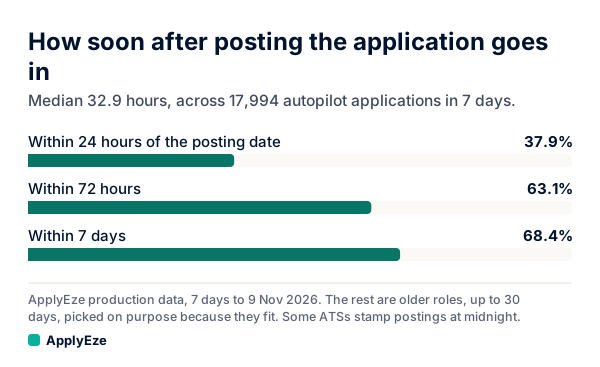
The chart shows how that plays out across 17,994 applications in the 7 days to 9 November 2026: 37.9% went in within 24 hours of the posting date, 63.1% within 72 hours and 68.4% within 7 days. The median was 32.9 hours. So 31.6% (100 less 68.4) were older than 7 days, up to 30 days old, picked on purpose because they fit. Some systems stamp a posting at midnight, so the short times are approximate.
A team also sets how recent a posting must be, so it can widen the window for a candidate in a thin field of work.
What the shortlist hands to the judge
The shortlist does not decide, and that is by design. Rules remove what is plainly out and leave every judgement call on the table. In the 14 days to 9 November 2026, 259,514 roles were planned and 209,893 were rejected at the next step, about 4 of every 5, in a median of 4.9 minutes from planning. The roles that pass have been through a read of the title, the level, the years and the first 2,000 characters of the description, on top of the rules.
That read has been checked. In a blind audit on 20 October 2026, a separate, stronger model re-judged 601 of the judge's decisions without seeing the verdict and agreed on 502, or 83.5%. That is one model checking another, not a panel of recruiters. How AI reads a job posting shows the judge's input line by line.
What to borrow for your own search
The order is worth copying even with no software. It costs nothing, and it stops you spending an hour tailoring a resume for a role you should have removed first.
- Remove before you rank. Closed, too old, already applied, on your skip list. Do this before you read a single description closely. For deciding among what is left, our shortlist routine gives a ten-minute way to do it by hand.
- Write your target titles in order, and list more than one. Your first title gets the first look. A role doing your work under a title you did not list ranks low, so your other titles catch the roles your first title would miss.
- Check the fences as yes or no. Does the posting state a citizenship or clearance requirement you cannot meet? If so, it goes, and it was never a question of fit. A posting that only says it will not sponsor is a judgement for you to make.
- Keep a count per employer. Note how many times you have applied to each company recently, and set yourself a limit.
- Give fresh roles a head start, not a free pass. A strong role from last week can still beat a weak one from this morning.
On a free account, this is what you are doing when you read the ranked board. Matches are ranked by a fit score from your role, skills, industry, level, education, experience and pay, and you decide what to queue. Keep your computer on and awake while the queue runs, and connect an application inbox to see Workday and Oracle jobs. How the rest of the team version runs, from judge to submitted form, is in how Autopilot works end to end. When your list is ready, your first 50 applications are free, no card needed, and ApplyEze fills and submits each form you queued.